


- Posts: 4
- Thank you received: 0
3 Post Moderation Rule for New Boarders (25 Jan 2021)
New boarders will have their posts moderated - Don't worry if you cannot see your post immediately.
FCPX 10.6.5 constantly crashing after Sonoma 14.0 update
- sambratby90
-
 Topic Author
- Offline
- New Member
-

Less
More
05 Oct 2023 17:22 #127378
by sambratby90
FCPX 10.6.5 keeps crashing after Sonama 14.0 update.
I'm assuming it's being triggered from a 3rd party plugin, but I don't know how to read the crash report.
If anyone can help, I'd greatly appreciate it.
Thanks
I'm assuming it's being triggered from a 3rd party plugin, but I don't know how to read the crash report.
If anyone can help, I'd greatly appreciate it.
Thanks
Please Log in to join the conversation.


05 Oct 2023 18:21 - 05 Oct 2023 18:26 #127379
by DaveM
Replied by DaveM on topic FCPX 10.6.5 constantly crashing after Sonoma 14.0 update
I wouldn't be surprised if FCP 10.6.5, which I am using myself, has compatibility issues with Sonoma. I'm using macOS 12.7. I know that for me to use FCP 10.6.9 I would need to move to at least macOS 13.4.
If you can locate any logs, or provide screenshots of error messages, etc., and post them, it would be very helpful. All details about your system, including types of storage/drives used, Mac model, RAM, how drives are connected, etc. would be helpful. If you use specific 3rd-party plugins with FCP, you might want to check with the vendor to make sure things are compatible. I wouldn't be surprised if most plugins and other tools used with FCP are not yet compatible with Sonoma. Usually, it's a good practice to wait until a 0.1 release, at least, before upgrading macOS, or several weeks (so you can monitor places like fcp.co for reports like yours).
I would turn off all auto-updates (except for system-level security updates). FCP probably uses more system resources than any other application under macOS. So, it can be sensitive to changes in system codec support, plugins, etc.
If you can locate any logs, or provide screenshots of error messages, etc., and post them, it would be very helpful. All details about your system, including types of storage/drives used, Mac model, RAM, how drives are connected, etc. would be helpful. If you use specific 3rd-party plugins with FCP, you might want to check with the vendor to make sure things are compatible. I wouldn't be surprised if most plugins and other tools used with FCP are not yet compatible with Sonoma. Usually, it's a good practice to wait until a 0.1 release, at least, before upgrading macOS, or several weeks (so you can monitor places like fcp.co for reports like yours).
I would turn off all auto-updates (except for system-level security updates). FCP probably uses more system resources than any other application under macOS. So, it can be sensitive to changes in system codec support, plugins, etc.
Last edit: 05 Oct 2023 18:26 by DaveM.
Please Log in to join the conversation.
- sambratby90
-
Topic Author
- Offline
- New Member
-
Less
More
- Posts: 4
- Thank you received: 0
05 Oct 2023 18:25 - 05 Oct 2023 22:15 #127380
by sambratby90
Replied by sambratby90 on topic FCPX 10.6.5 constantly crashing after Sonoma 14.0 update
thankyou
Last edit: 05 Oct 2023 22:15 by sambratby90.
Please Log in to join the conversation.
- sambratby90
-
Topic Author
- Offline
- New Member
-
Less
More
- Posts: 4
- Thank you received: 0
05 Oct 2023 22:01 #127383
by sambratby90
Replied by sambratby90 on topic FCPX 10.6.5 constantly crashing after Sonoma 14.0 update
thanks so much for your help.
crash report attached
crash report attached
Please Log in to join the conversation.

05 Oct 2023 22:26 #127384
by joema
Replied by joema on topic FCPX 10.6.5 constantly crashing after Sonoma 14.0 update
It looks like Color Finale. Verify with their technical support whether the version you have is supported on Sonoma and FCP 10.6.5.
Please Log in to join the conversation.

06 Oct 2023 00:35 #127386
by TerryB
Replied by TerryB on topic FCPX 10.6.5 constantly crashing after Sonoma 14.0 update
@joema, can you share how you concluded from the crash log that it's Color Finale?
Please Log in to join the conversation.
06 Oct 2023 00:56 - 06 Oct 2023 01:42 #127387
by DaveM
Terry, I can (surprisingly perhaps)... If you read through the log, you'll see that Thread 22 caused the crash. Then, looking down the log until you reach Thread 22, you'll see mention of Color Finale...
Joe will probably provide a better answer...
*** Top of the log file: ***
Process: Final Cut Pro [1315]
Path: /Applications/Final Cut Pro.app/Contents/MacOS/Final Cut Pro
Identifier: com.apple.FinalCutVersion: 10.6.5 (405627)
Code Type: X86-64 (Native)Parent Process: launchd [1]
User ID: 501
Date/Time: 2023-10-05 18:24:30.027 +01:00
OS Version: macOS 14.0 (23A344)
Report Version: 12
Anonymous UUID: E0362420-BFAD-928B-9BB6-DD82523A67C2
Time Awake Since Boot: 710 secondsSystem Integrity Protection: enabled
Crashed Thread: 22
Exception Type: EXC_BAD_ACCESS (SIGSEGV)Exception Codes: KERN_INVALID_ADDRESS at 0x0000000000000018
Termination Reason: Namespace SIGNAL, Code 0xb
Terminating Process: exc handler [1315]
*** Further down in the file: ***
Thread 22 Crashed:: com.apple.helium.rq.gpu-ru0.vs0
0 libobjc.A.dylib 0x00007ff8144ae91d objc_msgSend + 29
1 com.apple.CoreImage 0x00007ff81f9fb0d6 CI::XXHashHelper::add(__CFString const*) + 54
2 com.apple.CoreImage 0x00007ff81f9f9dc8 CI::ColorMatchImage::ColorMatchImage(CI::Image*, CGColorSpace*, bool) + 226
3 com.apple.CoreImage 0x00007ff81f7ac44c -[CIImage _initWithIOSurface:options:owner:] + 1957
4 com.apple.CoreImage 0x00007ff81f8bd8c1 +[CIImage imageWithIOSurface:options:] + 47
5 com.colorfinale.ColorFinaleFxPlug 0x0000000119b2df24 -[FTCIRendererprocessInputTexture:outputTexture:plugin:at:postProcessNodes:] + 1357
6 com.colorfinale.ColorFinaleFxPlug 0x0000000119b01c65 -[ColorFinalePlugIn renderOutput:withInput:withInfo:] + 829
Replied by DaveM on topic FCPX 10.6.5 constantly crashing after Sonoma 14.0 update
@joema, can you share how you concluded from the crash log that it's Color Finale?
Terry, I can (surprisingly perhaps)... If you read through the log, you'll see that Thread 22 caused the crash. Then, looking down the log until you reach Thread 22, you'll see mention of Color Finale...
Joe will probably provide a better answer...
*** Top of the log file: ***
Process: Final Cut Pro [1315]
Path: /Applications/Final Cut Pro.app/Contents/MacOS/Final Cut Pro
Identifier: com.apple.FinalCutVersion: 10.6.5 (405627)
Code Type: X86-64 (Native)Parent Process: launchd [1]
User ID: 501
Date/Time: 2023-10-05 18:24:30.027 +01:00
OS Version: macOS 14.0 (23A344)
Report Version: 12
Anonymous UUID: E0362420-BFAD-928B-9BB6-DD82523A67C2
Time Awake Since Boot: 710 secondsSystem Integrity Protection: enabled
Crashed Thread: 22
Exception Type: EXC_BAD_ACCESS (SIGSEGV)Exception Codes: KERN_INVALID_ADDRESS at 0x0000000000000018
Termination Reason: Namespace SIGNAL, Code 0xb
Terminating Process: exc handler [1315]
*** Further down in the file: ***
Thread 22 Crashed:: com.apple.helium.rq.gpu-ru0.vs0
0 libobjc.A.dylib 0x00007ff8144ae91d objc_msgSend + 29
1 com.apple.CoreImage 0x00007ff81f9fb0d6 CI::XXHashHelper::add(__CFString const*) + 54
2 com.apple.CoreImage 0x00007ff81f9f9dc8 CI::ColorMatchImage::ColorMatchImage(CI::Image*, CGColorSpace*, bool) + 226
3 com.apple.CoreImage 0x00007ff81f7ac44c -[CIImage _initWithIOSurface:options:owner:] + 1957
4 com.apple.CoreImage 0x00007ff81f8bd8c1 +[CIImage imageWithIOSurface:options:] + 47
5 com.colorfinale.ColorFinaleFxPlug 0x0000000119b2df24 -[FTCIRendererprocessInputTexture:outputTexture:plugin:at:postProcessNodes:] + 1357
6 com.colorfinale.ColorFinaleFxPlug 0x0000000119b01c65 -[ColorFinalePlugIn renderOutput:withInput:withInfo:] + 829
Last edit: 06 Oct 2023 01:42 by DaveM.
Please Log in to join the conversation.
06 Oct 2023 01:33 #127388
by TerryB
Replied by TerryB on topic FCPX 10.6.5 constantly crashing after Sonoma 14.0 update
Thanks DaveM! Trying to learn to how read these better.
Please Log in to join the conversation.
06 Oct 2023 01:48 - 06 Oct 2023 01:48 #127389
by DaveM
Me too...
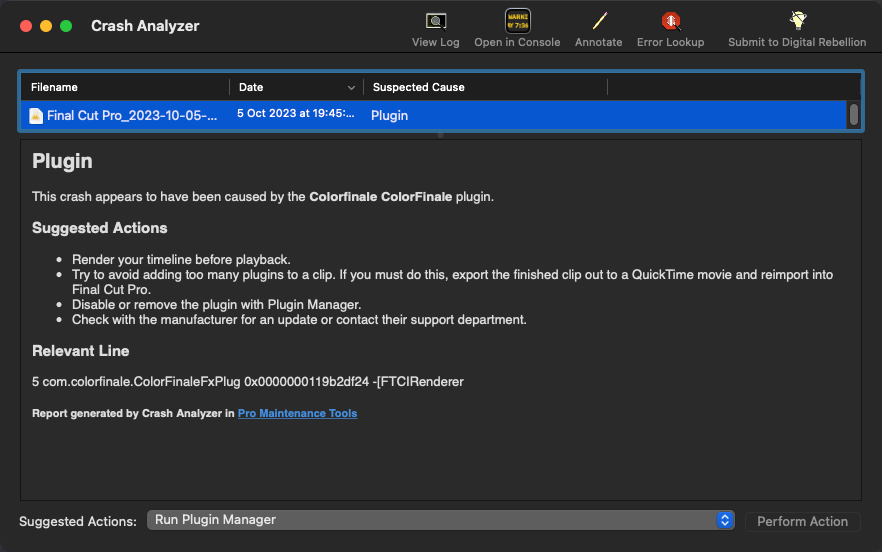
I often use "Crash Analyzer" by Digital Rebellion, though it's not always able to provide the correct answer... in this case it does... just used it now... in my previous post I manually scanned the file...
Replied by DaveM on topic FCPX 10.6.5 constantly crashing after Sonoma 14.0 update
Thanks DaveM! Trying to learn to how read these better.
Me too...
I often use "Crash Analyzer" by Digital Rebellion, though it's not always able to provide the correct answer... in this case it does... just used it now... in my previous post I manually scanned the file...
Last edit: 06 Oct 2023 01:48 by DaveM.
Please Log in to join the conversation.
06 Oct 2023 01:55 #127390
by joema
Replied by joema on topic FCPX 10.6.5 constantly crashing after Sonoma 14.0 update
As Dave said, the stack trace shows Color Finale functions close to the crash point. I'm a bit suspicious why those are even listed. It's my understanding that recent versions of MacOS and FCP require third-party plugins to use the FxPlug 4 framework, which I thought required plugins to run in a separate address space.
It appears to be an old version of Color Finale, version 2.5.2, dated 1-17-22. That is six versions old. The required version of Color Finale for Sonoma is 2.7.0.
It appears to be an old version of Color Finale, version 2.5.2, dated 1-17-22. That is six versions old. The required version of Color Finale for Sonoma is 2.7.0.
Please Log in to join the conversation.
06 Oct 2023 02:46 #127391
by TerryB
Replied by TerryB on topic FCPX 10.6.5 constantly crashing after Sonoma 14.0 update
Thanks Joe and DaveM for the explanation. There's a user on the Apple discussions that has consistent crashing when exporting. They posted a crash report but it does not break it out by thread.
Please Log in to join the conversation.
06 Oct 2023 14:58 #127397
by joema
I would like to help people like that, but the restrictions on the Apple forums are so stringent it is almost impossible. That type of case requires examining crash files, posting DropBox links, etc, which in general are prohibited. If there were clear-cut published rules about what is and is not allowed, it might be possible. However the rules are vague and inconsistently applied. It is easy to get banned just trying to help someone.
Replied by joema on topic FCPX 10.6.5 constantly crashing after Sonoma 14.0 update
Thanks Joe and DaveM for the explanation. There's a user on the Apple discussions that has consistent crashing when exporting. They posted a crash report but it does not break it out by thread.
I would like to help people like that, but the restrictions on the Apple forums are so stringent it is almost impossible. That type of case requires examining crash files, posting DropBox links, etc, which in general are prohibited. If there were clear-cut published rules about what is and is not allowed, it might be possible. However the rules are vague and inconsistently applied. It is easy to get banned just trying to help someone.
Please Log in to join the conversation.
06 Oct 2023 15:12 - 06 Oct 2023 15:12 #127398
by DaveM
Terry, I would suggest encouraging that person to post here about his/her issue.
I was banned from Apple Discussions for trying to help someone. There are vague rules there and, as Joe mentioned, they are arbitrarily applied. Apple talks about "community" and then hamstrings the enterprise...
Replied by DaveM on topic FCPX 10.6.5 constantly crashing after Sonoma 14.0 update
Thanks Joe and DaveM for the explanation. There's a user on the Apple discussions that has consistent crashing when exporting. They posted a crash report but it does not break it out by thread.
I would like to help people like that, but the restrictions on the Apple forums are so stringent it is almost impossible. That type of case requires examining crash files, posting DropBox links, etc, which in general are prohibited. If there were clear-cut published rules about what is and is not allowed, it might be possible. However the rules are vague and inconsistently applied. It is easy to get banned just trying to help someone.
Terry, I would suggest encouraging that person to post here about his/her issue.
I was banned from Apple Discussions for trying to help someone. There are vague rules there and, as Joe mentioned, they are arbitrarily applied. Apple talks about "community" and then hamstrings the enterprise...
Last edit: 06 Oct 2023 15:12 by DaveM.
Please Log in to join the conversation.
06 Oct 2023 16:36 #127399
by TerryB
Replied by TerryB on topic FCPX 10.6.5 constantly crashing after Sonoma 14.0 update
Thanks Joe and Dave. Yes, I agree it can be frustrating there at times. I will suggest the user post here.
Please Log in to join the conversation.
