


- Posts: 42
- Thank you received: 0
3 Post Moderation Rule for New Boarders (25 Jan 2021)
New boarders will have their posts moderated - Don't worry if you cannot see your post immediately.
Text animation. Where are these keyframes of which you speak?
- jamespeach
-
 Topic Author
- Offline
- Senior Member
-

Less
More
07 Aug 2023 19:20 #126704
by jamespeach
Custom text animation. I'm trying to time the words one by one.
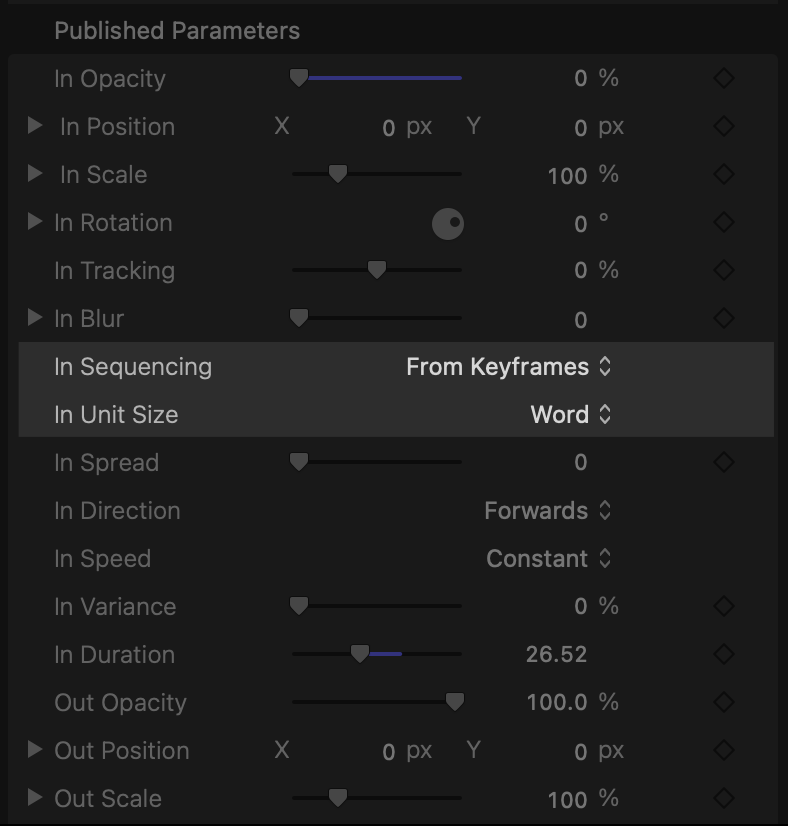
In custom text I can select "In Sequencing; From Keyframes" but I cannot see where to input these keyframes. Presumably (hopefully?) they are by the word and it's not just telling me I can put the opacity of the whole thing up and down?
Related question: can I round trip to Motion if I need to? I know it's better at this sort of stuff but I don't want to have a new project I have to open and then export etc. Is it easy to round trip at all?
In custom text I can select "In Sequencing; From Keyframes" but I cannot see where to input these keyframes. Presumably (hopefully?) they are by the word and it's not just telling me I can put the opacity of the whole thing up and down?
Related question: can I round trip to Motion if I need to? I know it's better at this sort of stuff but I don't want to have a new project I have to open and then export etc. Is it easy to round trip at all?
Please Log in to join the conversation.


09 Aug 2023 04:34 #126723
by sc_fox
Replied by sc_fox on topic Text animation. Where are these keyframes of which you speak?
The behavior used in Motion is a Sequence Text behavior. The behavior allows one to set up a Parameter that the behavior will use to either "move" to, move from, move "through" or move through inverted. The behavior also allows the user to create a keyframed animation on the text object which will be used to animate the text. In other words, you can build a "multi-state" parameter change over time that can be used as an "animation map" so to speak.
Those keyframed sequences are *not available* in Final Cut.
2) you can't really "round trip" to Motion like the old days.
You are much better off making a template of the animations/effects you want to be able to use in Final Cut. ** Design once — use forever **
Motion has "placeholders" for media used in Final Cut — Effects have an Effects Source; Titles have an optional Title Background; Generators are like plain Motion projects that are accessible to Final Cut and Transitions have two placeholders: A for incoming (left side) media and B for outgoing (right side) media.
I've been using Motion for a very long time — I don't miss round-tripping one bit. Good riddance.
However, if you need to, you can certainly build a template from "raw" media and publish it to Final Cut. You can even use the media as *your* guide/template while working on it in Motion and when you Save (Publish) the template, you can convert the media to one of the Placeholder types (depending on the project type) to be used more generically.
HTH
Those keyframed sequences are *not available* in Final Cut.
2) you can't really "round trip" to Motion like the old days.
You are much better off making a template of the animations/effects you want to be able to use in Final Cut. ** Design once — use forever **
Motion has "placeholders" for media used in Final Cut — Effects have an Effects Source; Titles have an optional Title Background; Generators are like plain Motion projects that are accessible to Final Cut and Transitions have two placeholders: A for incoming (left side) media and B for outgoing (right side) media.
I've been using Motion for a very long time — I don't miss round-tripping one bit. Good riddance.
However, if you need to, you can certainly build a template from "raw" media and publish it to Final Cut. You can even use the media as *your* guide/template while working on it in Motion and when you Save (Publish) the template, you can convert the media to one of the Placeholder types (depending on the project type) to be used more generically.
HTH
Please Log in to join the conversation.
- jamespeach
-
Topic Author
- Offline
- Senior Member
-
Less
More
- Posts: 42
- Thank you received: 0
11 Aug 2023 13:22 #126745
by jamespeach
Replied by jamespeach on topic Text animation. Where are these keyframes of which you speak?
Thank you. Yes, I've been making motion templates (simple ones) and rigs for a while now. I've found them to be very helpful.
The only thing I cannot understand is why saved changes to a motion template do not automatically cascade down to instances already in the timeline. It's exhausting replacing everything over and over after every improvement.
That being said, with a motion template would I just have to "publish" the keyframe parameter that I need and save it? I guess I'll have to experiment. I assume I can actually rig it in a way to go by the word in certain places; perhaps I can use a slider for each word and do away with keyframing altogether.
I'll take this moment to say (just because I've got no one else to say it to) that I am sick and tired of Final Cut Pro and changing every animation keyframe to linear and it still not working. I'm tired of a billion compound clips and losing track of what's what instead of a node editor. And I'm tired of having to make two key frames if i want something to stay in the same place instead of a "hold" keyframe or whatever like AE.
Oh well.
The only thing I cannot understand is why saved changes to a motion template do not automatically cascade down to instances already in the timeline. It's exhausting replacing everything over and over after every improvement.
That being said, with a motion template would I just have to "publish" the keyframe parameter that I need and save it? I guess I'll have to experiment. I assume I can actually rig it in a way to go by the word in certain places; perhaps I can use a slider for each word and do away with keyframing altogether.
I'll take this moment to say (just because I've got no one else to say it to) that I am sick and tired of Final Cut Pro and changing every animation keyframe to linear and it still not working. I'm tired of a billion compound clips and losing track of what's what instead of a node editor. And I'm tired of having to make two key frames if i want something to stay in the same place instead of a "hold" keyframe or whatever like AE.
Oh well.
Please Log in to join the conversation.
