


- Posts: 20
- Thank you received: 4
3 Post Moderation Rule for New Boarders (25 Jan 2021)
New boarders will have their posts moderated - Don't worry if you cannot see your post immediately.
FCPX update 10.6.7 causes video freezing and heat
27 Jul 2023 03:44 - 27 Jul 2023 03:44 #126585
by JeremyG
Replied by JeremyG on topic FCPX update 10.6.7 causes video freezing and heat
Make sure you are fully up to date. An OS point update dropped yesterday. Make sure all of your plugins, if you have them, are also up to date.
Last edit: 27 Jul 2023 03:44 by JeremyG.
Please Log in to join the conversation.

30 Jul 2023 18:41 #126611
by bareform
Replied by bareform on topic FCPX update 10.6.7 causes video freezing and heat
Same problem here. Editing 4k H.264 on a M1 Max. At least I'm glad I'm not alone, hope they'll fix it real soon.
Please Log in to join the conversation.

31 Jul 2023 20:24 #126617
by Corntrop
Replied by Corntrop on topic FCPX update 10.6.7 causes video freezing and heat
It's terrible. It freezes even with 1080p videos on my m1 max machine. Never had a problem until this update. Is it possible to roll back and install the old version?
Please Log in to join the conversation.
- Zooskifilms
-

- Offline
- New Member
-

Less
More
- Posts: 8
- Thank you received: 0
31 Jul 2023 22:36 #126618
by Zooskifilms
Replied by Zooskifilms on topic FCPX update 10.6.7 causes video freezing and heat
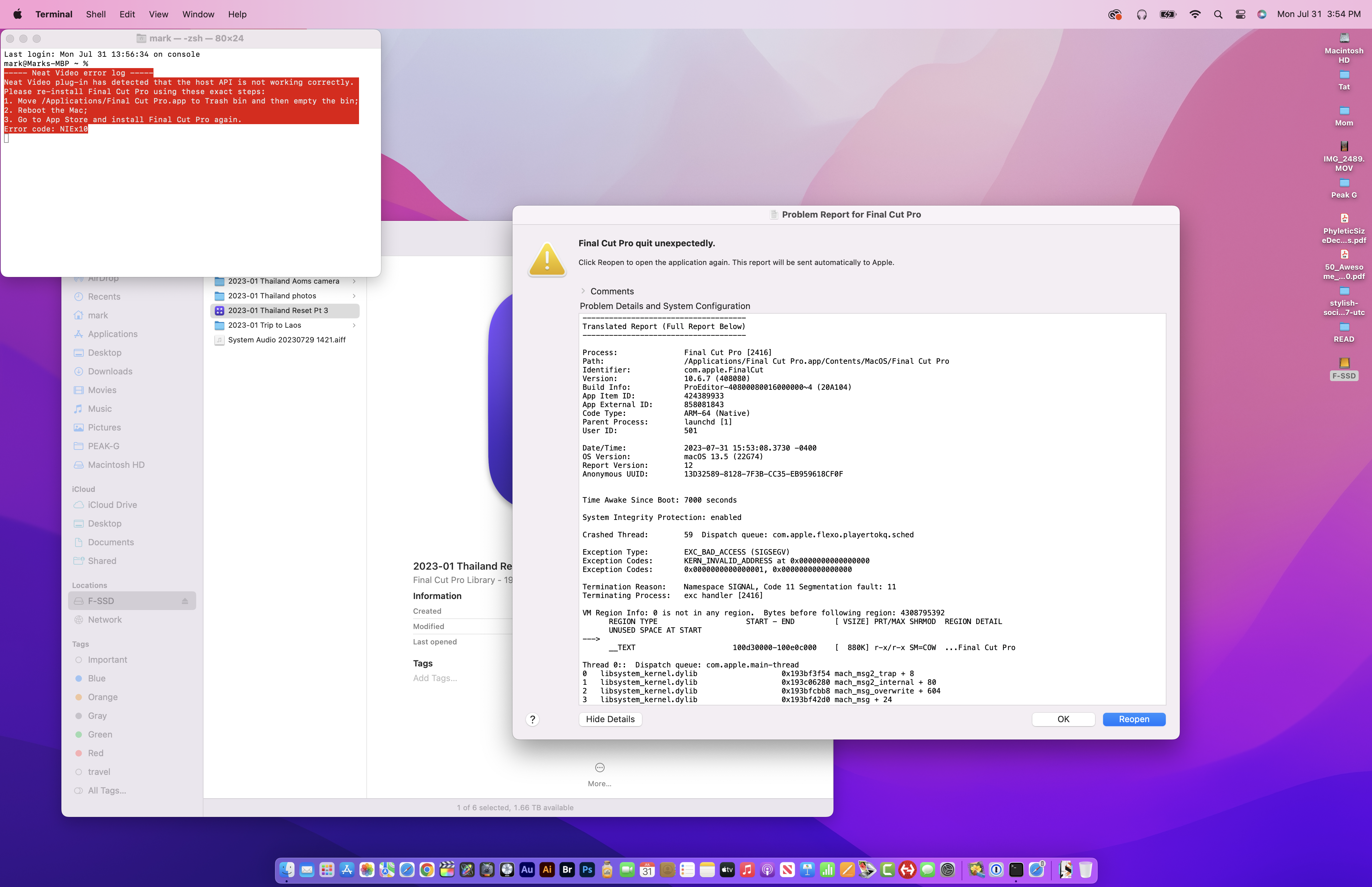
Still having regular Viewer freezes a couple of more FCP crashes. The latest one happened when applying the Neat noise reduction filter. Got a terminal message to throw out the FCP application and do a fresh install. I already applied the same filter on other clips in same Project without issue, it just didn't like this particular one. What a disaster!
Mark
Mark
Please Log in to join the conversation.
- Tom Wolsky
-

- Offline
- Moderator
-

01 Aug 2023 00:45 #126619
by Tom Wolsky
Replied by Tom Wolsky on topic FCPX update 10.6.7 causes video freezing and heat
It’s pretty simple of you have library and application backups. If you have a backup of the application you can export XMLs 1.10 from the current version library and bring them into a library create in the older version.
Please Log in to join the conversation.
- Chris Hocking
-

- Offline
- Junior Member
-

Less
More
- Posts: 25
- Thank you received: 10
01 Aug 2023 00:51 #126620
by Chris Hocking
Replied by Chris Hocking on topic FCPX update 10.6.7 causes video freezing and heat
We recommend sticking with Final Cut Pro 10.6.5 or Final Cut Pro 10.6.6 for now. Whilst there are SOME users that are reporting that 10.6.7 is stable, there's not enough improvements in that version to take the risk.
You can manually copy and paste the older Final Cut Pro application from a backup or another machine to your Mac. Final Cut Pro is a universal app, so the same binary works on both Intel and Apple Silicon.
Inside the Final Cut Pro application bundle is your unique App Store receipt - therefore it's only recommended use share your Final Cut Pro application with machines that are using the same Apple ID, otherwise it might trigger Apple's copy protection processes.
If you don't have a copy of Final Cut Pro 10.6.5 handy, if you have an older machine running macOS Big Sur, you can download Final Cut Pro 10.6.5 on it. You can download a copy of macOS Big Sur here and install it on an external SSD:
apps.apple.com/id/app/macos-big-sur/id1526878132?mt=12
If you're already updated a library to Final Cut Pro 10.6.7's format, Final Cut Pro will have automatically made a backup in your backups folder prior to the migration. Alternatively, you can also export out a FCPXML and import it into an older version, keeping in mind that FCPXML isn't lossless (i.e some Title parameters don't apply correctly).
You can learn more here:
fcp.cafe/bugtracker/
You can manually copy and paste the older Final Cut Pro application from a backup or another machine to your Mac. Final Cut Pro is a universal app, so the same binary works on both Intel and Apple Silicon.
Inside the Final Cut Pro application bundle is your unique App Store receipt - therefore it's only recommended use share your Final Cut Pro application with machines that are using the same Apple ID, otherwise it might trigger Apple's copy protection processes.
If you don't have a copy of Final Cut Pro 10.6.5 handy, if you have an older machine running macOS Big Sur, you can download Final Cut Pro 10.6.5 on it. You can download a copy of macOS Big Sur here and install it on an external SSD:
apps.apple.com/id/app/macos-big-sur/id1526878132?mt=12
If you're already updated a library to Final Cut Pro 10.6.7's format, Final Cut Pro will have automatically made a backup in your backups folder prior to the migration. Alternatively, you can also export out a FCPXML and import it into an older version, keeping in mind that FCPXML isn't lossless (i.e some Title parameters don't apply correctly).
You can learn more here:
fcp.cafe/bugtracker/
Please Log in to join the conversation.

01 Aug 2023 04:32 #126621
by Smesh
Replied by Smesh on topic FCPX update 10.6.7 causes video freezing and heat
Same problem here on Maxed M1 Max with 8TB internal SSD. Beachball city and unusable even with basic projects.
Where is the dynamic content they talk about? I can't find any new titles or transitions on my install.
Where is the dynamic content they talk about? I can't find any new titles or transitions on my install.
Please Log in to join the conversation.

01 Aug 2023 11:20 #126625
by Boberlino
Replied by Boberlino on topic FCPX update 10.6.7 causes video freezing and heat
Thx for this. I basically did the same and can reconfirm by sharing
my workaround fyi after creating a useless ticket with apple support: downgrade to 10.6.6 (apple does not provide one, so you need to take one from a thirdparty website) or use timemachine if you have a backup. Befor you do so: export your projects as xml and reimport after downgrade. Worked for me.
my workaround fyi after creating a useless ticket with apple support: downgrade to 10.6.6 (apple does not provide one, so you need to take one from a thirdparty website) or use timemachine if you have a backup. Befor you do so: export your projects as xml and reimport after downgrade. Worked for me.
Please Log in to join the conversation.
- Tom Wolsky
-
- Offline
- Moderator
-
01 Aug 2023 13:06 #126626
by Tom Wolsky
Replied by Tom Wolsky on topic FCPX update 10.6.7 causes video freezing and heat
You’re not seeing the Dynamic Titles category?
Please Log in to join the conversation.
