




- Posts: 14
- Thank you received: 0
3 Post Moderation Rule for New Boarders (25 Jan 2021)
New boarders will have their posts moderated - Don't worry if you cannot see your post immediately.
Freeze on a M1 Ultra 64 Go Mac Studio when moving clips??
10 Feb 2023 16:24 #124063
by Hikenkami
Hi there everyone!
I have a problem when working on my projects with my M1 Ultra Mac Studio, which seems to me kinda weird: as you can see in the image, I duplicate my timeline to be able to create jumpcuts effortlessly, by adjusting the scale of each timeline individually. When I try to duplicate the whole timeline to put it in top of the other, using Option, my mac starts lagging, to the point where it becomes impossible to correctly adjust the position of the timline I am moving. Is this normal? The clips I am using are 4k, but they are shot with an iPhone and Filmic, doesn't seem to me to be the most ressource-heavy material.
If you have any advice or idea, I will gladly take it, thanks !

I have a problem when working on my projects with my M1 Ultra Mac Studio, which seems to me kinda weird: as you can see in the image, I duplicate my timeline to be able to create jumpcuts effortlessly, by adjusting the scale of each timeline individually. When I try to duplicate the whole timeline to put it in top of the other, using Option, my mac starts lagging, to the point where it becomes impossible to correctly adjust the position of the timline I am moving. Is this normal? The clips I am using are 4k, but they are shot with an iPhone and Filmic, doesn't seem to me to be the most ressource-heavy material.
If you have any advice or idea, I will gladly take it, thanks !
Please Log in to join the conversation.


10 Feb 2023 16:31 #124065
by dmetz
Replied by dmetz on topic Freeze on a M1 Ultra 64 Go Mac Studio when moving clips??
This seems like the most resource-heavy way to accomplish this task.
Sure, you can only see the topmost layer, but behind the scenes FCP is computing all those layers to playback simultaneously.
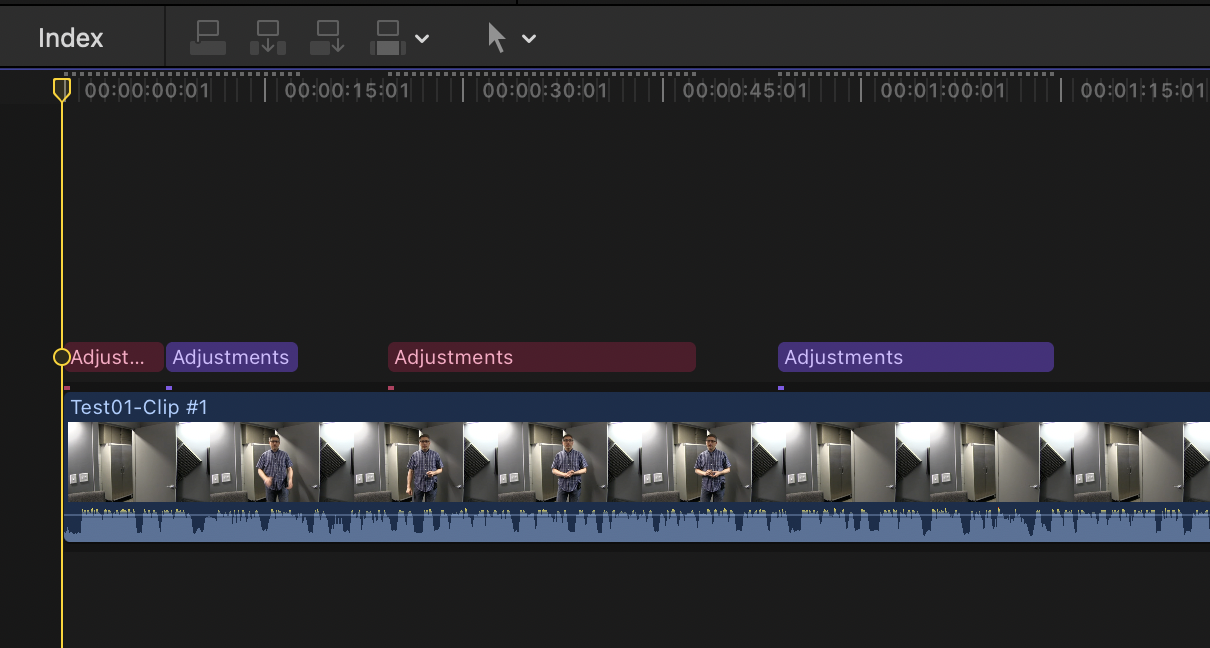
I'd take a different approach - keep a single instance of your clips in the primary storyline, and use an adjustment layer for the punches. You could have a pair of instances of the adjustment set to your differing scales, and drop copies over the main as needed.
Sure, you can only see the topmost layer, but behind the scenes FCP is computing all those layers to playback simultaneously.
I'd take a different approach - keep a single instance of your clips in the primary storyline, and use an adjustment layer for the punches. You could have a pair of instances of the adjustment set to your differing scales, and drop copies over the main as needed.
Please Log in to join the conversation.
10 Feb 2023 16:35 #124066
by Hikenkami
Replied by Hikenkami on topic Freeze on a M1 Ultra 64 Go Mac Studio when moving clips??
Hi dmetz, thanks for your answer! By the looks of what you are offering as a solution (never used layers), that would imply navigating between two "menus" to change the cuts of the video, right? Because the huuge strenght of this solution I use to have 5 timelines on top of each other, is that I can simply play my project, and use V to activate for each clip the zoom and scale level I want, that makes it very "industrial" and quick. But at the cost of ressources on the machine, that may be why I went for such a beefy speced Mac!
Another solution I found is to use option+v that will paste the layer on top of the other without having to move it, that works well!
Another solution I found is to use option+v that will paste the layer on top of the other without having to move it, that works well!
Please Log in to join the conversation.
10 Feb 2023 16:51 #124067
by dmetz
Replied by dmetz on topic Freeze on a M1 Ultra 64 Go Mac Studio when moving clips??
Not navigating any menus, no. You put an adjustment layer over the primary, and adjust the layer to your desired magnification. Then you can use Roles to color-code those adjustments and just copy/paste as needed. In this instance, the standard blue is 150% and the purple is 200%, with the gaps being 100%.
Please Log in to join the conversation.

10 Feb 2023 23:16 #124073
by joema
I also have an M1 Ultra. While it is usually fast, there are some cases where complex stacked timelines seem abnormally sluggish when manipulated. This is not unique to the M1 Ultra, rather it's an issue with current versions of FCP and MacOS vs. past versions. This is a difficult thing to investigate but I'm trying to do that.
If it's any consolation, I took an extremely complex timeline that was very sluggish on FCP, imported it to Resolve Studio 18.x, and it was also sluggish there, only less so.
A good approach is as dmetz said.
Replied by joema on topic Freeze on a M1 Ultra 64 Go Mac Studio when moving clips??
... M1 Ultra Mac Studio...When I try to duplicate the whole timeline to put it in top of the other, using Option, my mac starts lagging, to the point where it becomes impossible to correctly adjust the position of the timline I am moving. Is this normal?...
I also have an M1 Ultra. While it is usually fast, there are some cases where complex stacked timelines seem abnormally sluggish when manipulated. This is not unique to the M1 Ultra, rather it's an issue with current versions of FCP and MacOS vs. past versions. This is a difficult thing to investigate but I'm trying to do that.
If it's any consolation, I took an extremely complex timeline that was very sluggish on FCP, imported it to Resolve Studio 18.x, and it was also sluggish there, only less so.
A good approach is as dmetz said.
Please Log in to join the conversation.
