




- Posts: 3
- Thank you received: 0
3 Post Moderation Rule for New Boarders (25 Jan 2021)
New boarders will have their posts moderated - Don't worry if you cannot see your post immediately.
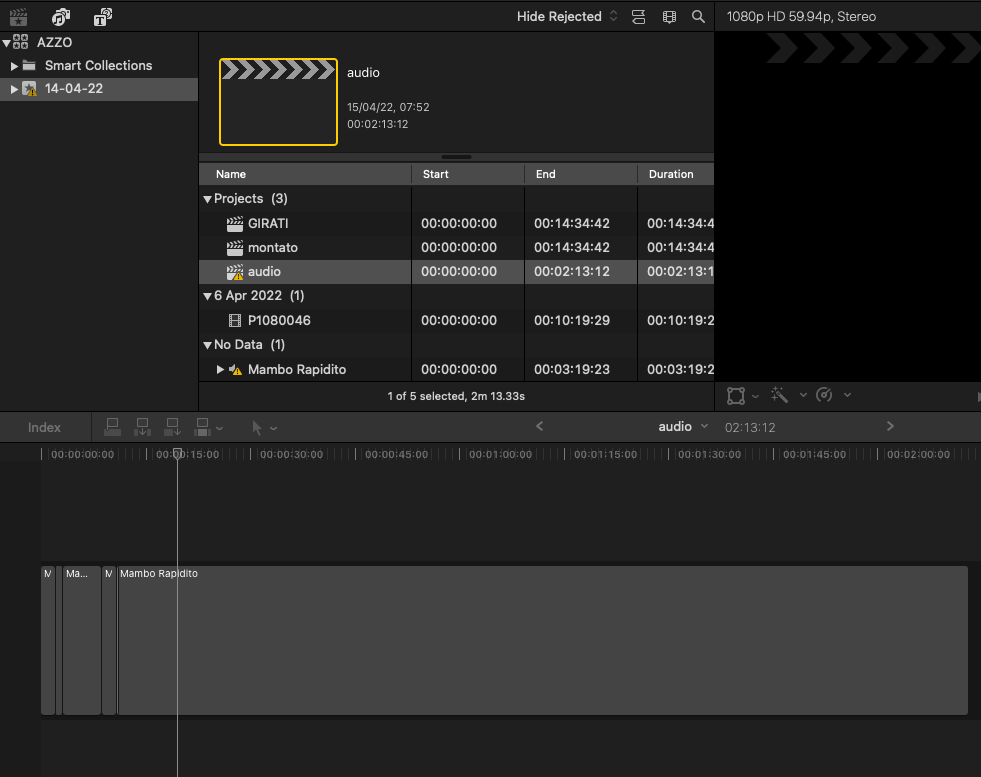
audio clip grey, no visible waves and unusable
15 Apr 2022 06:26 - 15 Apr 2022 18:08 #120036
by alelu74
audio clip grey, no visible waves and unusable was created by alelu74
Hello, yesterday I worked on a new project, today exclamation marks everywhere and audio clip on timeline appears in solid grey!!! Obviously clips don-t work as well. I post a picture. Can you help me?thank you
Last edit: 15 Apr 2022 18:08 by alelu74.
Please Log in to join the conversation.


15 Apr 2022 14:29 - 15 Apr 2022 14:37 #120038
by DaveM
Replied by DaveM on topic Final cut timeline all grey no waves no picture
Did you move your source media files to a new folder, accidentally delete them, or have an external disk that isn't connected?
More info about media management and missing items starts on page 820 of the FCP User Manual .
Cheers.
More info about media management and missing items starts on page 820 of the FCP User Manual .
Cheers.
Last edit: 15 Apr 2022 14:37 by DaveM.
Please Log in to join the conversation.
15 Apr 2022 17:59 - 15 Apr 2022 18:23 #120042
by alelu74
Replied by alelu74 on topic audio clip grey, no visible waves and unusable
thank you. I've changed the title of the post because the clip in question is an audio clip, I hope this info can shed some light on this mystery.
In fact, the problem is neither due to the disconnected HD nor to a physically moved clip.
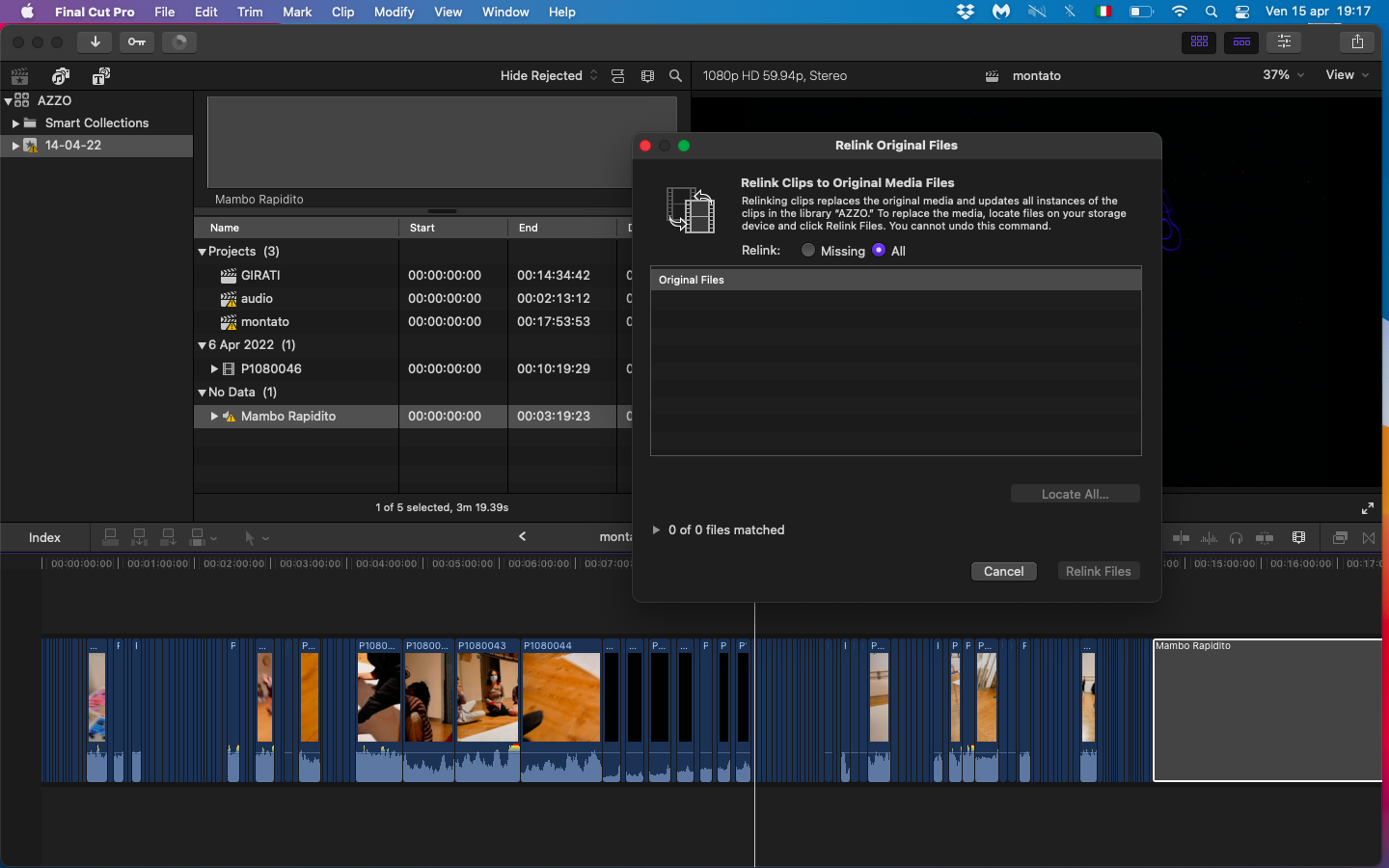
As you can see in attachment 1, when I try to relink the clip (which I have never moved anyway) fcp shows me "0 of 0 files matched" as if there was no file to relink at all.
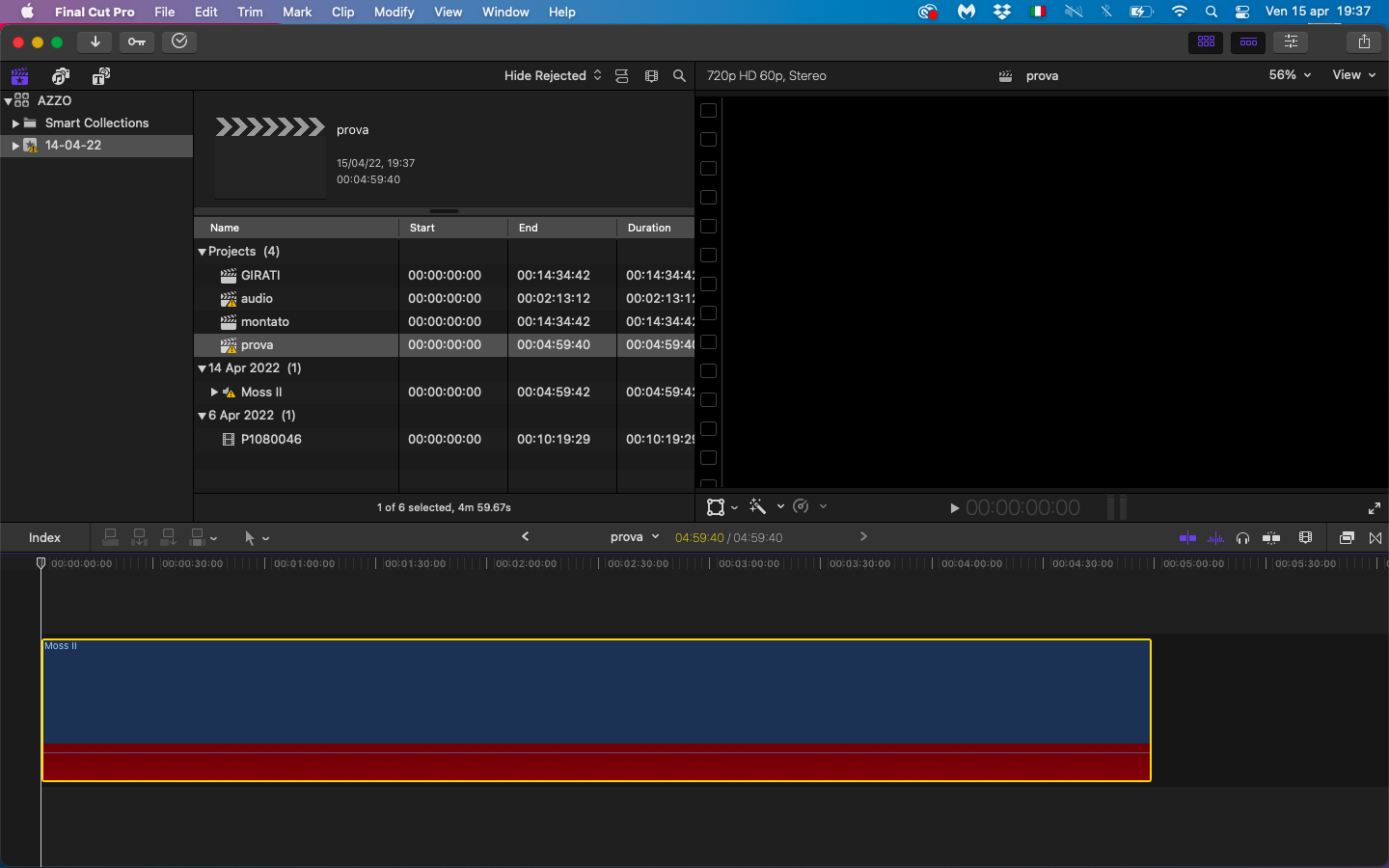
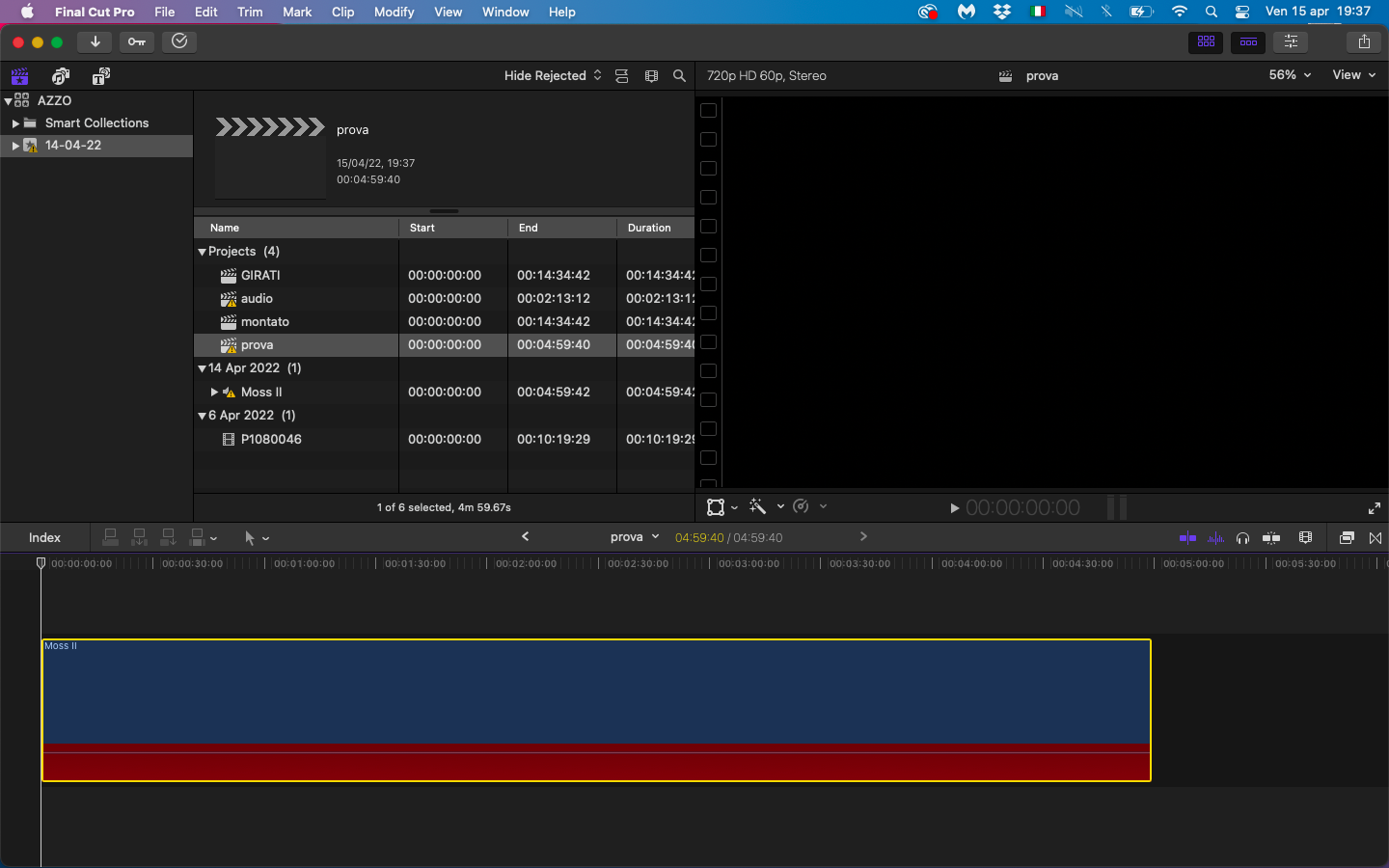
Moreover the clip on the timeline is grey and without waves, while if I make an experiment with another clip, moving it from where it was, the clip to relink appears red and blue (attachment 2).
I hope someone can help me, I've never had to deal with a ghost clip before!!
In fact, the problem is neither due to the disconnected HD nor to a physically moved clip.
As you can see in attachment 1, when I try to relink the clip (which I have never moved anyway) fcp shows me "0 of 0 files matched" as if there was no file to relink at all.
Moreover the clip on the timeline is grey and without waves, while if I make an experiment with another clip, moving it from where it was, the clip to relink appears red and blue (attachment 2).
I hope someone can help me, I've never had to deal with a ghost clip before!!
Last edit: 15 Apr 2022 18:23 by alelu74.
Please Log in to join the conversation.
15 Apr 2022 20:20 #120045
by DaveM
Replied by DaveM on topic audio clip grey, no visible waves and unusable
Thanks for posting the attached screenshots.
Usually, when media goes offline or missing it would show the media file in the relink dialog window.
In the Browser, if you right-click on "Mambo Rapidito" and choose "Reveal in Finder", does it open a window with the source media file shown?
Also, it might help to know the exact specs of the audio files you're having trouble with, such as file format, full filename, bit rate, sample rate, number of channels in the files, etc.
Usually, when media goes offline or missing it would show the media file in the relink dialog window.
In the Browser, if you right-click on "Mambo Rapidito" and choose "Reveal in Finder", does it open a window with the source media file shown?
Also, it might help to know the exact specs of the audio files you're having trouble with, such as file format, full filename, bit rate, sample rate, number of channels in the files, etc.
Please Log in to join the conversation.

15 Apr 2022 23:42 #120046
by dgwvideo
Creating history....one edit at a time !
Replied by dgwvideo on topic audio clip grey, no visible waves and unusable
Try selecting the MISSING tab instead of the ALL tab in the relink dialogue.As you can see in attachment 1, when I try to relink the clip (which I have never moved anyway) fcp shows me "0 of 0 files matched" as if there was no file to relink at all.
Creating history....one edit at a time !
Please Log in to join the conversation.
16 Apr 2022 00:39 - 16 Apr 2022 00:42 #120047
by DaveM
Replied by DaveM on topic audio clip grey, no visible waves and unusable
Another thing to check...
Open the timeline index and select Roles.
It may be that some of your audio clips are assigned to a role that has been disabled/turned-off. I know that turning off a role will make a timeline clip grayed-out (which is different from disabling a clip with the "V" key).
The confusing part is the warning sign icon...
Open the timeline index and select Roles.
It may be that some of your audio clips are assigned to a role that has been disabled/turned-off. I know that turning off a role will make a timeline clip grayed-out (which is different from disabling a clip with the "V" key).
The confusing part is the warning sign icon...
Last edit: 16 Apr 2022 00:42 by DaveM.
Please Log in to join the conversation.
19 Apr 2022 09:20 #120082
by alelu74
Replied by alelu74 on topic audio clip grey, no visible waves and unusable SOLVED!
Hi, I SOLVED IT!!!
The source media dosn't appear in the "Reveal in Finder" window, wether I select MISSING tab or ALL tab.
Exact specs of the audio:
full filename "Mambo Rapidito"
file format MPEG Audio layer 1/2 (mpga)
bit rate 256000
sample rate 44,1 kHz
number of channels 1
I also checked the timeline Roles index and the clip dosn't have the role disabled.
There was a super BUG with the audio itself. I moved again the original audio from the folder directly to the timeline and also the edited version of the audio in the timeline turned blue again, it worked but NO WAVES anyway!
So I converted the audio in AIFF and relinked and the waves finally appeared!
Thank you
The source media dosn't appear in the "Reveal in Finder" window, wether I select MISSING tab or ALL tab.
Exact specs of the audio:
full filename "Mambo Rapidito"
file format MPEG Audio layer 1/2 (mpga)
bit rate 256000
sample rate 44,1 kHz
number of channels 1
I also checked the timeline Roles index and the clip dosn't have the role disabled.
There was a super BUG with the audio itself. I moved again the original audio from the folder directly to the timeline and also the edited version of the audio in the timeline turned blue again, it worked but NO WAVES anyway!
So I converted the audio in AIFF and relinked and the waves finally appeared!
Thank you
Please Log in to join the conversation.
20 Apr 2022 13:06 - 20 Apr 2022 13:07 #120102
by DaveM
Replied by DaveM on topic audio clip grey, no visible waves and unusable SOLVED!
Glad to hear you got things sorted!
For future reference, FCP will convert certain "older" audio files into PCM-based MOV files in the background. Many MPEG audio files may be very non-standard or poorly encoded and FCP may have trouble with them (likely in your case).
It's always a good idea to convert all media into standard formats that FCP can handle easily. For audio, that would be AIF or WAV files, with 16, 24, or 32 bit depth and a sample rate of 48 kHz.
Cheers.
Exact specs of the audio:
full filename "Mambo Rapidito"
file format MPEG Audio layer 1/2 (mpga)
bit rate 256000
sample rate 44,1 kHz
number of channels 1
For future reference, FCP will convert certain "older" audio files into PCM-based MOV files in the background. Many MPEG audio files may be very non-standard or poorly encoded and FCP may have trouble with them (likely in your case).
It's always a good idea to convert all media into standard formats that FCP can handle easily. For audio, that would be AIF or WAV files, with 16, 24, or 32 bit depth and a sample rate of 48 kHz.
Cheers.
Last edit: 20 Apr 2022 13:07 by DaveM.
Please Log in to join the conversation.
