


- Posts: 29
- Thank you received: 0
3 Post Moderation Rule for New Boarders (25 Jan 2021)
New boarders will have their posts moderated - Don't worry if you cannot see your post immediately.
Post audio video sync
- Ultramagnustcv
-
 Topic Author
- Offline
- Junior Member
-

Less
More
14 Mar 2022 00:22 #119441
by Ultramagnustcv
Post audio video sync was created by Ultramagnustcv
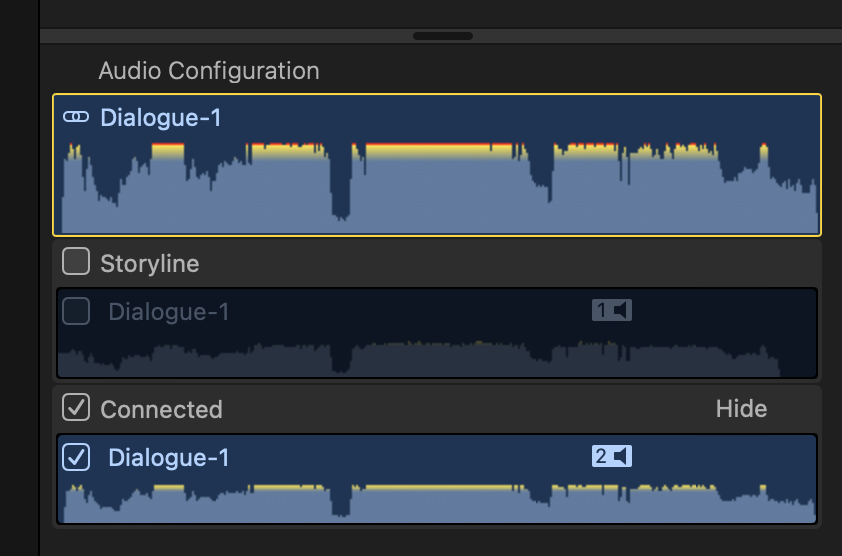
I’ve done all this a few times and it’s going okay. One thing I don’t understand is, in the synced audio, should BOTH audio sources be checked? It is that way initially and I thought it shouldn’t be? Otherwise, it’s going okay.
Please Log in to join the conversation.
- Ultramagnustcv
-
Topic Author
- Offline
- Junior Member
-
Less
More
- Posts: 29
- Thank you received: 0
14 Mar 2022 22:28 #119450
by Ultramagnustcv
Replied by Ultramagnustcv on topic Post audio video sync
This is what I mean: which is the synced-in audio?
Please Log in to join the conversation.
- Tom Wolsky
-

- Offline
- Moderator
-

14 Mar 2022 22:35 #119451
by Tom Wolsky
Replied by Tom Wolsky on topic Post audio video sync
Connected. Storyline is the camera audio.
Please Log in to join the conversation.
- Ultramagnustcv
-
Topic Author
- Offline
- Junior Member
-
Less
More
- Posts: 29
- Thank you received: 0
14 Mar 2022 22:38 #119452
by Ultramagnustcv
Replied by Ultramagnustcv on topic Post audio video sync
Okay. The only other mystery... which I'm past right now, is that I noted that went I selected a clip of this long, synced in audio, both StoryLine and Connected were checked. When I unchecked either, both unchecked. I then went back to the Synced video audio and then unchecked Storyline there, re-selected the area of the clip I wanted to add to the timeline, then the clip showed only Connected was checked.
Maybe I should have unclicked Storyline before I started moving pieces of the clip to the timeline?
Thanks again!
Maybe I should have unclicked Storyline before I started moving pieces of the clip to the timeline?
Thanks again!
Please Log in to join the conversation.
