


- Posts: 126
- Thank you received: 18
3 Post Moderation Rule for New Boarders (25 Jan 2021)
New boarders will have their posts moderated - Don't worry if you cannot see your post immediately.
Tagging workflow suggestions
08 Mar 2022 21:58 #119355
by Larrie
Tagging workflow suggestions was created by Larrie
I can never decide which is better, simpler, faster; do the clip tagging in Final Cut or in the Finder. What are your thoughts?
For example, I just returned from five weeks traveling around Baja California and just finished transferring all the clips to my Mac. The clips are divided up into camera folders. The next step is to add the locations, subject, etc tags to of each clips.
For example, I just returned from five weeks traveling around Baja California and just finished transferring all the clips to my Mac. The clips are divided up into camera folders. The next step is to add the locations, subject, etc tags to of each clips.
Please Log in to join the conversation.

08 Mar 2022 23:44 #119360
by VTC
Replied by VTC on topic Tagging workflow suggestions
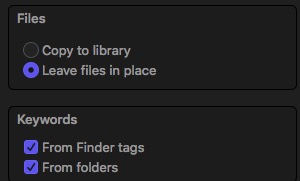
Another option is tagging before import giving greater control over any embedded metadata. Tagging in Finder after import doesn't update keywords in FCP. You'll need to reimport then delete the previous non-finder tagged ones. (Throw all bird pics in a 'bird' tagged folder & that folder populates everything with 'bird'.)
Please Log in to join the conversation.
08 Mar 2022 23:49 #119361
by Larrie
Replied by Larrie on topic Tagging workflow suggestions
I guess I was not totally clear. Have not imported into Final Cut yet. So the question should have been: Is better, simpler, faster; do the clip tagging in Final Cut after importing the clips or in the Finder before importing them?
Please Log in to join the conversation.
09 Mar 2022 01:35 #119364
by VTC
Replied by VTC on topic Tagging workflow suggestions
My earlier reply got supplanted by that one I tried adding.
-
Yes. Tag them first in Finder. Much faster to group them into folders/subject like you mentioned and apply the tags there, than it is to scroll through the files and do it in FCP later on. Applying tags in Finder after already imported into FCP and expecting them to be identified doesn't work. That graphic is to make sure those boxes are checked before import or else the tags don't get shown.
-
Yes. Tag them first in Finder. Much faster to group them into folders/subject like you mentioned and apply the tags there, than it is to scroll through the files and do it in FCP later on. Applying tags in Finder after already imported into FCP and expecting them to be identified doesn't work. That graphic is to make sure those boxes are checked before import or else the tags don't get shown.
Please Log in to join the conversation.
- Carsten Orlt
-

- Offline
- Platinum Member
-

Less
More
- Posts: 422
- Thank you received: 82
09 Mar 2022 02:44 #119366
by Carsten Orlt
Replied by Carsten Orlt on topic Tagging workflow suggestions
If you need the tags in the Finder then yes tag first in Finder. They can then used by FCP on import.
But I wouldn't do that because the Finder is not made to be a quick video scanner for tagging. You would have to open or at least preview every clip inside the camera folder to be able to give meaningful tags.
FCP with its skimmer and Keyword user interface is way faster and as it doesn't matter where a video file lives you don't have to drill through several folders to get to the next batch of clips.
I see FCP as my dedicated Video (finder) interface to work with video. Exactly as Photos is the interface for images. Same idea of having Libraries to organise on the macro level and Events or Albums on the micro level.
Finder is a good tool for general organisation but it really isn't made for specific tasks like video, audio or image organisation.
But I wouldn't do that because the Finder is not made to be a quick video scanner for tagging. You would have to open or at least preview every clip inside the camera folder to be able to give meaningful tags.
FCP with its skimmer and Keyword user interface is way faster and as it doesn't matter where a video file lives you don't have to drill through several folders to get to the next batch of clips.
I see FCP as my dedicated Video (finder) interface to work with video. Exactly as Photos is the interface for images. Same idea of having Libraries to organise on the macro level and Events or Albums on the micro level.
Finder is a good tool for general organisation but it really isn't made for specific tasks like video, audio or image organisation.
Please Log in to join the conversation.
