


- Posts: 4
- Thank you received: 0
3 Post Moderation Rule for New Boarders (25 Jan 2021)
New boarders will have their posts moderated - Don't worry if you cannot see your post immediately.
Sizing and scaling workflow advice
- christo_pritchez
-
 Topic Author
- Offline
- New Member
-

Less
More
27 Feb 2022 14:39 #119207
by christo_pritchez
Sizing and scaling workflow advice was created by christo_pritchez
Hi all,
I'm providing some assets for electronic boards at an expo - really simple moving text, background, logo type thing. Edit itself is just a couple of transitions and an export to MP4 / AVI.
I've got to produce:
2 @ 384 x 672px
1@ 2880 x 384px
Now, because these are used at expo these will be blown up really big on the electronic boards, particularly the one at 2880 which goes right across the entrance and my main concern is that they might pixellate.
I suppose my two queries are on the way into and out of FCPX.
Import - I'm working with assets provided by a designer from Adobe Illustrator. I know he can output vectors which means the asset will not pixelate, but I know FCPX won't take SVG's. As I understand, if I were to request PNG's then that's rasterized, and I just don't know enough about it to say that won't cause me problems. It's only a couple of logos I need, are there any suggestions as to what I should request from the designer?
Output - I've set up the workspace to the dimensions above, all fine. Other than the logos, it's generator background with text and transitions. Done test exports, all fine but obviously I am just viewing the frame size on a standard monitor. I don't know what will happen when it's blown up HUGE on one of these digital screens, and am concerned about pixellation in either the logos (from the designer), or the text / generator assets I've created in FCPX. Is there anything I need to be doing in either the workspace settings or the output settings?
It could be that I'm worrying over nothing, but would appreciate any advice, thoughts or comments on workflow.
Cheers
Chris
I'm providing some assets for electronic boards at an expo - really simple moving text, background, logo type thing. Edit itself is just a couple of transitions and an export to MP4 / AVI.
I've got to produce:
2 @ 384 x 672px
1@ 2880 x 384px
Now, because these are used at expo these will be blown up really big on the electronic boards, particularly the one at 2880 which goes right across the entrance and my main concern is that they might pixellate.
I suppose my two queries are on the way into and out of FCPX.
Import - I'm working with assets provided by a designer from Adobe Illustrator. I know he can output vectors which means the asset will not pixelate, but I know FCPX won't take SVG's. As I understand, if I were to request PNG's then that's rasterized, and I just don't know enough about it to say that won't cause me problems. It's only a couple of logos I need, are there any suggestions as to what I should request from the designer?
Output - I've set up the workspace to the dimensions above, all fine. Other than the logos, it's generator background with text and transitions. Done test exports, all fine but obviously I am just viewing the frame size on a standard monitor. I don't know what will happen when it's blown up HUGE on one of these digital screens, and am concerned about pixellation in either the logos (from the designer), or the text / generator assets I've created in FCPX. Is there anything I need to be doing in either the workspace settings or the output settings?
It could be that I'm worrying over nothing, but would appreciate any advice, thoughts or comments on workflow.
Cheers
Chris
Please Log in to join the conversation.


02 Mar 2022 01:45 - 02 Mar 2022 01:47 #119223
by dgwvideo
Creating history....one edit at a time !
Replied by dgwvideo on topic Sizing and scaling workflow advice
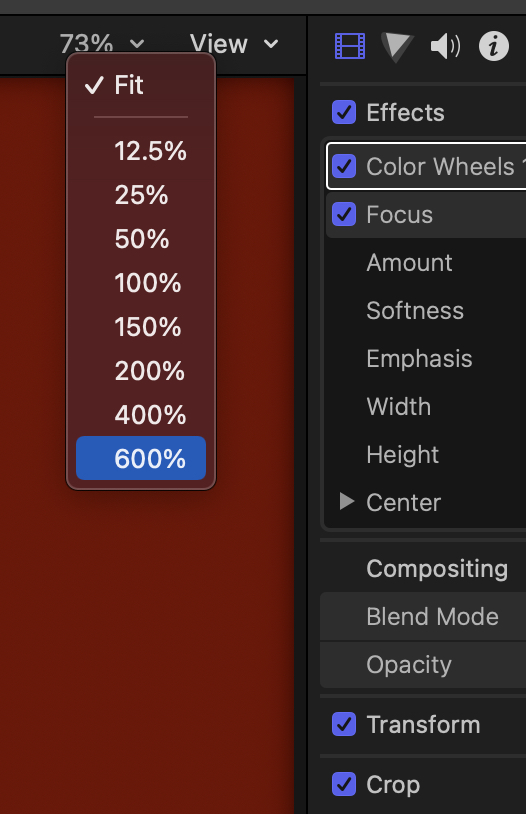
The dimensions that you state are not enormous by today's standards. If you created your content in that size project you should be able to tell in the viewer if it looks OK at 100% (or as FIT). If it's Ok there, I'd recommend scaling the viewer up (as much as 600%) and move your content around in the viewer to see the edges of fonts, logos, etc. all appear crisp. High Quality PNG or TIFF files should be able to be enlarged significantly without issue, and they retain transparency. The designer can also make them twice the size keeping the same aspect if the original seems questionable. Best of all, feeding your content from a laptop or iPad to the actual screens to be used in advance of the event will give you the most piece of mind that all is good.
Creating history....one edit at a time !
Last edit: 02 Mar 2022 01:47 by dgwvideo.
Please Log in to join the conversation.
- christo_pritchez
-
Topic Author
- Offline
- New Member
-
Less
More
- Posts: 4
- Thank you received: 0
02 Mar 2022 14:01 #119229
by christo_pritchez
Replied by christo_pritchez on topic Sizing and scaling workflow advice
Thanks for the response, really appreciate it.
It's not the aspect ratio itself that's bothering me; I've set the project up to those dims and there's no footage anyway. It's what happens when the output is played in situ. The digital screens are like advertising boards, and the one at 2880x384 aspect ratio will be, when displayed about 8 metres long. I've done a test output on my monitor and testing it on my monitor obviously it's all fine, but I'm just concerned that when it's on the digital screen 'bloody massive', that the logo assets might pixellate. I suspect the answer is simply to output at as highest quality as possible and not big compression?
It's not the aspect ratio itself that's bothering me; I've set the project up to those dims and there's no footage anyway. It's what happens when the output is played in situ. The digital screens are like advertising boards, and the one at 2880x384 aspect ratio will be, when displayed about 8 metres long. I've done a test output on my monitor and testing it on my monitor obviously it's all fine, but I'm just concerned that when it's on the digital screen 'bloody massive', that the logo assets might pixellate. I suspect the answer is simply to output at as highest quality as possible and not big compression?
Please Log in to join the conversation.
