



- Posts: 4
- Thank you received: 0
3 Post Moderation Rule for New Boarders (25 Jan 2021)
New boarders will have their posts moderated - Don't worry if you cannot see your post immediately.
Split-Screen With Animated Map?
17 Feb 2022 16:33 #119069
by Per Hansa
Split-Screen With Animated Map? was created by Per Hansa
I'm a hobbyist who enjoys making home movies of our family's travels, and am trying to up my game with FCP and Motion-5.
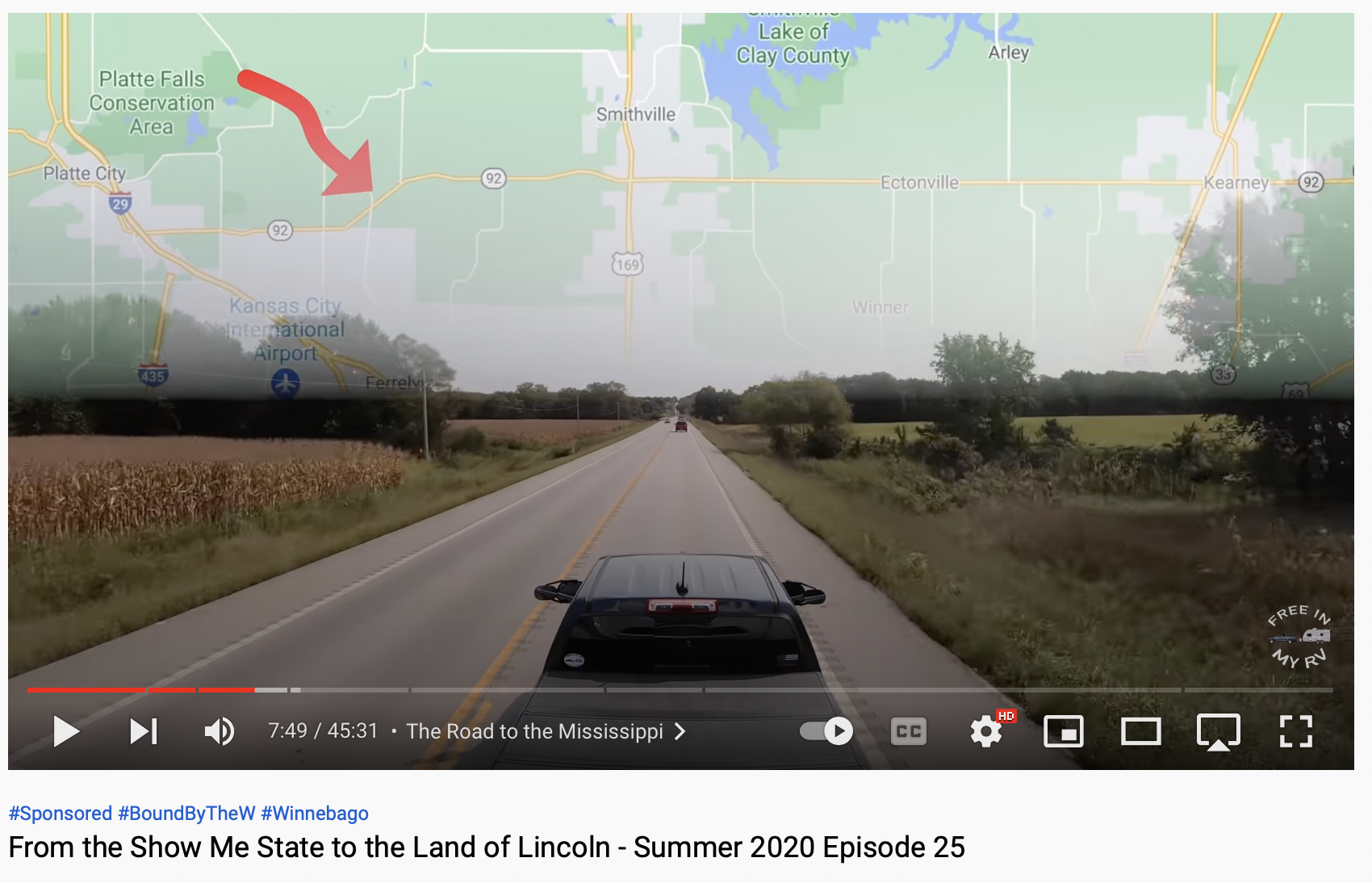
The effect I'm going for is a split-screen, with driving footage on the bottom, and an animated map on top (see attached photo, or reference youtube video "From the Show Me State to the Land of Lincoln" 7:48 mark).
An initial contact with this video's creator revealed he used Motion5 for the animation, then used a FCP crop effect to create the split screen, but that's all I know.
I was able to create a similar map animation, and I was able to split the screens in FCP by stacking the clips on top of each other, then using the "transform" command to move the animated clip to the top half of the frame, but the problems I can't resolve are....
1) Keeping the animated line in frame as it moves across the map (mine always moves out of frame--even when trying to use Ken Burn Effect to pan within the clip).
2) I can't figure out how he's able to get the clip to follow the animated line for so long (45 sec) with such zoomed in HD detail. My experience so far as that I need to use a zoomed out (not as much detail) map to cover that many miles traveled, and even then I'm only getting about 15 sec worth of clip. Is he seamlessly stitching several zoomed in map clips to make a long 45 sec clip, or is there a function in Motion 5 that makes this possible using one map?
3) Finally, I can't figure out how he fades the two split clips together so well with that blended look. I've got another message out to Robert looking for help but haven't heard back.
I know that's a lot guys, sorry. I'm at the point of giving up on this effect, but it would be such a nice one to create for so many of our videos!
The effect I'm going for is a split-screen, with driving footage on the bottom, and an animated map on top (see attached photo, or reference youtube video "From the Show Me State to the Land of Lincoln" 7:48 mark).
An initial contact with this video's creator revealed he used Motion5 for the animation, then used a FCP crop effect to create the split screen, but that's all I know.
I was able to create a similar map animation, and I was able to split the screens in FCP by stacking the clips on top of each other, then using the "transform" command to move the animated clip to the top half of the frame, but the problems I can't resolve are....
1) Keeping the animated line in frame as it moves across the map (mine always moves out of frame--even when trying to use Ken Burn Effect to pan within the clip).
2) I can't figure out how he's able to get the clip to follow the animated line for so long (45 sec) with such zoomed in HD detail. My experience so far as that I need to use a zoomed out (not as much detail) map to cover that many miles traveled, and even then I'm only getting about 15 sec worth of clip. Is he seamlessly stitching several zoomed in map clips to make a long 45 sec clip, or is there a function in Motion 5 that makes this possible using one map?
3) Finally, I can't figure out how he fades the two split clips together so well with that blended look. I've got another message out to Robert looking for help but haven't heard back.
I know that's a lot guys, sorry. I'm at the point of giving up on this effect, but it would be such a nice one to create for so many of our videos!
Please Log in to join the conversation.
