


- Posts: 422
- Thank you received: 82
3 Post Moderation Rule for New Boarders (25 Jan 2021)
New boarders will have their posts moderated - Don't worry if you cannot see your post immediately.
MacBook Pro 2021 Notch
- Carsten Orlt
-
 Topic Author
- Offline
- Platinum Member
-

Less
More
06 Dec 2021 04:49 #117810
by Carsten Orlt
MacBook Pro 2021 Notch was created by Carsten Orlt
Just got my new MacBook 16' 2021 and stumble over one little detail. I have my system/app menu set to 'automatically hide'. When I try to resize FCP to cover the whole screen it doesn't let me and sizes down and leaves the menu space left and right of the notch blank, meaning showing the desktop picture behind.
Even when I go to full screen mode FCP never sizes to more than below the notch. In fact none of my apps does.
Is this normal? Or where is the hidden setting which I can't find
Even when I go to full screen mode FCP never sizes to more than below the notch. In fact none of my apps does.
Is this normal? Or where is the hidden setting which I can't find
Please Log in to join the conversation.
- Tom Wolsky
-

- Offline
- Moderator
-

06 Dec 2021 06:21 #117811
by Tom Wolsky
Replied by Tom Wolsky on topic MacBook Pro 2021 Notch
AFAIK FCP has always worked like that on a laptop. If you click the green dot it will go into full screen mode. You can also move the application window to the top of the screen and manually fill the space. It doesn’t remember full screen mode on relaunch.
Please Log in to join the conversation.
- Carsten Orlt
-
Topic Author
- Offline
- Platinum Member
-
Less
More
- Posts: 422
- Thank you received: 82
06 Dec 2021 06:29 #117812
by Carsten Orlt
Replied by Carsten Orlt on topic MacBook Pro 2021 Notch
Thanks Tom. Sorry I wasn't clear in my description. On a pre 'camera notch' laptops you could enable 'auto hide menu' in the dock menu system preferences. Which made it look like it was in full screen but wasn't. When you move the mouse to the top of the screen the menu will appear, pretty much the same as the dock when you turn on 'auto hide dock'.
But on the new MacBook with the camera notch FCP (or any other app) never allows to fill the whole screen going 'under the camera notch'. So you always see an app or desktop behind on top in the height of the notch. There is an option in the app get info window to enable 'scale to fit below camera'. But it doesn't have any effect?
What am I missing?
But on the new MacBook with the camera notch FCP (or any other app) never allows to fill the whole screen going 'under the camera notch'. So you always see an app or desktop behind on top in the height of the notch. There is an option in the app get info window to enable 'scale to fit below camera'. But it doesn't have any effect?
What am I missing?
Please Log in to join the conversation.
- Tom Wolsky
-
- Offline
- Moderator
-
06 Dec 2021 07:18 #117814
by Tom Wolsky
Replied by Tom Wolsky on topic MacBook Pro 2021 Notch
I don’t think there is a way to avoid it. The notch really needs the menu bar to fit into it.
Please Log in to join the conversation.

06 Dec 2021 18:31 #117819
by joema
Replied by joema on topic MacBook Pro 2021 Notch
My problem is not aesthetics of the notch but function -- it covers the icons of some "menu bar" apps such as iStat Menus, esp. when combined with other apps like Resolve which occupy many menu positions. A workaround is using the excellent 3rd-party utility Bartender:
www.macbartender.com
Please Log in to join the conversation.

06 Dec 2021 20:54 #117823
by JoeEditor
Replied by JoeEditor on topic MacBook Pro 2021 Notch
The notice is pretty stupid...
Please Log in to join the conversation.
- Carsten Orlt
-
Topic Author
- Offline
- Platinum Member
-
Less
More
- Posts: 422
- Thank you received: 82
06 Dec 2021 20:56 #117824
by Carsten Orlt
Replied by Carsten Orlt on topic MacBook Pro 2021 Notch
Thanks Joe, will have a look.
Please Log in to join the conversation.
- drcajunkenny
-

- Offline
- New Member
-

Less
More
- Posts: 1
- Thank you received: 0
17 Mar 2022 13:22 #119504
by drcajunkenny
Replied by drcajunkenny on topic MacBook Pro 2021 Notch
Hi,
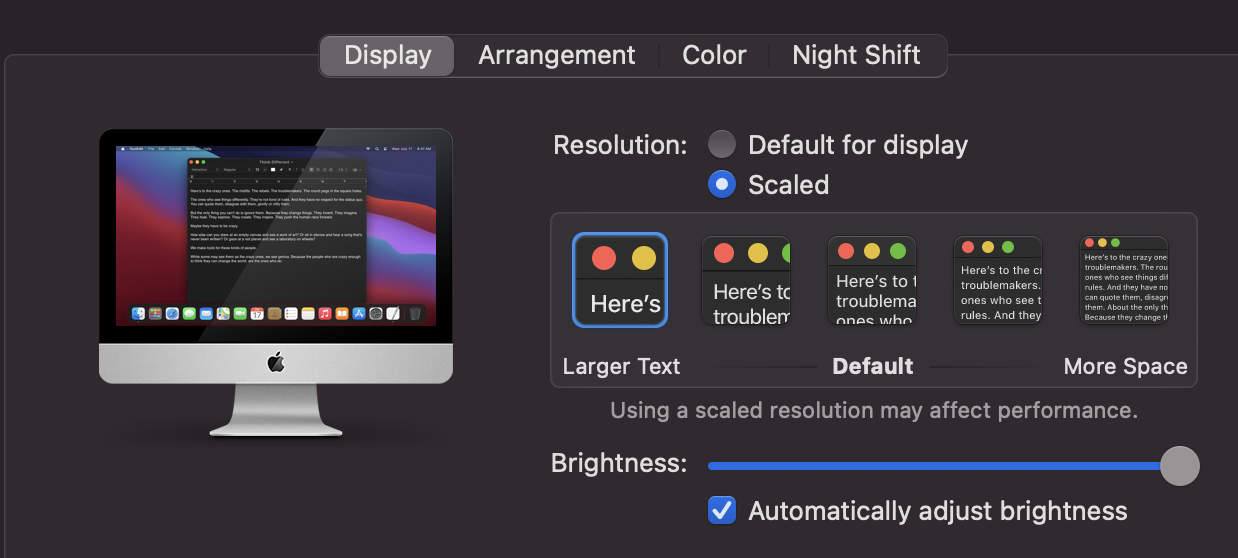
I found you looking for the same solution. I was going to hook up a 2nd monitor after giving up and clicked on my display preferences button. Then realizing I was in largest text size in the scaled format. Just step it down and perfect.
I found you looking for the same solution. I was going to hook up a 2nd monitor after giving up and clicked on my display preferences button. Then realizing I was in largest text size in the scaled format. Just step it down and perfect.
Please Log in to join the conversation.

30 Mar 2022 04:14 #119720
by slim971
Replied by slim971 on topic MacBook Pro 2021 Notch
Hello, i have same problem, i am loosing space with this black bar.
I want FCPX in full screen with the notch in the gray bar of fcpx.
Working on my 16 Macbook pro 2021 below the notch is like working on a 15inch...
I want FCPX in full screen with the notch in the gray bar of fcpx.
Working on my 16 Macbook pro 2021 below the notch is like working on a 15inch...

Please Log in to join the conversation.
