


- Posts: 175
- Thank you received: 5
3 Post Moderation Rule for New Boarders (25 Jan 2021)
New boarders will have their posts moderated - Don't worry if you cannot see your post immediately.
HDMI Monitor out on New Macs
- CBlakeston
-
 Topic Author
- Offline
- Elite Member
-

Less
More
22 Oct 2021 09:45 - 22 Oct 2021 09:48 #116891
by CBlakeston
HDMI Monitor out on New Macs was created by CBlakeston
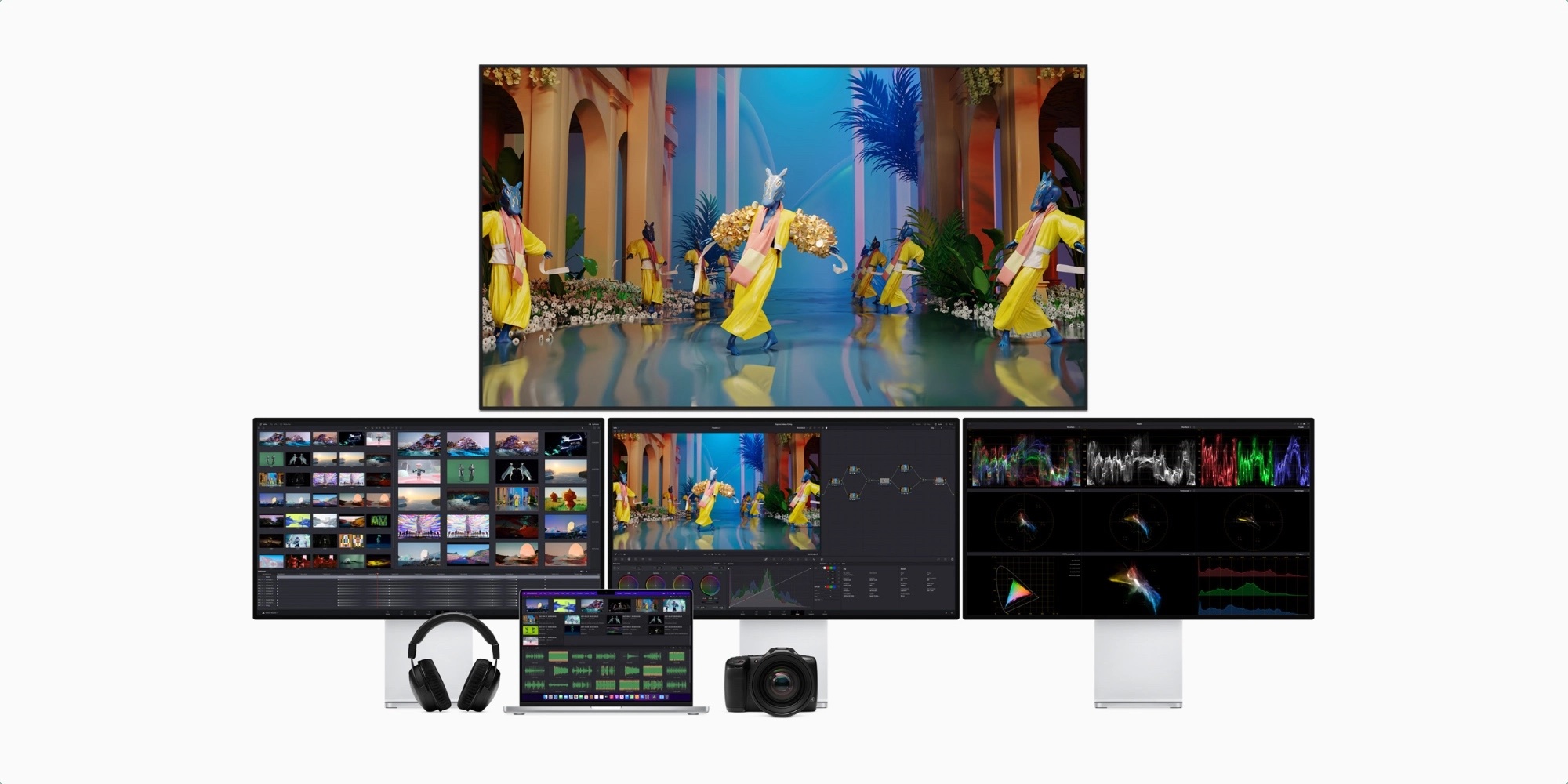
Going by the promotional images for the new Macs they show FCP running multiple monitors with monitor output to the TV display. Unless I'm mistaken full monitor output to a TV or display that isn't the Pro XDR isn't something you can do currently and needed extra hardware for like a black magic box output or something??
I couldn't just plug my 4K TV into my m1 and get a similar monitor out to the TV for example. (feel free to correct me if I'm wrong)
Do we know if it's something the new FCP 10.6 update enables or if it's hardware dependant on the new M1 Pro and or M1 Mac chip? (notably it's only shown as output with the M1 Max)
I couldn't just plug my 4K TV into my m1 and get a similar monitor out to the TV for example. (feel free to correct me if I'm wrong)
Do we know if it's something the new FCP 10.6 update enables or if it's hardware dependant on the new M1 Pro and or M1 Mac chip? (notably it's only shown as output with the M1 Max)
Last edit: 22 Oct 2021 09:48 by CBlakeston.
Please Log in to join the conversation.
- Tom Wolsky
-

- Offline
- Moderator
-

22 Oct 2021 13:02 #116895
by Tom Wolsky
Replied by Tom Wolsky on topic HDMI Monitor out on New Macs
This is a feature of the M1 Pro and the M1 Max chips. It's only on the 2021 MacBook Pro.
Please Log in to join the conversation.


22 Oct 2021 15:15 - 22 Oct 2021 15:16 #116907
by VTC
Why couldn't you? Have some 2009 MacPros doing just that directly off the video card. Seems like 12 year newer technology should be able to do that without running it through boxes and plug in add ons.
Replied by VTC on topic HDMI Monitor out on New Macs
I couldn't just plug my 4K TV into my m1 and get a similar monitor out to the TV for example. (feel free to correct me if I'm wrong)
Why couldn't you? Have some 2009 MacPros doing just that directly off the video card. Seems like 12 year newer technology should be able to do that without running it through boxes and plug in add ons.
Last edit: 22 Oct 2021 15:16 by VTC.
Please Log in to join the conversation.

22 Oct 2021 18:32 - 22 Oct 2021 18:33 #116912
by Redifer
Replied by Redifer on topic HDMI Monitor out on New Macs
Only Apple® Silicon™ Pro and Max are powerful and INSPIRATIONAL enough to route a unique output through the HDMI port.
Sorry, couldn't resist.
I did buy one of those Blackmagic thingies for my 2013 Mac Pro so I could mix 5.1 sound, but as it turns out the HDMI out on the Mac Pro itself provides the full 5.1 that I need. I was informed that in order to monitor 5.1 audio the Blackmagic thingy would be needed, so Apple surprised me in a positive way regarding the HDMI out. Thank goodness I bought the Blackmagic thingy used. I guess I can still use it for a video monitor out if I need, though.
Sorry, couldn't resist.
I did buy one of those Blackmagic thingies for my 2013 Mac Pro so I could mix 5.1 sound, but as it turns out the HDMI out on the Mac Pro itself provides the full 5.1 that I need. I was informed that in order to monitor 5.1 audio the Blackmagic thingy would be needed, so Apple surprised me in a positive way regarding the HDMI out. Thank goodness I bought the Blackmagic thingy used. I guess I can still use it for a video monitor out if I need, though.
Last edit: 22 Oct 2021 18:33 by Redifer.
Please Log in to join the conversation.


09 May 2023 11:26 - 15 May 2023 10:52 #125332
by Simohson
Replied by Simohson on topic HDMI Monitor out on New Macs
You are correct that using a 4K TV as a monitor output for a Mac currently requires additional hardware like a Blackmagic device, as the standard HDMI port on most Macs is not capable of outputting a 4K resolution signal at 60Hz. What to do if
macbook hdmi port not working
.
Regarding the promotional images you mentioned, it's likely that the new M1 Pro and M1 Max chips are capable of outputting a 4K resolution signal at 60Hz over HDMI, which would allow them to be directly connected to a 4K TV without the need for additional hardware. This capability could be due to improvements in the hardware, as well as updates to macOS and Final Cut Pro.
It's also worth noting that Final Cut Pro has supported multiple monitors for a long time, so it's not necessarily a new feature.
Regarding the promotional images you mentioned, it's likely that the new M1 Pro and M1 Max chips are capable of outputting a 4K resolution signal at 60Hz over HDMI, which would allow them to be directly connected to a 4K TV without the need for additional hardware. This capability could be due to improvements in the hardware, as well as updates to macOS and Final Cut Pro.
It's also worth noting that Final Cut Pro has supported multiple monitors for a long time, so it's not necessarily a new feature.
Last edit: 15 May 2023 10:52 by Simohson.
Please Log in to join the conversation.
