


- Posts: 568
- Thank you received: 74
3 Post Moderation Rule for New Boarders (25 Jan 2021)
New boarders will have their posts moderated - Don't worry if you cannot see your post immediately.
German keyboard only shows QWERTY layout for custom shortcuts
04 Sep 2021 16:46 #116116
by Axel
FCP 10.5.4 on Big Sur 11.5.2, M1 Mac Mini 16GB, Magic keyboard with QWERTZ layout, no brackets, delete key is actually backspace key. So I can't make a shortcut for delete and replace with gap-clip. Have a look:
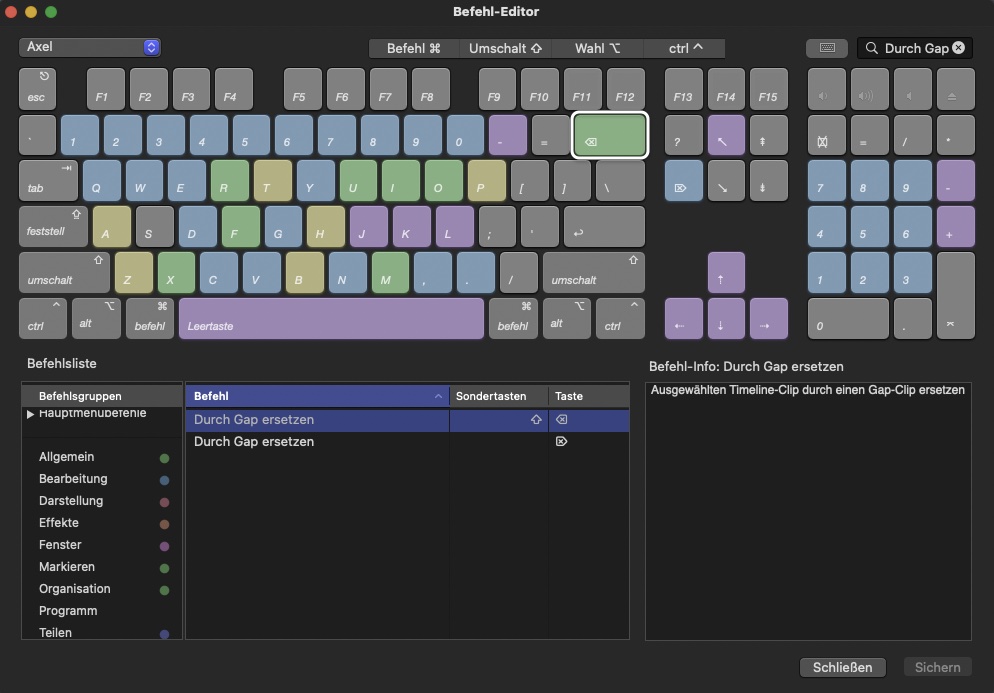 Of course, I've already tried a few things, like telling Mac OS that it was actually a US layout and then re-assigning the shortcut - ploink (= not allowed). Running FCP in english (no problem with that), but no luck.
Any ideas?
Any ideas?
Please Log in to join the conversation.


05 Sep 2021 09:52 #116120
by rsoetewey
Replied by rsoetewey on topic German keyboard only shows QWERTY layout for custom shortcuts
Hi, as a Belgian user with a French keyboard layout, I always had the same problems with FCP. I solved it by using Keyboard Maestro, an app that let you make macro's and shortcuts and just works. You can even 'automise' mouseclicks and the lot, and make sure a shortcut functions only within FCP.
Hope this helps.
Rudy
Hope this helps.
Rudy
Please Log in to join the conversation.
06 Sep 2021 14:38 #116129
by Axel
It did, thanks!
Although indirectly. I swallowed at the price of 43 € with taxes for Keyboard Maestro. I thought, why do I have to do this? Can't Apple provide a german layout by themselves? This is ridiculous. I had already sent feedback to Apple where I complained. I know that they act on feedback, because some years ago I made a big fuss about not being able to eject camera cards from within FCP. I think I personally brought 100 people to send feedback about this, and it changed.
However, when I read about the functionality of Keyboard Maestro, I had a vague idea that I had bought something like this back in the day, for 8 or 9 bucks.
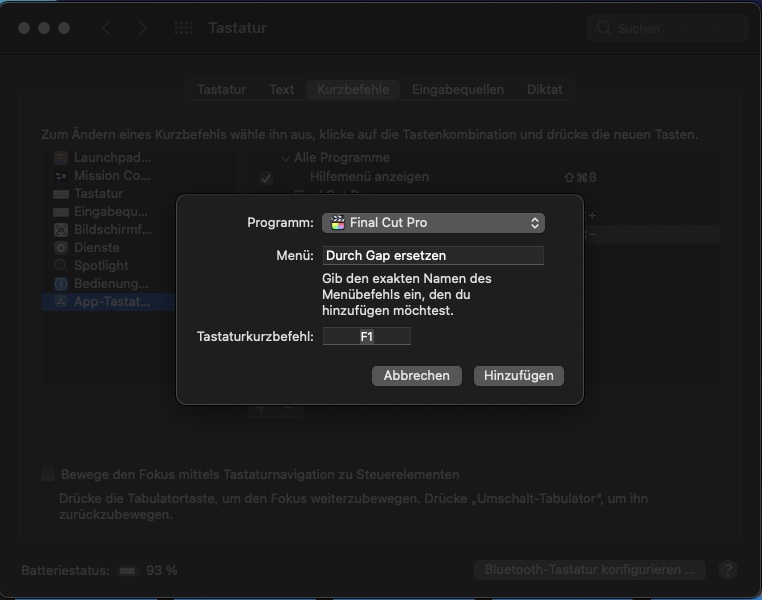
And afterwards I made the discovery that Mac OS' preferences have their own customizable keyboard shortcuts that can be made app-specific. Everything that's listed in the FCP top menu, be it directly or through pop-ups, can be made into new shortcuts. All you have to do is to write down the exact spelling of the command:
For the record: yesterday I also tested an ancient Apple USB keyboard with number pad (what's the opposite of magic? Natural?) This one works with the custom keyboard editor.
Replied by Axel on topic German keyboard only shows QWERTY layout for custom shortcuts
Hope this helps.
Rudy
It did, thanks!
Although indirectly. I swallowed at the price of 43 € with taxes for Keyboard Maestro. I thought, why do I have to do this? Can't Apple provide a german layout by themselves? This is ridiculous. I had already sent feedback to Apple where I complained. I know that they act on feedback, because some years ago I made a big fuss about not being able to eject camera cards from within FCP. I think I personally brought 100 people to send feedback about this, and it changed.
However, when I read about the functionality of Keyboard Maestro, I had a vague idea that I had bought something like this back in the day, for 8 or 9 bucks.
And afterwards I made the discovery that Mac OS' preferences have their own customizable keyboard shortcuts that can be made app-specific. Everything that's listed in the FCP top menu, be it directly or through pop-ups, can be made into new shortcuts. All you have to do is to write down the exact spelling of the command:
For the record: yesterday I also tested an ancient Apple USB keyboard with number pad (what's the opposite of magic? Natural?) This one works with the custom keyboard editor.
Please Log in to join the conversation.
06 Sep 2021 17:18 #116134
by rsoetewey
Replied by rsoetewey on topic German keyboard only shows QWERTY layout for custom shortcuts
Great.
One of the nice things about Keybord Maestro in FCP is dat one can use it for adding a shortcut for a 'string' of different commands, (as macro's) ending up at putting 3 points f.i. with the mouse on a curve, before you start moving them. Virtually just everything you do can be automised. (Just so you know: it works with every mac-app. And I have no personal connection with the makers whatsoever. I just think it a very useful app.)
Succes.
Rudy
One of the nice things about Keybord Maestro in FCP is dat one can use it for adding a shortcut for a 'string' of different commands, (as macro's) ending up at putting 3 points f.i. with the mouse on a curve, before you start moving them. Virtually just everything you do can be automised. (Just so you know: it works with every mac-app. And I have no personal connection with the makers whatsoever.
I just think it a very useful app.)Succes.
Rudy
Please Log in to join the conversation.
- ronny courtens
-

- Offline
- Moderator
-

Less
More
- Posts: 4455
- Thank you received: 962
06 Sep 2021 18:13 #116143
by ronny courtens
Replied by ronny courtens on topic German keyboard only shows QWERTY layout for custom shortcuts
Hey Rudy, what a surprise to see you here.
I have read a few of your books, love your work!
Groetjes uit Zeebrugge.
- Ronny
I have read a few of your books, love your work!
Groetjes uit Zeebrugge.
- Ronny
Please Log in to join the conversation.
06 Sep 2021 18:20 #116144
by Axel
Replied by Axel on topic German keyboard only shows QWERTY layout for custom shortcuts
Definitely. Will give it a try (literally, use the trial). Thanks again.
Please Log in to join the conversation.
06 Sep 2021 18:50 - 07 Sep 2021 13:19 #116145
by rsoetewey
Replied by rsoetewey on topic German keyboard only shows QWERTY layout for custom shortcuts
Hey Ronny, speaking of a surprise! 😀😀😀 Didn't know thàt! I've been using FCP as an amateur for some years now, and been following fop.co as well. Lovely to hear that you read some of my books and liked them. Keep up the good work!
Hartelijke groeten uit Edegem.
Rudy
Hartelijke groeten uit Edegem.
Rudy
Last edit: 07 Sep 2021 13:19 by rsoetewey.
Please Log in to join the conversation.
