




- Posts: 3
- Thank you received: 0
3 Post Moderation Rule for New Boarders (25 Jan 2021)
New boarders will have their posts moderated - Don't worry if you cannot see your post immediately.
How to Sync dual channel/track audio with video footage
21 Dec 2020 20:54 #111650
by OutofSync
How to Sync dual channel/track audio with video footage was created by OutofSync
Hi all!
New to this forum, excited to chat and learn from the experts!
My question involves syncing two channel/track audio to video in FCPX.
I'm capturing dialogue/sound (it's a cooking show) using two Sennheiser wireless lav mics connected to a Zoom H4N recorder. Each subject/host has her own transmitter and receiver.
I'm looking for the cleanest/most efficient way to sync this sound to the video while being able to work on each individual mic and mix the two as needed.
Here's what I've discovered so far:
1) If I set the Zoom record mode to stereo I get one file and left/right channels. If I sync this audio clip to the video footage manually, I'm able to change it to dual mono channels and edit each mic separately. Noice.
BUT! When I use Sync clips it no longer allows me to change the mode and work with each mic individually - kind of feels like the FCPX sync clip(s) function flattens everything into a single mono track. Not so noice.
Alternatively:
2) If I set the Zoom record mode to Multitrack (MTR) I get two separate mono files, one for each mic.
BUT! It doesn't work well to try to sync the footage with both audio tracks. It really only seems to work when I sync the video footage with one of the audio tracks and then attach the 2nd audio track in the timeline.
Because there are so many variables, I want to make sure I'm not missing something. Is there a way to capture dual track/channel sound and sync it up in one go while maintaining separate channels?
Thank you for the help, would love to hear your thoughts!
One thing I will ask is that any advice offered work with the stuff I have right now as I can't afford to add more gear.
Daniel
New to this forum, excited to chat and learn from the experts!
My question involves syncing two channel/track audio to video in FCPX.
I'm capturing dialogue/sound (it's a cooking show) using two Sennheiser wireless lav mics connected to a Zoom H4N recorder. Each subject/host has her own transmitter and receiver.
I'm looking for the cleanest/most efficient way to sync this sound to the video while being able to work on each individual mic and mix the two as needed.
Here's what I've discovered so far:
1) If I set the Zoom record mode to stereo I get one file and left/right channels. If I sync this audio clip to the video footage manually, I'm able to change it to dual mono channels and edit each mic separately. Noice.
BUT! When I use Sync clips it no longer allows me to change the mode and work with each mic individually - kind of feels like the FCPX sync clip(s) function flattens everything into a single mono track. Not so noice.
Alternatively:
2) If I set the Zoom record mode to Multitrack (MTR) I get two separate mono files, one for each mic.
BUT! It doesn't work well to try to sync the footage with both audio tracks. It really only seems to work when I sync the video footage with one of the audio tracks and then attach the 2nd audio track in the timeline.
Because there are so many variables, I want to make sure I'm not missing something. Is there a way to capture dual track/channel sound and sync it up in one go while maintaining separate channels?
Thank you for the help, would love to hear your thoughts!
One thing I will ask is that any advice offered work with the stuff I have right now as I can't afford to add more gear.
Daniel
Please Log in to join the conversation.


21 Dec 2020 22:27 #111653
by Doug
Replied by Doug on topic How to Sync dual channel/track audio with video footage
Your best bet is to sync the audio and video as a 'Multicam' clip, rather than a synchronized clip. This allows you to maintain the ability to work on the audio individually as you're hoping to but it also syncs everything together. It's a little strange to think of because you're only using one video file but it works perfectly.
Please Log in to join the conversation.
22 Dec 2020 00:16 - 22 Dec 2020 10:29 #111655
by OutofSync
Replied by OutofSync on topic How to Sync dual channel/track audio with video footage
Hi Doug,
Really appreciate the reply! I've come across several blog reads about using multi-cam clips to sync like this. Good suggestion! I just tried it and it worked, however I'm not totally sure I'm doing it correctly.
After dropping the MCC into my timeline I double clicked and expanded audio until I was able to change the stereo file in the audio inspector to dual mono.
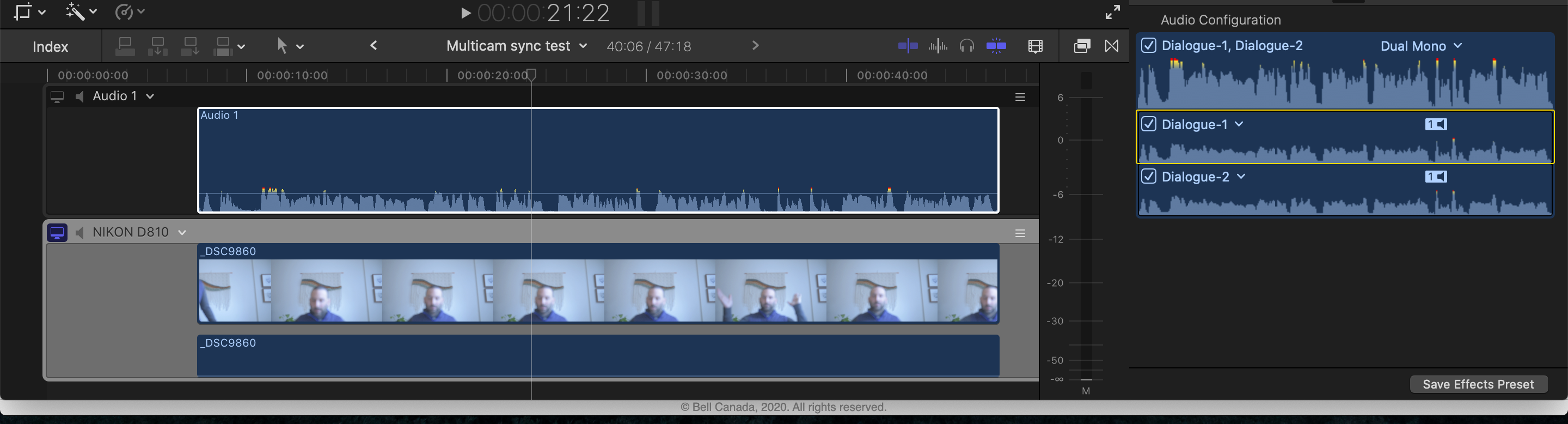
So now I have a synced clip with two mono channels in the inspector BUT I don't exactly know how to mix or tweak them (I've attached a screen capture for you). E.g. they show up in the audio inspector but not in the timeline.
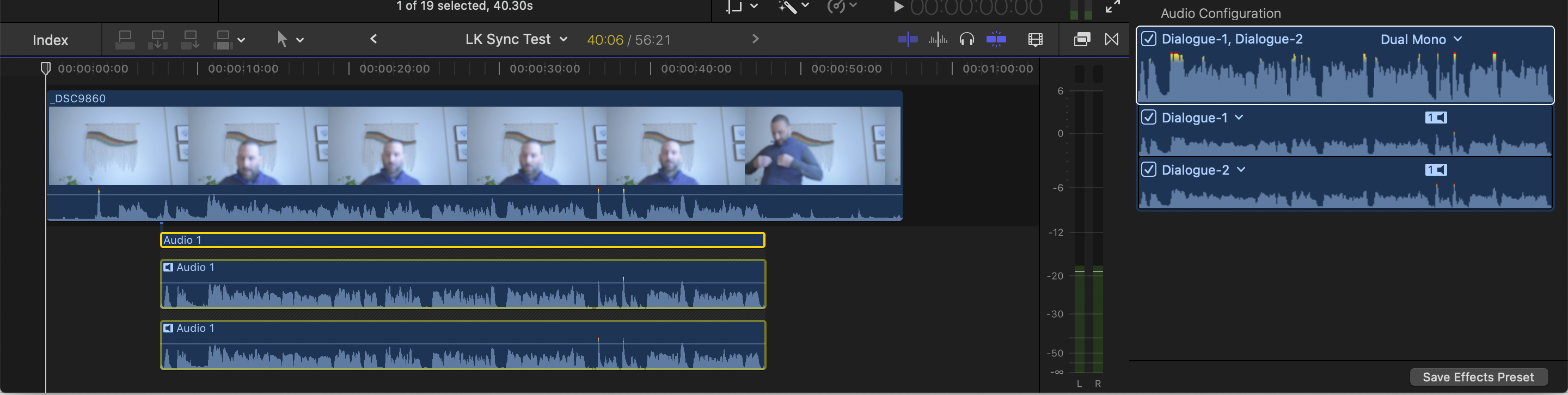
The 2nd screen capture is what I'm trying to achieve.....in this case I simply dropped my audio file and video file into the timeline and synced them manually based on a clap. Then I was able to change the stereo file to dual mono in the audio inspector (just like the MCC) but have them sit directly under my video footage so I can work with them together (see screen capture)
Anyway I can accomplish the same thing using MCCs?
Thanks again for your time and help!
Daniel
Really appreciate the reply! I've come across several blog reads about using multi-cam clips to sync like this. Good suggestion! I just tried it and it worked, however I'm not totally sure I'm doing it correctly.
After dropping the MCC into my timeline I double clicked and expanded audio until I was able to change the stereo file in the audio inspector to dual mono.
So now I have a synced clip with two mono channels in the inspector BUT I don't exactly know how to mix or tweak them (I've attached a screen capture for you). E.g. they show up in the audio inspector but not in the timeline.
The 2nd screen capture is what I'm trying to achieve.....in this case I simply dropped my audio file and video file into the timeline and synced them manually based on a clap. Then I was able to change the stereo file to dual mono in the audio inspector (just like the MCC) but have them sit directly under my video footage so I can work with them together (see screen capture)
Anyway I can accomplish the same thing using MCCs?
Thanks again for your time and help!
Daniel
Last edit: 22 Dec 2020 10:29 by peteramwiggins.
Please Log in to join the conversation.


22 Dec 2020 02:25 - 22 Dec 2020 02:28 #111659
by JoeEditor
Replied by JoeEditor on topic How to Sync dual channel/track audio with video footage
Go to the original Zoom recorded audio inside of your Sync clip. Set it to Dual Mono there. Back out in your Project, you select that Sync Clip, and you should see both channels of that Zoom audio.
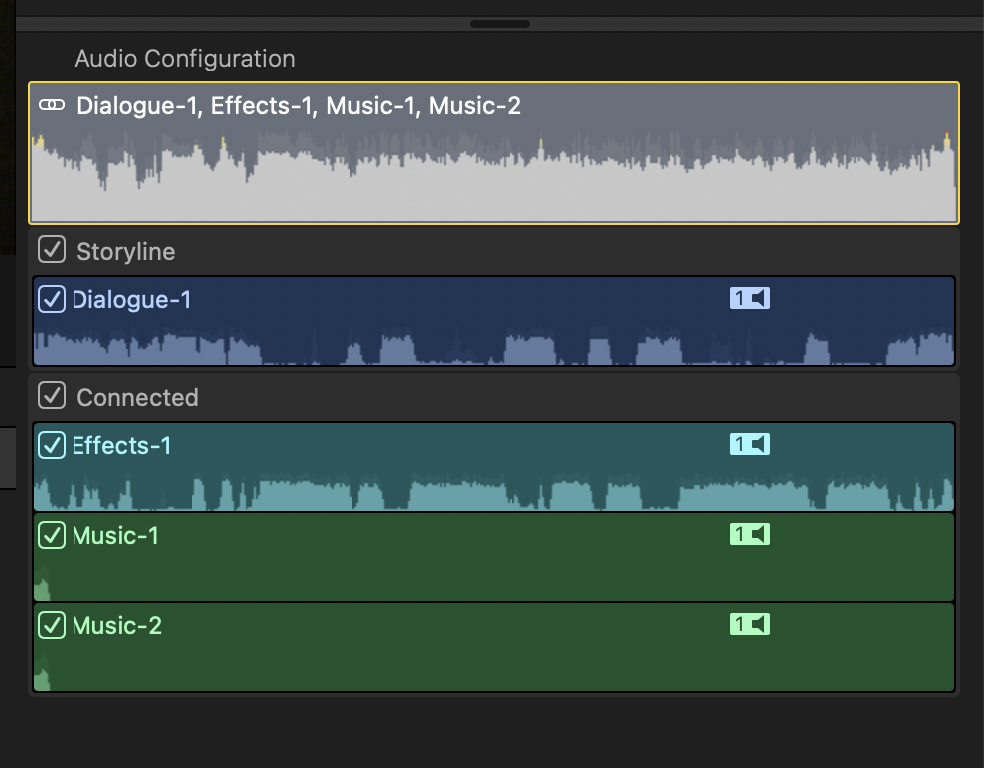
I took two mono recordings, tagged one as Dialog role and the other as Effects role.
Then I took a recording that was stereo and I tagged as Music role.
Put them all into one Sync clip.
From the Project Timeline I was working in, I double-clicked the Sync clip to open it into its own Timeline.
Select the stereo clip, set it to dual mono.
Back out in my Project Timeline, my audio shows both channels of that stereo recording now.
See attached screen shot.
I took two mono recordings, tagged one as Dialog role and the other as Effects role.
Then I took a recording that was stereo and I tagged as Music role.
Put them all into one Sync clip.
From the Project Timeline I was working in, I double-clicked the Sync clip to open it into its own Timeline.
Select the stereo clip, set it to dual mono.
Back out in my Project Timeline, my audio shows both channels of that stereo recording now.
See attached screen shot.
Last edit: 22 Dec 2020 02:28 by JoeEditor.
Please Log in to join the conversation.
22 Dec 2020 14:43 #111661
by JoeEditor
Replied by JoeEditor on topic How to Sync dual channel/track audio with video footage
You can also, in the Timeline, right-click the clip (Sync or Mutlicam, I'd use Sync clip for your situation) and Expand Audio Components. You'll have access to each channel independently there in the Timeline (as well as in the Inspector).
Please Log in to join the conversation.
23 Dec 2020 02:29 #111672
by OutofSync
Replied by OutofSync on topic How to Sync dual channel/track audio with video footage
Hey Ben,
Thanks for this and the attachment, made it much clearer! I think you're totally right, it makes more sense to use sync vs multicam in my situation if I can expand the audio components and work on the individual mono channels. Oddly enough, I accidentally realized this yesterday......not sure why I thought it couldn't be done.
So I'm going to capture stereo with two mics (unless this somehow degrades the quality vs capturing two mono files with my H4N) and then use the sync clip to sync with the video then expand audio components as you suggested.
Thanks again for your time and help! Checked out your website btw, awesome work!
Thanks for this and the attachment, made it much clearer! I think you're totally right, it makes more sense to use sync vs multicam in my situation if I can expand the audio components and work on the individual mono channels. Oddly enough, I accidentally realized this yesterday......not sure why I thought it couldn't be done.
So I'm going to capture stereo with two mics (unless this somehow degrades the quality vs capturing two mono files with my H4N) and then use the sync clip to sync with the video then expand audio components as you suggested.
Thanks again for your time and help! Checked out your website btw, awesome work!
Please Log in to join the conversation.
