


3 Post Moderation Rule for New Boarders (25 Jan 2021)
New boarders will have their posts moderated - Don't worry if you cannot see your post immediately.
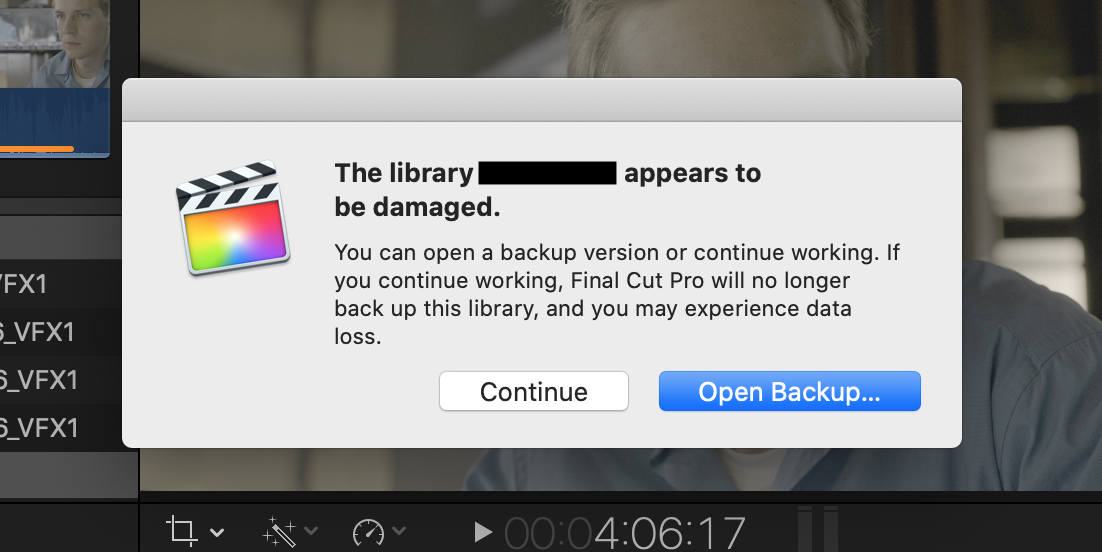
"Library appears to be damaged"


16 Jun 2020 22:14 - 16 Jun 2020 22:17 #107950
by Emmanuel
"Library appears to be damaged" was created by Emmanuel
Guys,
I'm in serious trouble. I'm at a very advanced version of the edit of a film, and after a Force Quit of FPCX because it was unresponsive, I got this message (see image attached, I don't know how to insert it here)
After quitting and opening again, the Project I was working on was gone. I searched its name it appeared with a different logo (not the logo of a project) and an exclamation point.
I had to delete it (and lost several days of work).
The worst is that I have Backups for Final Cut Pro, but even when I regress to an older version which was working... I get the same problem !!!!
I used Digital Rebellion Project Repair, Backups for Final Cut Pro, I did checkdisk on the hard drive... and nothing helped.
So after an hour of despair I deleted that corrupt project and started again... but the same error message is appearing !
What to do now ???
Thanks a lot !!
I'm in serious trouble. I'm at a very advanced version of the edit of a film, and after a Force Quit of FPCX because it was unresponsive, I got this message (see image attached, I don't know how to insert it here)
After quitting and opening again, the Project I was working on was gone. I searched its name it appeared with a different logo (not the logo of a project) and an exclamation point.
I had to delete it (and lost several days of work).
The worst is that I have Backups for Final Cut Pro, but even when I regress to an older version which was working... I get the same problem !!!!
I used Digital Rebellion Project Repair, Backups for Final Cut Pro, I did checkdisk on the hard drive... and nothing helped.
So after an hour of despair I deleted that corrupt project and started again... but the same error message is appearing !
What to do now ???
Thanks a lot !!
Last edit: 16 Jun 2020 22:17 by Emmanuel.
Please Log in to join the conversation.

17 Jun 2020 01:48 - 17 Jun 2020 18:02 #107953
by joema
Replied by joema on topic "Library appears to be damaged"
I have infrequently seen that error, but never on a large production project. I'd estimate that over the past three years I've had FCPX crash 100 times on five different machines, yet I've never lost any data. In general the data integrity is quite good.
The project itself is a separate SQLite database within the library bundle, in the folder EventName/ProjectName/CurrentVersion.fcpevent. Within each event are separate CurrentVersion.fcpevent databases to hold clips and other items. Each database file contains eight SQL tables and I believe the schema or data layout is the same in each .fcpevent file.
SQLite is supposed to have transactional integrity so that each transaction (IOW each group of modified rows in potentially multiple SQL tables) is either totally committed or totally rolled back. However this may vary based on the behavior of the underlying disk subsystem. It may be more reliable on HFS+ or APFS than on ExFAT or a NAS, since the first two have transactional file systems.
Re how to fix the current situation, in the few cases I've seen data corruption the backup libraries always work. I've never seen a case all the backups are also logically damaged. In fact the error itself says the library appears to be damaged and it won't be backed up, which is designed to prevent auto-backup of a damaged library.
One possibility is the project is OK but something at the event level is damaged. When using Digital Rebellion Project Repair, did you point that at each CurrentVersion.fcpevent file in each *event* or just the projects. It's possible the events themselves need repair.
The project itself is a separate SQLite database within the library bundle, in the folder EventName/ProjectName/CurrentVersion.fcpevent. Within each event are separate CurrentVersion.fcpevent databases to hold clips and other items. Each database file contains eight SQL tables and I believe the schema or data layout is the same in each .fcpevent file.
SQLite is supposed to have transactional integrity so that each transaction (IOW each group of modified rows in potentially multiple SQL tables) is either totally committed or totally rolled back. However this may vary based on the behavior of the underlying disk subsystem. It may be more reliable on HFS+ or APFS than on ExFAT or a NAS, since the first two have transactional file systems.
Re how to fix the current situation, in the few cases I've seen data corruption the backup libraries always work. I've never seen a case all the backups are also logically damaged. In fact the error itself says the library appears to be damaged and it won't be backed up, which is designed to prevent auto-backup of a damaged library.
One possibility is the project is OK but something at the event level is damaged. When using Digital Rebellion Project Repair, did you point that at each CurrentVersion.fcpevent file in each *event* or just the projects. It's possible the events themselves need repair.
Last edit: 17 Jun 2020 18:02 by joema.
Please Log in to join the conversation.
17 Jun 2020 17:41 #107965
by Emmanuel
Replied by Emmanuel on topic "Library appears to be damaged"
Thank you for your knowledgeable post Joema.
I did replace the database with one that was showing no errors but still got errors. So that might come from the filesystem, but it's a MacOs Journaled.
Digital Rebellion is a pain, having to apply it on every project in the library...
I have no choice but to keep editing, crossing fingers it doesn't get worse...
I did replace the database with one that was showing no errors but still got errors. So that might come from the filesystem, but it's a MacOs Journaled.
Digital Rebellion is a pain, having to apply it on every project in the library...
I have no choice but to keep editing, crossing fingers it doesn't get worse...
Please Log in to join the conversation.
17 Jun 2020 23:08 #107973
by Emmanuel
Replied by Emmanuel on topic "Library appears to be damaged"
OK my work is collapsing further and further.
I managed to work today, but at the end of the day I have files that are written as "modified" and hence with the red warning.
I didn't alter them at all obviously.
This is becoming scary.
I managed to work today, but at the end of the day I have files that are written as "modified" and hence with the red warning.
I didn't alter them at all obviously.
This is becoming scary.
Please Log in to join the conversation.
17 Jun 2020 23:22 - 17 Jun 2020 23:26 #107974
by joema
Replied by joema on topic "Library appears to be damaged"
You may have something wrong at the system layer. I just checked using the command-line Dtrace utilities and FCPX only opens media source files for reading. It should be impossible for FCPX to modify any media source file.
Of course generated files such as cache, proxies and optimized media are opened for writing when first generated. Also with any media file the attributes are stored in the library, so if the library is not maintained properly an unchanged media file could be flagged as modified.
If you have any proxies or optimized media you could re-generate those, also delete and re-generate any cache files. As a standard troubleshooting method, disable background rendering, delete all cache files and only generate those as needed by selecting the clips in the timeline and doing CTRL+R.
If any media or library files are on your system volume, you could run Disk Utility First Aid on that. The only way First Aid can check and update the system volume is from Recovery Mode. Noe also starting with Catalina there are two partitions which must be separately checked on the system volume. support.apple.com/en-us/HT201314
It would not hurt to rebuild Spotlight indexes on all volumes, including the system volume. If FCPX is using Spotlight lookups and the indexes are stale or damaged that could cause problems like this: support.apple.com/en-us/HT201716
Of course generated files such as cache, proxies and optimized media are opened for writing when first generated. Also with any media file the attributes are stored in the library, so if the library is not maintained properly an unchanged media file could be flagged as modified.
If you have any proxies or optimized media you could re-generate those, also delete and re-generate any cache files. As a standard troubleshooting method, disable background rendering, delete all cache files and only generate those as needed by selecting the clips in the timeline and doing CTRL+R.
If any media or library files are on your system volume, you could run Disk Utility First Aid on that. The only way First Aid can check and update the system volume is from Recovery Mode. Noe also starting with Catalina there are two partitions which must be separately checked on the system volume. support.apple.com/en-us/HT201314
It would not hurt to rebuild Spotlight indexes on all volumes, including the system volume. If FCPX is using Spotlight lookups and the indexes are stale or damaged that could cause problems like this: support.apple.com/en-us/HT201716
Last edit: 17 Jun 2020 23:26 by joema.
Please Log in to join the conversation.
18 Jun 2020 00:52 #107975
by Emmanuel
Replied by Emmanuel on topic "Library appears to be damaged"
Thank you so much Joema.
Unfortunately I've already tried all of this. There seem to be nothing wrong with the disk, and the files.
All of this happened after I forced quit FCPX. But restoring an earlier database should have worked.
I am puzzled.
Unfortunately I've already tried all of this. There seem to be nothing wrong with the disk, and the files.
All of this happened after I forced quit FCPX. But restoring an earlier database should have worked.
I am puzzled.
Please Log in to join the conversation.
18 Jun 2020 15:59 - 18 Jun 2020 16:03 #107986
by joema
Replied by joema on topic "Library appears to be damaged"
Can you please re-state the current situation and error? Is the project gone or will the library open but gives the error: "Library appears to be damaged, open a backup version or continue working. FCPX will no longer back up this library", or some other error?
If you have any version of the library (backup or otherwise) that will open, here are four different repair procedures (Do these ONLY if the entire library bundle is backed up at a file level):
- Select damaged project, hold down OPT key and select the undocumented menu Clip>Verify and Repair Project
OR:
1. Create a new empty library and rename the event to be the same as the source library
2. Shut down FCPX
3. Open both original and new library bundles in Finder by right-click "open package contents"
4. Copy (do not move) the project-level CurrentVersion.fcpevent bundle from within the original event's project folder to the project folder of the same event in the new library
5. One level above that, repeat this for the event-level CurrentVersion.fcpevent file. Copy to the corresponding location in the new library.
6. In the new library delete the bundle CurrentVersion.flexolibrary
7. Start FCPX and load the *new* library. The clips may all be black. Delete all generated files with Files>Delete Generated Library Files>Delete Render Files>All, also delete any proxy & optimized media (whether those exist or not).
8. Select all black clips and relink them.
If your project references media in multiple events you'd also have to create those event names in the new library and copy the event-level CurrentVersion.fcpevent bundles for those.
The goal of the above is copy only the project .fcpevent database and the minimum necessary supporting elements to the new library. If the project itself is not damaged but some other databases outside the event are damaged, in some cases this may work. If the project itself is damaged it likely won't work.
OR:
(1) Create new library.
(2) In original library if it will open, create a transfer event
(3) Copy (do not move) the project to the transfer event
(4) Copy the transfer event from original library to the new library
(5) See if the project will open in the new library
OR:
(1) Create new library
(2) In original library, if it will open select the project and export the project XML
(3) In the new library load the project XML you just exported
If you have any version of the library (backup or otherwise) that will open, here are four different repair procedures (Do these ONLY if the entire library bundle is backed up at a file level):
- Select damaged project, hold down OPT key and select the undocumented menu Clip>Verify and Repair Project
OR:
1. Create a new empty library and rename the event to be the same as the source library
2. Shut down FCPX
3. Open both original and new library bundles in Finder by right-click "open package contents"
4. Copy (do not move) the project-level CurrentVersion.fcpevent bundle from within the original event's project folder to the project folder of the same event in the new library
5. One level above that, repeat this for the event-level CurrentVersion.fcpevent file. Copy to the corresponding location in the new library.
6. In the new library delete the bundle CurrentVersion.flexolibrary
7. Start FCPX and load the *new* library. The clips may all be black. Delete all generated files with Files>Delete Generated Library Files>Delete Render Files>All, also delete any proxy & optimized media (whether those exist or not).
8. Select all black clips and relink them.
If your project references media in multiple events you'd also have to create those event names in the new library and copy the event-level CurrentVersion.fcpevent bundles for those.
The goal of the above is copy only the project .fcpevent database and the minimum necessary supporting elements to the new library. If the project itself is not damaged but some other databases outside the event are damaged, in some cases this may work. If the project itself is damaged it likely won't work.
OR:
(1) Create new library.
(2) In original library if it will open, create a transfer event
(3) Copy (do not move) the project to the transfer event
(4) Copy the transfer event from original library to the new library
(5) See if the project will open in the new library
OR:
(1) Create new library
(2) In original library, if it will open select the project and export the project XML
(3) In the new library load the project XML you just exported
Last edit: 18 Jun 2020 16:03 by joema.
Please Log in to join the conversation.
18 Jun 2020 16:46 #107987
by Emmanuel
Replied by Emmanuel on topic "Library appears to be damaged"
Joema
Thank you so much for everything.
This is the way to go indeed. I have created a new Library, and I'm dragging some of the older edits in the new one, making sure everytime that I don't add a bad apple (if I do, I revert it with my backup).
Let's see if it works.
You've been immensely helpful
Thank you so much for everything.
This is the way to go indeed. I have created a new Library, and I'm dragging some of the older edits in the new one, making sure everytime that I don't add a bad apple (if I do, I revert it with my backup).
Let's see if it works.
You've been immensely helpful
Please Log in to join the conversation.
