


- Posts: 119
- Thank you received: 0
3 Post Moderation Rule for New Boarders (25 Jan 2021)
New boarders will have their posts moderated - Don't worry if you cannot see your post immediately.
Make Secondary Display (Viewers) a Floating Window?
12 Sep 2019 03:55 #101393
by mgmartino
Make Secondary Display (Viewers) a Floating Window? was created by mgmartino
Is there a way to make Secondary Display (when set on Viewers) a floating window that I can also resize?
Please Log in to join the conversation.

12 Sep 2019 07:36 #101396
by schloerg
Replied by schloerg on topic Make Secondary Display (Viewers) a Floating Window?
As far as I know and tested it, there is no way to do that. You can move and resize the main window.
Please Log in to join the conversation.
12 Sep 2019 21:39 #101401
by mgmartino
Replied by mgmartino on topic Make Secondary Display (Viewers) a Floating Window?
Seems like a ridiculous oversight and simple thing to fix from FCP. Anyone know any third party work around for this?
Please Log in to join the conversation.
13 Sep 2019 16:33 #101410
by schloerg
Replied by schloerg on topic Make Secondary Display (Viewers) a Floating Window?
If the reason to get the window resized is need for more workspace, then you can simply add a third monitor (physical). That's what I have. A beautiful Apple thunderbolt display, a Dell display and an iMac. You will also need a thunderbolt dock for that solution. I have a OWC-dock (T2) with HDMI support. I use the thunderbolt display for a/v output, the Dell for all media files. If I need to work with other files like text at the same time, I pause the a/v output and place the files instead on the thunderbolt display.
Please Log in to join the conversation.

14 Sep 2019 04:30 #101420
by arc
FCPX forces you to compromise how you want to edit. I am not saying FCPX does not work but the lack of customization of the GUI is the Achilles' heel of FCPX. You can hide panels but you cannot rearrange them. The timeline index takes up screen real estate of the timeline. Kind of poor design don't you think? Why not let the users dock things where they want?
Replied by arc on topic Make Secondary Display (Viewers) a Floating Window?
schloerg wrote: If the reason to get the window resized is need for more workspace, then you can simply add a third monitor (physical). That's what I have. A beautiful Apple thunderbolt display, a Dell display and an iMac. You will also need a thunderbolt dock for that solution. I have a OWC-dock (T2) with HDMI support. I use the thunderbolt display for a/v output, the Dell for all media files. If I need to work with other files like text at the same time, I pause the a/v output and place the files instead on the thunderbolt display.
FCPX forces you to compromise how you want to edit. I am not saying FCPX does not work but the lack of customization of the GUI is the Achilles' heel of FCPX. You can hide panels but you cannot rearrange them. The timeline index takes up screen real estate of the timeline. Kind of poor design don't you think? Why not let the users dock things where they want?
Please Log in to join the conversation.
14 Sep 2019 16:19 #101431
by schloerg
Replied by schloerg on topic Make Secondary Display (Viewers) a Floating Window?
When I open fcpx, the steering wheel is on the left side of the car, exactly as it should be. I do not need a GUI where I can attach the steering wheel on the right side, in the back seat or in the trunk or in a car that drives behind my car. Yes, of course, it's great to have the steering wheel in the trunk (it does not take away any visible space), but to move forward is slow and is associated with many roundabouts (crashes). If you want that, then PP is your deal. (The wheel flies in a drone over the car)
Please Log in to join the conversation.
15 Sep 2019 08:36 #101439
by arc
It is cool to use car analogies but make sure they are valid. Do not equate customization with bat shit crazy scenarios.
Here is a better analogy. FCPX has a vinyl bench seat and standard steering wheel. Premiere allows you to use a tilt steering wheel and reclining seats making the ride more enjoyable. Trust me, the fixed GUI layout is the Achilles's Heel of FCPX. Why have the timeline index take away screen real estate form the timeline? I also don't like the transition pallet taking away from the timeline's screen real estate. As I stated you can hide panels in FCPX but you cannot rearrange them.
Replied by arc on topic Make Secondary Display (Viewers) a Floating Window?
schloerg wrote: When I open fcpx, the steering wheel is on the left side of the car, exactly as it should be. I do not need a GUI where I can attach the steering wheel on the right side, in the back seat or in the trunk or in a car that drives behind my car. Yes, of course, it's great to have the steering wheel in the trunk (it does not take away any visible space), but to move forward is slow and is associated with many roundabouts (crashes). If you want that, then PP is your deal. (The wheel flies in a drone over the car)
It is cool to use car analogies but make sure they are valid. Do not equate customization with bat shit crazy scenarios.
Here is a better analogy. FCPX has a vinyl bench seat and standard steering wheel. Premiere allows you to use a tilt steering wheel and reclining seats making the ride more enjoyable. Trust me, the fixed GUI layout is the Achilles's Heel of FCPX. Why have the timeline index take away screen real estate form the timeline? I also don't like the transition pallet taking away from the timeline's screen real estate. As I stated you can hide panels in FCPX but you cannot rearrange them.
Please Log in to join the conversation.


15 Sep 2019 12:42 #101444
by JoeEditor
Replied by JoeEditor on topic Make Secondary Display (Viewers) a Floating Window?
There are very few posts complaining about it. I've never had a need for it. I actually don't like the floating windows in PPro, personally. This is a very subjective issue.
But yes, it could have some advantages, so fill out the feedback page.
But yes, it could have some advantages, so fill out the feedback page.
Please Log in to join the conversation.


08 Nov 2021 17:15 #117360
by hankle
Replied by hankle on topic Make Secondary Display (Viewers) a Floating Window?
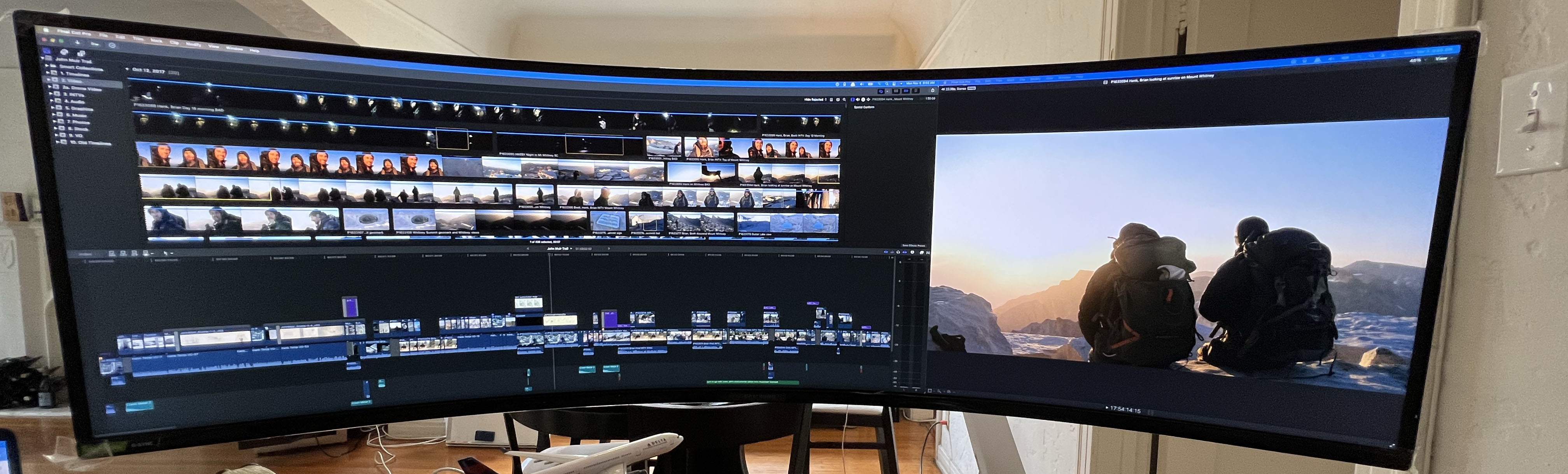
With the advent of widescreen monitors, it's a big oversight that FCPX doesn't make it possible to separate UI elements (at least, the viewers) into unattached floating windows, because the current design makes it impossible to show a full-height viewer on the side of the widescreen outside of the main UI. Apple should implement a solution -- allow unattached viewer windows, or make it possible to adjust the in-window viewers to be full-height so that the timeline doesn't always need to span the full screen -- but for those with widescreen monitors with two inputs like the Samsung Odyssey G9, here's a solution that works right now:
If you use two separate cables and USB-C ports to plug your Mac into the two monitor DisplayPorts, the Mac will/can treat the monitor as though it's two separate monitors, even though it's one. Since the Odyssey G9 allows picture-in-picture from two sources, and allows placing two sources side-by-side on the wide screen, you can select "Window/Show in Secondary Display/Viewers" and set the monitor to show the second "display" to the right of the first "display." Hopefully, in the future, Apple will also change this feature to a more sane "Window/Show in Second Window/Viewers," but this is a surprisingly good workaround for those with two-source widescreen monitors, for now.
-Hank
If you use two separate cables and USB-C ports to plug your Mac into the two monitor DisplayPorts, the Mac will/can treat the monitor as though it's two separate monitors, even though it's one. Since the Odyssey G9 allows picture-in-picture from two sources, and allows placing two sources side-by-side on the wide screen, you can select "Window/Show in Secondary Display/Viewers" and set the monitor to show the second "display" to the right of the first "display." Hopefully, in the future, Apple will also change this feature to a more sane "Window/Show in Second Window/Viewers," but this is a surprisingly good workaround for those with two-source widescreen monitors, for now.
-Hank
Please Log in to join the conversation.
- Tom Wolsky
-

- Offline
- Moderator
-

08 Nov 2021 17:37 #117361
by Tom Wolsky
Replied by Tom Wolsky on topic Make Secondary Display (Viewers) a Floating Window?
User feedback to make a feature request.
Please Log in to join the conversation.
10 Nov 2021 15:00 #117424
by arc
Replied by arc on topic Make Secondary Display (Viewers) a Floating Window?
Hankle,
I am sure if FCPX did allow for full customization of the GUI you would see everyone in the these forums altering the default layout of FCPX to some extent.
I am sure if FCPX did allow for full customization of the GUI you would see everyone in the these forums altering the default layout of FCPX to some extent.
Please Log in to join the conversation.
