- Posts: 3
- Thank you received: 0
3 Post Moderation Rule for New Boarders (25 Jan 2021)
New boarders will have their posts moderated - Don't worry if you cannot see your post immediately.
Monitoring 5.1 audio
12 Mar 2018 20:32 #94608
by gabor75
Monitoring 5.1 audio was created by gabor75
Hello Everyone, can you please help me how to setup or what kind of hardware needed in order to monitor 5.1 surround sound while editing in fcpx.
Please Log in to join the conversation.

13 Mar 2018 11:41 - 13 Mar 2018 11:41 #94614
by JoeEditor
Replied by JoeEditor on topic Monitoring 5.1 audio
Basically you're going to need a Surround Sound 5.1 interface, USB usually. Then a set of matched 5.1 speakers to plug into that. Then just set that as your output in System Settings.
I personally can't recommend specific brands or models. I do recommend learning how to mix 5.1 properly first, also.
I personally can't recommend specific brands or models. I do recommend learning how to mix 5.1 properly first, also.
Last edit: 13 Mar 2018 11:41 by JoeEditor.
Please Log in to join the conversation.
14 Mar 2018 12:49 #94650
by gabor75
Replied by gabor75 on topic Monitoring 5.1 audio
Hi, thanks for your reply...in order to learns to edit surround, i need to monitor it as it is hard to learn if I dont hear it.
I assume that I need an external audio card with analog out and also a received with analog in...that is what i read on the internet but nothing specific I have found.
I assume that I need an external audio card with analog out and also a received with analog in...that is what i read on the internet but nothing specific I have found.
Please Log in to join the conversation.
- haysoos123
-

- Offline
- Platinum Member
-

Less
More
- Posts: 402
- Thank you received: 72
16 Mar 2018 18:26 #94671
by haysoos123
Replied by haysoos123 on topic Monitoring 5.1 audio
We did recently set up 5.1 monitoring in our suite. You can choose an interface with both in and out, preferably with balanced XLR or 1/4" outputs. I know we did get a little buzzing until we switched to balanced cables. Specifically, we're using a Focusrite Scarlett 18i20 which actually has a ton more outputs than needed, but it fits on a rack and does a lot for the price. You can also try something like the Steinberg UR28M which is a little cheaper and has enough outputs. There are a wide variety of more expensive interfaces as well.
The Focusrite Scarlett has a program that configures its in/out routing, and all you have to do is set outputs 1-6 to line out and plug in your speakers. We generally set output 1 and 2 to be monitor 1-2, so they can be controlled together. In the system sound settings, you set it to output to your interface, and FCPX should be aware of it. One other program you may be using is Audio Midi Setup, but I don't think you'll need to be changing the defaults here.
One important thing for 5.1 monitoring is using an audio meter and setting the levels of your speakers properly. There are apps for smartphones that do this well, or you can get a dedicated audio meter. You can find some videos on Youtube that show you how to do this. It's also important to have a matching set of speakers.
The Focusrite Scarlett has a program that configures its in/out routing, and all you have to do is set outputs 1-6 to line out and plug in your speakers. We generally set output 1 and 2 to be monitor 1-2, so they can be controlled together. In the system sound settings, you set it to output to your interface, and FCPX should be aware of it. One other program you may be using is Audio Midi Setup, but I don't think you'll need to be changing the defaults here.
One important thing for 5.1 monitoring is using an audio meter and setting the levels of your speakers properly. There are apps for smartphones that do this well, or you can get a dedicated audio meter. You can find some videos on Youtube that show you how to do this. It's also important to have a matching set of speakers.
Please Log in to join the conversation.
17 Mar 2018 17:50 #94676
by gabor75
Replied by gabor75 on topic Monitoring 5.1 audio
Thanks a lot for this info. So basically I plug the scarlet into the usb port of the iMac and than the 6 speakers directly into the input of the scarlet. And basically that is it, correct ?
Please Log in to join the conversation.

19 Mar 2018 16:44 #94711
by maclamb
Replied by maclamb on topic Monitoring 5.1 audio
I use a Black Magic design Ultra Studio Mini Thunderbolt to HDMI. I lead the HDMI signal thru a 5.2 channel Sony Surround amplifier and on to a HDMI monitor. This is a low cost monitoring system. But it works. Put the FCPX into 5.1.
Change any sound source to surround in inspector .
Change any sound source to surround in inspector .
Please Log in to join the conversation.
- haysoos123
-
- Offline
- Platinum Member
-
Less
More
- Posts: 402
- Thank you received: 72
19 Mar 2018 19:46 #94717
by haysoos123
Replied by haysoos123 on topic Monitoring 5.1 audio
For that particular Scarlett, yes, the outputs are all in the back of the unit except for the headphone jacks, and the speakers should be connected to those outputs (not inputs). And the configuration is pretty straightforward because you want each speaker to have a direct signal. I have 1-2 as Left and Right, 3 as Center, 4 as LFE, and 5-6 are Rear Left and Rear Right.
Please Log in to join the conversation.
- PhotoJoseph
-
- Offline
- New Member
-

Less
More
- Posts: 2
- Thank you received: 0
24 Sep 2020 00:53 #110201
by PhotoJoseph
Hey Maclamb… I know this is an old post but hopefully you see this. In this configuration, how do you map speakers to channels… or do you not need to; does it basically "just work"?
Replied by PhotoJoseph on topic Monitoring 5.1 audio
maclamb wrote: I use a Black Magic design Ultra Studio Mini Thunderbolt to HDMI. I lead the HDMI signal thru a 5.2 channel Sony Surround amplifier and on to a HDMI monitor. This is a low cost monitoring system. But it works. Put the FCPX into 5.1.
Change any sound source to surround in inspector .
Hey Maclamb… I know this is an old post but hopefully you see this. In this configuration, how do you map speakers to channels… or do you not need to; does it basically "just work"?
Please Log in to join the conversation.
- Buhardilla
-

- Offline
- Premium Member
-

Less
More
- Posts: 105
- Thank you received: 16
24 Sep 2020 15:45 #110206
by Buhardilla
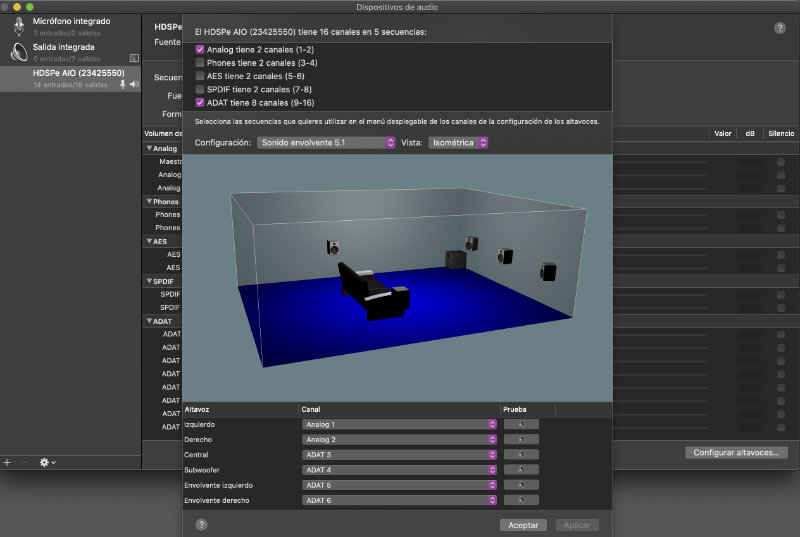
It's very easy. You need open Audio Midi set up application (included in Utilities folder). Select your audio interface and click Output tab. A virtual room will appear in the window. Next, click on speakers (frontal, center, surround, LFE) and select the correct audio output of your audio interface.... that's all!!
Replied by Buhardilla on topic Monitoring 5.1 audio
PhotoJoseph wrote:
maclamb wrote: I use a Black Magic design Ultra Studio Mini Thunderbolt to HDMI. I lead the HDMI signal thru a 5.2 channel Sony Surround amplifier and on to a HDMI monitor. This is a low cost monitoring system. But it works. Put the FCPX into 5.1.
Change any sound source to surround in inspector .
Hey Maclamb… I know this is an old post but hopefully you see this. In this configuration, how do you map speakers to channels… or do you not need to; does it basically "just work"?
It's very easy. You need open Audio Midi set up application (included in Utilities folder). Select your audio interface and click Output tab. A virtual room will appear in the window. Next, click on speakers (frontal, center, surround, LFE) and select the correct audio output of your audio interface.... that's all!!
Please Log in to join the conversation.
- PhotoJoseph
-
- Offline
- New Member
-
Less
More
- Posts: 2
- Thank you received: 0
24 Sep 2020 23:01 #110213
by PhotoJoseph
Replied by PhotoJoseph on topic Monitoring 5.1 audio
Thanks, that's cool. Sadly I have since learned that youtube doesn't support 5.1… here I had all these grand ideas of upping my youtube video audio only to find this out. D'oh! Still, very useful and I may set this up for client work anyway. Thanks!
Please Log in to join the conversation.