


- Posts: 101
- Thank you received: 0
3 Post Moderation Rule for New Boarders (25 Jan 2021)
New boarders will have their posts moderated - Don't worry if you cannot see your post immediately.
Can you do Shift-dragging on a selected range ( In and Out point) in FCPX as in FCP6/7?
- ronny courtens
-

- Offline
- Moderator
-

Less
More
- Posts: 4455
- Thank you received: 962
01 Aug 2014 08:26 #50802
by ronny courtens
Replied by ronny courtens on topic Can you do Shift-dragging on a selected range ( In and Out point) in FCPX as in FCP6/7?
What exactly do you want to accomplish with this?
- Ronny
- Ronny
Please Log in to join the conversation.
01 Aug 2014 10:49 #50818
by Soran
Replied by Soran on topic Can you do Shift-dragging on a selected range ( In and Out point) in FCPX as in FCP6/7?
Hi Ronny,
1.Say, I need 2sec media I've already had in & out on the clip in browser and that I want to bring it to the timeline, (for fit-to fill or for placeholder clip) . Then, I'm not happy with that 2sec, I need a better shot on the same clip, keeping the range (in&out) I want to move the selection and park it on the better shot. (maybe do a new key wording). I know,I can achieve this either with slip/slide trimming on the time line, however, I miss the persistent marking and other features on the browser.
2. Audition is incredibly handy and fast solution for range selects, however, when other time you decide to change your range selects in browser shifting in&out points comes very handy with Shift-dragging.
Please appreciate that I don't want to cling old habits of using Legacy, but this tiny feature are immensely useful on certain edit situation and speed up the edit.
I don't know may be that feature is already made its way to FCPX or there might be better way of using the tools that FCPX offer?
Thanks again for your support Ronny,
-Soran
1.Say, I need 2sec media I've already had in & out on the clip in browser and that I want to bring it to the timeline, (for fit-to fill or for placeholder clip) . Then, I'm not happy with that 2sec, I need a better shot on the same clip, keeping the range (in&out) I want to move the selection and park it on the better shot. (maybe do a new key wording). I know,I can achieve this either with slip/slide trimming on the time line, however, I miss the persistent marking and other features on the browser.
2. Audition is incredibly handy and fast solution for range selects, however, when other time you decide to change your range selects in browser shifting in&out points comes very handy with Shift-dragging.
Please appreciate that I don't want to cling old habits of using Legacy, but this tiny feature are immensely useful on certain edit situation and speed up the edit.
I don't know may be that feature is already made its way to FCPX or there might be better way of using the tools that FCPX offer?
Thanks again for your support Ronny,
-Soran
Please Log in to join the conversation.
- ronny courtens
-
- Offline
- Moderator
-
Less
More
- Posts: 4455
- Thank you received: 962
01 Aug 2014 11:20 #50821
by ronny courtens
Replied by ronny courtens on topic Can you do Shift-dragging on a selected range ( In and Out point) in FCPX as in FCP6/7?
No problem, we all have had to go through the winds of change 
You can create different persistent ranges in one and the same clip by CMD-dragging the ranges:
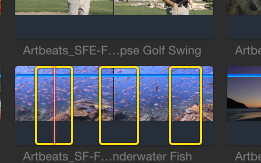
BUT there is a caveat: as soon as you set any new I or O point in that clip the persistent ranges will be gone. Fortunately there are ways to avoid this. Instead of me explaining this, watch this video:
I prefer the Favorites method above SHIFT+CMD+I/O as it is more precise and much more fail-safe. You can use I/O to mark different ranges as Favorites, then just click on the green Favorites line to change the Favorite into a persistent range. You also can set I/O markers to preserve a range within a clip:
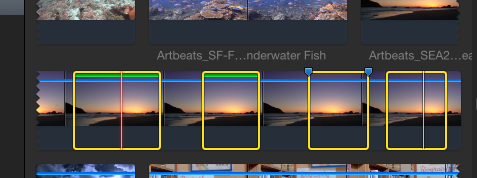
- Ronny
You can create different persistent ranges in one and the same clip by CMD-dragging the ranges:
BUT there is a caveat: as soon as you set any new I or O point in that clip the persistent ranges will be gone. Fortunately there are ways to avoid this. Instead of me explaining this, watch this video:
I prefer the Favorites method above SHIFT+CMD+I/O as it is more precise and much more fail-safe. You can use I/O to mark different ranges as Favorites, then just click on the green Favorites line to change the Favorite into a persistent range. You also can set I/O markers to preserve a range within a clip:
- Ronny
Please Log in to join the conversation.
01 Aug 2014 14:11 #50833
by Soran
Replied by Soran on topic Can you do Shift-dragging on a selected range ( In and Out point) in FCPX as in FCP6/7?
Hi Ronny,
Many Thanks for the links and suggestions, they're so useful and awesome. To be honest with you, I've been using those features almost all the time since coming across Richard Taylor's great tutorial.
Sorry to reiterate, the question was whether you can shift a marked (in&out) selection to a different position on the same clip in browser i.e. without marking in&out again as in 'Shift+ dragging the selection' FCP 6/7.
Anyways, it was a tiny nifty feature that helped me a lot in audio work as well.
Much appreciated.
-Soran
Many Thanks for the links and suggestions, they're so useful and awesome. To be honest with you, I've been using those features almost all the time since coming across Richard Taylor's great tutorial.
Sorry to reiterate, the question was whether you can shift a marked (in&out) selection to a different position on the same clip in browser i.e. without marking in&out again as in 'Shift+ dragging the selection' FCP 6/7.
Anyways, it was a tiny nifty feature that helped me a lot in audio work as well.
Much appreciated.
-Soran
Please Log in to join the conversation.

01 Aug 2014 14:54 #50838
by JasonP
Replied by JasonP on topic Can you do Shift-dragging on a selected range ( In and Out point) in FCPX as in FCP6/7?
Hey Soran,
I don't know a way to do exactly what you're asking, but I think I can get done what you want.
From what I understand, you want to get a different clip that is the exact length of something that is already in the timeline, right?
Just put your cursor (or the playhead if you are using the keyboard to select your clips) over the clip that is in the timeline and hit X. Then mark an in point in the browser and hit Q. There will now be an attached clip in the timeline that is the exact same length of the clip you marked. You could do the same with D for overwrite if you are just replacing placeholders instead of trying to see what works better.
I hope this helps.
I don't know a way to do exactly what you're asking, but I think I can get done what you want.
From what I understand, you want to get a different clip that is the exact length of something that is already in the timeline, right?
Just put your cursor (or the playhead if you are using the keyboard to select your clips) over the clip that is in the timeline and hit X. Then mark an in point in the browser and hit Q. There will now be an attached clip in the timeline that is the exact same length of the clip you marked. You could do the same with D for overwrite if you are just replacing placeholders instead of trying to see what works better.
I hope this helps.
Please Log in to join the conversation.
- ronny courtens
-
- Offline
- Moderator
-
Less
More
- Posts: 4455
- Thank you received: 962
01 Aug 2014 17:27 #50847
by ronny courtens
Replied by ronny courtens on topic Can you do Shift-dragging on a selected range ( In and Out point) in FCPX as in FCP6/7?
Jason's tip is correct, but I think now I see what you mean.
Yes, in FCP you could move both the I and O positions together by Shift-dragging them to move the selection to a different part of the clip. As an FCP X range has no real "In" and "Out" points there seems no way to do this. You can submit a feature request using the feedback page.
- Ronny
Yes, in FCP you could move both the I and O positions together by Shift-dragging them to move the selection to a different part of the clip. As an FCP X range has no real "In" and "Out" points there seems no way to do this. You can submit a feature request using the feedback page.
- Ronny
Please Log in to join the conversation.
- JPM Editor
-

- Offline
- Premium Member
-

01 Aug 2014 17:51 #50849
by JPM Editor
I agree that it would be a nice addition to be able to move ranges in the Browser with a modifier key.
However in order to modify a clip that has already been edited in the timeline, FCPX would also need to be able to open edited clips in the viewer (like FCP7 did). And that's just not the way it is designed. But instead, we can "Open in Timeline", Nudge the clip in its own timeline, and then go back to the main timeline. So there you go, a slightly different way to accomplish the same thing that we used to do in 7.
Anyway, I prefer to do Slip Trims which is faster, but I understand the benefits of actually seing the entire clip (handles) not just the edited portion, specially for audio work. With this medthod we can see it, play it, skim it, tweak it, and then go back to our main sequence. It never occured to me that we could use the "Open in Timeline" feature as a pseudo "Precission Editor" for Slip Trims. Thanks for making me think about that!
Jesús Pérez-Miranda
Cut People CEO & Founder
www.cutpeople.es
Replied by JPM Editor on topic Can you do Shift-dragging on a selected range ( In and Out point) in FCPX as in FCP6/7?
Soran wrote:
1.Say, I need 2sec media I've already had in & out on the clip in browser and that I want to bring it to the timeline, (for fit-to fill or for placeholder clip) . Then, I'm not happy with that 2sec, I need a better shot on the same clip, keeping the range (in&out) I want to move the selection and park it on the better shot. (maybe do a new key wording). I know,I can achieve this either with slip/slide trimming on the time line, however, I miss the persistent marking and other features on the browser.
I agree that it would be a nice addition to be able to move ranges in the Browser with a modifier key.
However in order to modify a clip that has already been edited in the timeline, FCPX would also need to be able to open edited clips in the viewer (like FCP7 did). And that's just not the way it is designed. But instead, we can "Open in Timeline", Nudge the clip in its own timeline, and then go back to the main timeline. So there you go, a slightly different way to accomplish the same thing that we used to do in 7.
Anyway, I prefer to do Slip Trims which is faster, but I understand the benefits of actually seing the entire clip (handles) not just the edited portion, specially for audio work. With this medthod we can see it, play it, skim it, tweak it, and then go back to our main sequence. It never occured to me that we could use the "Open in Timeline" feature as a pseudo "Precission Editor" for Slip Trims. Thanks for making me think about that!
Jesús Pérez-Miranda
Cut People CEO & Founder
www.cutpeople.es
Please Log in to join the conversation.

01 Aug 2014 20:45 #50852
by BenB
Replied by BenB on topic Can you do Shift-dragging on a selected range ( In and Out point) in FCPX as in FCP6/7?
"1.Say, I need 2sec media I've already had in & out on the clip in browser and that I want to bring it to the timeline, (for fit-to fill or for placeholder clip) . Then, I'm not happy with that 2sec, I need a better shot on the same clip, keeping the range (in&out) I want to move the selection and park it on the better shot. (maybe do a new key wording)."
Um, Replace From Start doesn't do the trick? All you have to do is set an In or an Out point, and use Replace from Start or Replace from End.
Um, Replace From Start doesn't do the trick? All you have to do is set an In or an Out point, and use Replace from Start or Replace from End.
Please Log in to join the conversation.
01 Aug 2014 22:42 #50855
by Soran
Replied by Soran on topic Can you do Shift-dragging on a selected range ( In and Out point) in FCPX as in FCP6/7?
Hi Ben,
Both yours and Jason's tip would do the trick, in fact there're many ways performing this simple task.
But what I was after having a fluidity in edit: A simple feature like this, present an opportunity of added functionality that can be exploited in many different ways.
Whether you use it in browser or in timeline you keep making instant decision on the fly and finding a good shot or a soundbite, tagging it instantly for future use, whilst you carry on what you edit in some cases save the day.
Assuming that each editor, who have different needs (depend on the project), work in different creative mindset, and the way they use the available toolset in a unique way, to a full potential surely enhance their creative process.
JMP Editor echoes idea in which the way he use it "Open in Timeline"...
Well, FCPX offers crazy possibilities...
Many Thanks for your help..
-Soran
Both yours and Jason's tip would do the trick, in fact there're many ways performing this simple task.
But what I was after having a fluidity in edit: A simple feature like this, present an opportunity of added functionality that can be exploited in many different ways.
Whether you use it in browser or in timeline you keep making instant decision on the fly and finding a good shot or a soundbite, tagging it instantly for future use, whilst you carry on what you edit in some cases save the day.
Assuming that each editor, who have different needs (depend on the project), work in different creative mindset, and the way they use the available toolset in a unique way, to a full potential surely enhance their creative process.
JMP Editor echoes idea in which the way he use it "Open in Timeline"...
Well, FCPX offers crazy possibilities...
Many Thanks for your help..
-Soran
Please Log in to join the conversation.
02 Aug 2014 11:45 #50883
by BenB
Replied by BenB on topic Can you do Shift-dragging on a selected range ( In and Out point) in FCPX as in FCP6/7?
"... tagging it instantly for future use, whilst you carry on what you edit..."
Keywords, notes, favorites, reel, take, there are tons of metadata you can use for this purpose. Then create a Smart Collection (or series of Smart Collections) for them to automatically be a part of.
It all takes mere seconds to do. Not sure what the existing tools are not doing for you. But, there are many ways to do it in FCPX.
As for Auditions, build one. If they're not all the same duration, and you know your duration; select a clip in the Audition, Control-D, type in a duration, hit enter, done.
Lots of ways to do lots of things.
Being able to slide a range selection across a clip would be a nice feature. Feedback page!
Keywords, notes, favorites, reel, take, there are tons of metadata you can use for this purpose. Then create a Smart Collection (or series of Smart Collections) for them to automatically be a part of.
It all takes mere seconds to do. Not sure what the existing tools are not doing for you. But, there are many ways to do it in FCPX.
As for Auditions, build one. If they're not all the same duration, and you know your duration; select a clip in the Audition, Control-D, type in a duration, hit enter, done.
Lots of ways to do lots of things.
Being able to slide a range selection across a clip would be a nice feature. Feedback page!
Please Log in to join the conversation.
