


- Posts: 868
- Thank you received: 85
3 Post Moderation Rule for New Boarders (25 Jan 2021)
New boarders will have their posts moderated - Don't worry if you cannot see your post immediately.
FCPX 10.1.0 PRE-RELEASE DISCUSSION
19 Nov 2013 18:25 #34395
by cseeman
Replied by cseeman on topic FCPX 10.1.0 PRE-RELEASE DISCUSSION
But, to me, all this points to very poor marketing to the "Pro" community. It's probably the biggest problem with FCPX and the Pro Apps in general. The perception has to hurt sales. Unlike FCPX by itself, there's significant hardware riding on this now with the new MacPro. The ProApps have to be a big part of selling the MacPro. No where else in their product line is there an apparent "it'll sell itself" attitude. Sure it's a niche market but if you're targeting a niche market you have to Target Market that market.
The topic has been locked.
- Darren Roark
-

- Offline
- Platinum Member
-

19 Nov 2013 18:32 #34396
by Darren Roark
Replied by Darren Roark on topic FCPX 10.1.0 PRE-RELEASE DISCUSSION
"I'm sure once we see the benefit of those multiple GPUs that $2K won't be a big deal."
The pros seem like the better investment. I still have a 30" cinema display that has outlived a G5, a 2007 mac pro, and is now going strong on a 2010 mac pro. Monoprice sells a 27" display with the same LG panel Apple uses for $450. Mine works great, and it already looks like it belongs hooked up to the new pro being that it's all black. I buy memory from OWC for a fraction of what Apple charges.
The muscle requirements for H.265 alone are enough to make the pro worth the price difference. (Yes I'm just trying to convince myself that parting with thousands of dollars is worth it. Yikes!)
The pros seem like the better investment. I still have a 30" cinema display that has outlived a G5, a 2007 mac pro, and is now going strong on a 2010 mac pro. Monoprice sells a 27" display with the same LG panel Apple uses for $450. Mine works great, and it already looks like it belongs hooked up to the new pro being that it's all black. I buy memory from OWC for a fraction of what Apple charges.
The muscle requirements for H.265 alone are enough to make the pro worth the price difference. (Yes I'm just trying to convince myself that parting with thousands of dollars is worth it. Yikes!)
The topic has been locked.
- Disproportionate Pictures
-
 Topic Author
- Offline
- Platinum Member
-
Less
More
- Posts: 1433
- Thank you received: 64
19 Nov 2013 18:36 #34397
by Disproportionate Pictures
Replied by Disproportionate Pictures on topic FCPX 10.1.0 PRE-RELEASE DISCUSSION
You'll get no argument from me that user engagement isn't an issue.
And from what I've heard, the FCPX team IS engaging with Hollywood.
But that hasn't filtered down to a general public engagement and PR strategy for Pro apps. It's definitely a PR battle they don't seem to be interested in playing with the fervour that AVID, Adobe, and BMD have.
And from what I've heard, the FCPX team IS engaging with Hollywood.
But that hasn't filtered down to a general public engagement and PR strategy for Pro apps. It's definitely a PR battle they don't seem to be interested in playing with the fervour that AVID, Adobe, and BMD have.
The topic has been locked.
- Disproportionate Pictures
-
Topic Author
- Offline
- Platinum Member
-
Less
More
- Posts: 1433
- Thank you received: 64
19 Nov 2013 18:37 #34398
by Disproportionate Pictures
The question is how long will we have to wait before they get in MacPro 2013 compatible RAM.
Replied by Disproportionate Pictures on topic FCPX 10.1.0 PRE-RELEASE DISCUSSION
Darren Roark wrote: I buy memory from OWC for a fraction of what Apple charges.
The question is how long will we have to wait before they get in MacPro 2013 compatible RAM.
The topic has been locked.
- Darren Roark
-
- Offline
- Platinum Member
-
19 Nov 2013 18:59 #34400
by Darren Roark
You can already buy Crucial 16gb ECC 1866MHz DIMMs for $200 each I'm sure OWC will start selling them as soon as they can test them with the new machines. The huge markup apple charges for memory is one of my biggest gripes with them.
Replied by Darren Roark on topic FCPX 10.1.0 PRE-RELEASE DISCUSSION
Disproportionate Pictures wrote:
Darren Roark wrote: I buy memory from OWC for a fraction of what Apple charges.
The question is how long will we have to wait before they get in MacPro 2013 compatible RAM.
You can already buy Crucial 16gb ECC 1866MHz DIMMs for $200 each I'm sure OWC will start selling them as soon as they can test them with the new machines. The huge markup apple charges for memory is one of my biggest gripes with them.
The topic has been locked.
- Disproportionate Pictures
-
Topic Author
- Offline
- Platinum Member
-
Less
More
- Posts: 1433
- Thank you received: 64
19 Nov 2013 19:00 #34401
by Disproportionate Pictures
Replied by Disproportionate Pictures on topic FCPX 10.1.0 PRE-RELEASE DISCUSSION
My impression was that Apple's add-on RAM prices have fallen to more reasonable levels in the last couple of years.
The topic has been locked.
- Darren Roark
-
- Offline
- Platinum Member
-
19 Nov 2013 19:06 #34402
by Darren Roark
Replied by Darren Roark on topic FCPX 10.1.0 PRE-RELEASE DISCUSSION
Yeah, now that they started soldering it to the logic board they had to. It was $200 extra to have 8GB more memory in my retina MBP to get it to 16GB. I could have bought 16GB for $100 and sold the stock 8GB on ebay for $50 if it were the older MBP with user serviceable memory.
I want my $150 bucks back!
I want my $150 bucks back!
The topic has been locked.
- Disproportionate Pictures
-
Topic Author
- Offline
- Platinum Member
-
Less
More
- Posts: 1433
- Thank you received: 64
19 Nov 2013 19:09 #34403
by Disproportionate Pictures
Replied by Disproportionate Pictures on topic FCPX 10.1.0 PRE-RELEASE DISCUSSION
Right. A more accurate representation might be maxing out an iMac with RAM on the store and seeing what OWC's price is comparably.
The topic has been locked.
- Darren Roark
-
- Offline
- Platinum Member
-
19 Nov 2013 19:16 #34404
by Darren Roark
Replied by Darren Roark on topic FCPX 10.1.0 PRE-RELEASE DISCUSSION
OWC $387, Apple $600
The corsair 'apple certified' memory on amazon is $280 for 32GB.
Good times...
The corsair 'apple certified' memory on amazon is $280 for 32GB.
Good times...
The topic has been locked.
19 Nov 2013 23:50 #34408
by NocoDave
Replied by NocoDave on topic FCPX 10.1.0 PRE-RELEASE DISCUSSION
I just thought of a nice feature I'd like to see. I found I've come to use "rejected" as something else, like a differently titled "favourite", not necessarily second favourite. But I would like to have my "rejected" back swell.
I'd like to see a 3rd option, "favourite", "customisable", "rejected". The new one is obviously re-namable. The option to add any number of "customisable" subsets of "favourites"might also be nice.
Id like to have more options in the first, fast setup of metadata before going to "keyword collections".
After keyword collecting it would give a great flexible system for what is/isn't being displayed in the "event browser".
I'd like to see a 3rd option, "favourite", "customisable", "rejected". The new one is obviously re-namable. The option to add any number of "customisable" subsets of "favourites"might also be nice.
Id like to have more options in the first, fast setup of metadata before going to "keyword collections".
After keyword collecting it would give a great flexible system for what is/isn't being displayed in the "event browser".
The topic has been locked.
19 Nov 2013 23:52 #34409
by Dave_EP
Replied by Dave_EP on topic FCPX 10.1.0 PRE-RELEASE DISCUSSION
Why not just have the section as a rateable selection, such as 1,2,3,4,5 etc instead of just favourite or reject?
The topic has been locked.
- Disproportionate Pictures
-
Topic Author
- Offline
- Platinum Member
-
Less
More
- Posts: 1433
- Thank you received: 64
20 Nov 2013 00:16 - 20 Nov 2013 00:17 #34410
by Disproportionate Pictures
Replied by Disproportionate Pictures on topic FCPX 10.1.0 PRE-RELEASE DISCUSSION
I would worry that a multi-rated star-system would get too finicky.
Right now the existing system IS 3 levels. Favourite, Neutral [No Rating], and Rejected. Using the Event filter you can view each of these categories. So I tend to use No Rating as the middle tier- not circle takes, but not outwardly rejected.
You could also further define favourites by adding text into the Notes field, and then creating a smart collection for Favourites with the word "awesome" or "best" in a text field.
Right now the existing system IS 3 levels. Favourite, Neutral [No Rating], and Rejected. Using the Event filter you can view each of these categories. So I tend to use No Rating as the middle tier- not circle takes, but not outwardly rejected.
You could also further define favourites by adding text into the Notes field, and then creating a smart collection for Favourites with the word "awesome" or "best" in a text field.
Last edit: 20 Nov 2013 00:17 by Disproportionate Pictures.
The topic has been locked.
20 Nov 2013 00:25 #34411
by NocoDave
This is what I currently do, It might explain it better like this. What I'd like to see is a little more user control over a the colour codes on the filmstrips, it's fast setup, fast read metadata before going to setting up keyword collections. All that needs done is titling a subset when creating it.
Before and not to go as detailed as keyword/smart collections, which is fast in FCPX. Setting up favourites/rejected is even faster. If the colour coding translated to the clips in the timeline that would be excellent.
Replied by NocoDave on topic FCPX 10.1.0 PRE-RELEASE DISCUSSION
You could also further define favourites by adding text into the Notes field, and then creating a smart collection for Favourites with the word "awesome" or "best" in a text field.
This is what I currently do, It might explain it better like this. What I'd like to see is a little more user control over a the colour codes on the filmstrips, it's fast setup, fast read metadata before going to setting up keyword collections. All that needs done is titling a subset when creating it.
Before and not to go as detailed as keyword/smart collections, which is fast in FCPX. Setting up favourites/rejected is even faster. If the colour coding translated to the clips in the timeline that would be excellent.
The topic has been locked.
20 Nov 2013 00:31 #34412
by tpayton
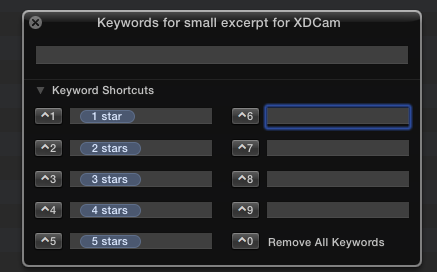
You can create a star system quite easily with keywords. It works great. Especially when using the keyboard shortcuts to assign them. Then we add notes. Those notes and keywords will then get transferred to the timeline when editing.
Replied by tpayton on topic FCPX 10.1.0 PRE-RELEASE DISCUSSION
Dave_EP wrote: Why not just have the section as a rateable selection, such as 1,2,3,4,5 etc instead of just favourite or reject?
You can create a star system quite easily with keywords. It works great. Especially when using the keyboard shortcuts to assign them. Then we add notes. Those notes and keywords will then get transferred to the timeline when editing.
The topic has been locked.
20 Nov 2013 00:42 - 20 Nov 2013 00:43 #34413
by NocoDave
Thank you very much T. that's an excellent idea.
I'd still like the additional favourite subsets, with colours that translate to the timeline. It would give a simple 1st meta-data run over based colour coding before the complexes keyword/smart collections kick in.
Replied by NocoDave on topic FCPX 10.1.0 PRE-RELEASE DISCUSSION
You can create a star system quite easily with keywords. It works great. Especially when using the keyboard shortcuts to assign them. Then we add notes. Those notes and keywords will then get transferred to the timeline when editing.
Thank you very much T. that's an excellent idea.
I'd still like the additional favourite subsets, with colours that translate to the timeline. It would give a simple 1st meta-data run over based colour coding before the complexes keyword/smart collections kick in.
Last edit: 20 Nov 2013 00:43 by NocoDave. Reason: reworded final sentence
The topic has been locked.

20 Nov 2013 03:30 - 20 Nov 2013 03:31 #34414
by Redifer
FCPX. Why would I use iMovie? And sorry it was an unwrapped MXF, not MTS. 30 seconds only with raw MXF. I wish there were even more confusing file extensions. I want FCPX to be able to import EVERYTHING. I don't want to have to worry about it. Make it happen Apple!
Replied by Redifer on topic FCPX 10.1.0 PRE-RELEASE DISCUSSION
Tom Wolsky wrote: Are you talking about the current version of FCP or iMovie 10? How are you importing .mts into FCP?
FCPX. Why would I use iMovie? And sorry it was an unwrapped MXF, not MTS. 30 seconds only with raw MXF. I wish there were even more confusing file extensions. I want FCPX to be able to import EVERYTHING. I don't want to have to worry about it. Make it happen Apple!
Last edit: 20 Nov 2013 03:31 by Redifer.
The topic has been locked.
- Tom Wolsky
-

- Offline
- Moderator
-

20 Nov 2013 03:36 #34415
by Tom Wolsky
Replied by Tom Wolsky on topic FCPX 10.1.0 PRE-RELEASE DISCUSSION
Right. MXF is a known problem.
The topic has been locked.
- Darren Roark
-
- Offline
- Platinum Member
-
20 Nov 2013 03:38 #34416
by Darren Roark
It's a nightmare with P2 MXFs. If I don't create optimized media they go offline randomly just to hurt me.
Replied by Darren Roark on topic FCPX 10.1.0 PRE-RELEASE DISCUSSION
Tom Wolsky wrote: Right. MXF is a known problem.
It's a nightmare with P2 MXFs. If I don't create optimized media they go offline randomly just to hurt me.
The topic has been locked.
20 Nov 2013 03:42 #34417
by plysat
I got a drive full of loose AVID MXF files the other day, sync audio and 2k video. Nothing would see them. This little app:
www.brorsoft.com/mxf-converter-mac/
Saved my butt. I know there are probably others, but for $29 bucks, totally worth it.
Can't sleep? Try this: fcpxpert.net ;-)
Replied by plysat on topic FCPX 10.1.0 PRE-RELEASE DISCUSSION
Tom Wolsky wrote: Right. MXF is a known problem.
I got a drive full of loose AVID MXF files the other day, sync audio and 2k video. Nothing would see them. This little app:
www.brorsoft.com/mxf-converter-mac/
Saved my butt. I know there are probably others, but for $29 bucks, totally worth it.
Can't sleep? Try this: fcpxpert.net ;-)
The topic has been locked.
- Darren Roark
-
- Offline
- Platinum Member
-
20 Nov 2013 03:44 #34418
by Darren Roark
Replied by Darren Roark on topic FCPX 10.1.0 PRE-RELEASE DISCUSSION
I like Clipwrap, mostly because it rewraps the MXF files in a QT wrapper. You lose any metadata, but it really makes all the spanned clips easy to deal with.
So to stay on topic, I sure hope Apple makes MXF files easier to deal with in 10.1. (Good save?)
So to stay on topic, I sure hope Apple makes MXF files easier to deal with in 10.1. (Good save?)
The topic has been locked.
