


- Posts: 49
- Thank you received: 0
3 Post Moderation Rule for New Boarders (25 Jan 2021)
New boarders will have their posts moderated - Don't worry if you cannot see your post immediately.
Can't import C300 .MXF footage in FCPX!
30 Aug 2012 15:37 #13560
by Ferrari
Can't import C300 .MXF footage in FCPX! was created by Ferrari
I am trying to import C300 footage into FCPX but failing.
I don't have the CF cards anymore. I have a folder containing all my MXF clips.
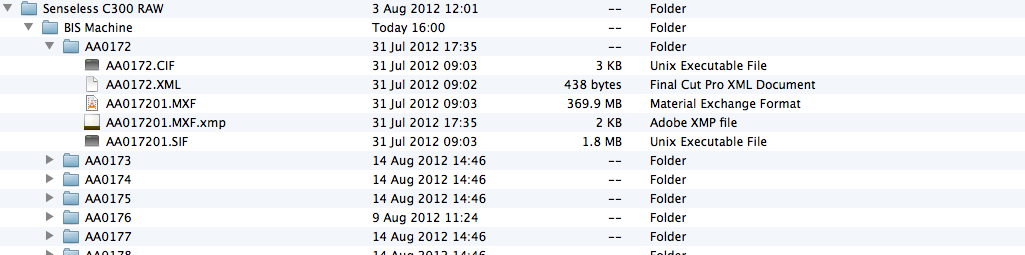
The folder contains all my clips as folders with .CIF, .XML, .MXF, .XMP and .SIF files within it.
I've tried to 'import files' and 'import from camera' but I always get 'No importable files' error message.
I was really hoping to edit the native.MXF files in FCPX without transcoding.
Thanks.
I don't have the CF cards anymore. I have a folder containing all my MXF clips.
The folder contains all my clips as folders with .CIF, .XML, .MXF, .XMP and .SIF files within it.
I've tried to 'import files' and 'import from camera' but I always get 'No importable files' error message.
I was really hoping to edit the native.MXF files in FCPX without transcoding.
Thanks.
Please Log in to join the conversation.
- Tom Wolsky
-

- Offline
- Moderator
-

30 Aug 2012 15:57 #13561
by Tom Wolsky
Replied by Tom Wolsky on topic Re: Can't import C300 .MXF footage in FCPX!
Can you post a screen shot in column view of the whole folder structure that you have? You should be able to use Open Archive in camera import to access this, unless Canon has changed something in the folder structure for this camera.
Please Log in to join the conversation.
30 Aug 2012 16:01 #13562
by Ferrari
Replied by Ferrari on topic Re: Can't import C300 .MXF footage in FCPX!
Hello,
I've attached a screen shot of the file structure.
Thanks!
I've attached a screen shot of the file structure.
Thanks!
Please Log in to join the conversation.
- Tom Wolsky
-
- Offline
- Moderator
-
30 Aug 2012 16:51 #13563
by Tom Wolsky
Replied by Tom Wolsky on topic Re: Can't import C300 .MXF footage in FCPX!
That looks a bit odd. Can't check it at the moment.
Try opening FCP, using camera import, click on Open Archive and select BIS Machine and click Open. What happens?
Try opening FCP, using camera import, click on Open Archive and select BIS Machine and click Open. What happens?
Please Log in to join the conversation.

30 Aug 2012 18:03 #13564
by Wildgiles
Replied by Wildgiles on topic Re: Can't import C300 .MXF footage in FCPX!
You need a plugin to import C300 footage natively.
look it up under lion software
usa.canon.com/cusa/professional/products...0#DriversAndSoftware
look it up under lion software
usa.canon.com/cusa/professional/products...0#DriversAndSoftware
Please Log in to join the conversation.
30 Aug 2012 18:05 #13565
by Wildgiles
Replied by Wildgiles on topic Re: Can't import C300 .MXF footage in FCPX!
Sometime this year an FCP X update will include the code without the plugin from the canon site, possibly Sept 4th
Please Log in to join the conversation.

30 Aug 2012 19:04 #13570
by cgbier
Replied by cgbier on topic Re: Can't import C300 .MXF footage in FCPX!
Did you try to convert the files with the help of XFCPX -
pika.dk/?p=406
- if th plugin doesn't work?
Please Log in to join the conversation.
- Tom Wolsky
-
- Offline
- Moderator
-
30 Aug 2012 20:17 #13572
by Tom Wolsky
Replied by Tom Wolsky on topic Re: Can't import C300 .MXF footage in FCPX!
support.apple.com/kb/HT4724?viewlocale=en_US&locale=en_US
Doesn't this do it? Or has Canon come up with yet anther codec/format variation?
Doesn't this do it? Or has Canon come up with yet anther codec/format variation?
Please Log in to join the conversation.
30 Aug 2012 20:27 #13573
by cgbier
Replied by cgbier on topic Re: Can't import C300 .MXF footage in FCPX!
The XDCAM plugin doesn't work with Canon MXF files. There are audio issues.
Ferrari, do you also have a file called index? Without that you're most likely screwed.
Ferrari, do you also have a file called index? Without that you're most likely screwed.
Please Log in to join the conversation.
30 Aug 2012 20:53 - 30 Aug 2012 23:42 #13575
by Seanus
Sean Lander - Editing since 1982 - AVID 1991 - FCP 1999 - FCPX 2011
Replied by Seanus on topic Re: Can't import C300 .MXF footage in FCPX!
Also the folder CLIPS001 is missing.
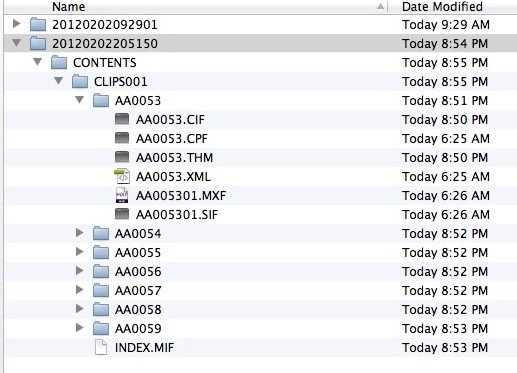
Structure MUST be: CONTENTS/CLIPS001/meta files
Then you import them as a camera archive. As was said you need the Canon XF Plugin.
Structure MUST be: CONTENTS/CLIPS001/meta files
Then you import them as a camera archive. As was said you need the Canon XF Plugin.
Sean Lander - Editing since 1982 - AVID 1991 - FCP 1999 - FCPX 2011
Last edit: 30 Aug 2012 23:42 by Seanus.
Please Log in to join the conversation.
- Tom Wolsky
-
- Offline
- Moderator
-
30 Aug 2012 22:15 #13579
by Tom Wolsky
Replied by Tom Wolsky on topic Re: Can't import C300 .MXF footage in FCPX!
"The XDCAM plugin doesn't work with Canon MXF files. There are audio issues."
What sort of issues? On all Canon XDCAM cameras? I've not seen this on media from other cameras.
What sort of issues? On all Canon XDCAM cameras? I've not seen this on media from other cameras.
Please Log in to join the conversation.
31 Aug 2012 00:03 #13582
by cgbier
Replied by cgbier on topic Re: Can't import C300 .MXF footage in FCPX!
I can't remember the exact issues - different formats? The story has been discussed on the Apple Support Forum. IIRC, these issues have triggered Rune to develop his XFCPX app.
Please Log in to join the conversation.
31 Aug 2012 03:21 #13586
by Wildgiles
Replied by Wildgiles on topic Re: Can't import C300 .MXF footage in FCPX!
Didn't you guys check out my link? this is a specific plugin in for Canon C300 files. It's not XDCAM. Go to the Canon website for the C300 and you will find a specific plugin for FCP X it's version 1.3
Please Log in to join the conversation.
31 Aug 2012 05:31 #13587
by cgbier
Replied by cgbier on topic Re: Can't import C300 .MXF footage in FCPX!
Yes, but if the CF card's original structure is not complete anymore, the Canon plugin won't help.
Please Log in to join the conversation.
31 Aug 2012 07:01 #13588
by Seanus
Sean Lander - Editing since 1982 - AVID 1991 - FCP 1999 - FCPX 2011
Replied by Seanus on topic Re: Can't import C300 .MXF footage in FCPX!
As long as the database file is still there it should be possible to reconstruct the file structure and then use the Canon Plugin.
I've done it before.
I've done it before.
Sean Lander - Editing since 1982 - AVID 1991 - FCP 1999 - FCPX 2011
Please Log in to join the conversation.
31 Aug 2012 08:53 #13594
by Ferrari
Replied by Ferrari on topic Re: Can't import C300 .MXF footage in FCPX!
Thanks for all your comments.
I already have the Canon XF Plugin.
Importing as Camera archive and selecting BIS Machine still gives me this error:
"BIS Machine" contains unsupported media or has an invalid directory structure. Please choose a folder whose directory structure matches supported media.
I've not tried XFCPX as I was hoping to edit the files natively as I can in Premiere Pro CS6.
Is there no other option other than transcoding all the files then?
I already have the Canon XF Plugin.
Importing as Camera archive and selecting BIS Machine still gives me this error:
"BIS Machine" contains unsupported media or has an invalid directory structure. Please choose a folder whose directory structure matches supported media.
I've not tried XFCPX as I was hoping to edit the files natively as I can in Premiere Pro CS6.
Is there no other option other than transcoding all the files then?
Please Log in to join the conversation.
31 Aug 2012 09:36 - 26 Oct 2012 22:13 #13595
by Seanus
Sean Lander - Editing since 1982 - AVID 1991 - FCP 1999 - FCPX 2011
Replied by Seanus on topic Re: Can't import C300 .MXF footage in FCPX!
That's because the file structure in munted.
Rename the C300 master folder to CONTENTS and the enclosed folder to CLIPS001
It should look like this attached pic.
Also you need the index file.
If you don't have it then you'll have to use XfcpX to convert the raw MXF files to Movs.
Sadly you will lose all meta data.
Rename the C300 master folder to CONTENTS and the enclosed folder to CLIPS001
It should look like this attached pic.
Also you need the index file.
If you don't have it then you'll have to use XfcpX to convert the raw MXF files to Movs.
Sadly you will lose all meta data.
Sean Lander - Editing since 1982 - AVID 1991 - FCP 1999 - FCPX 2011
Last edit: 26 Oct 2012 22:13 by Seanus.
Please Log in to join the conversation.
31 Aug 2012 11:21 #13597
by Ferrari
Replied by Ferrari on topic Re: Can't import C300 .MXF footage in FCPX!
Thanks Seanus, I've renamed the file structure and it's worked.
The metadata is there too which his nice.
Lesson learnt...
The metadata is there too which his nice.
Lesson learnt...
Please Log in to join the conversation.
31 Aug 2012 13:19 #13600
by Seanus
Sean Lander - Editing since 1982 - AVID 1991 - FCP 1999 - FCPX 2011
Replied by Seanus on topic Re: Can't import C300 .MXF footage in FCPX!
EXCELLENT NEWS!
Glad I could be of service.
Glad I could be of service.
Sean Lander - Editing since 1982 - AVID 1991 - FCP 1999 - FCPX 2011
Please Log in to join the conversation.
26 Oct 2012 22:16 #15896
by Seanus
Sean Lander - Editing since 1982 - AVID 1991 - FCP 1999 - FCPX 2011
Replied by Seanus on topic Can't import C300 .MXF footage in FCPX!
FCP x handles the native files just fine. No need to transcode tp ProRes
Sean Lander - Editing since 1982 - AVID 1991 - FCP 1999 - FCPX 2011
Please Log in to join the conversation.
