


3 Post Moderation Rule for New Boarders (25 Jan 2021)
New boarders will have their posts moderated - Don't worry if you cannot see your post immediately.
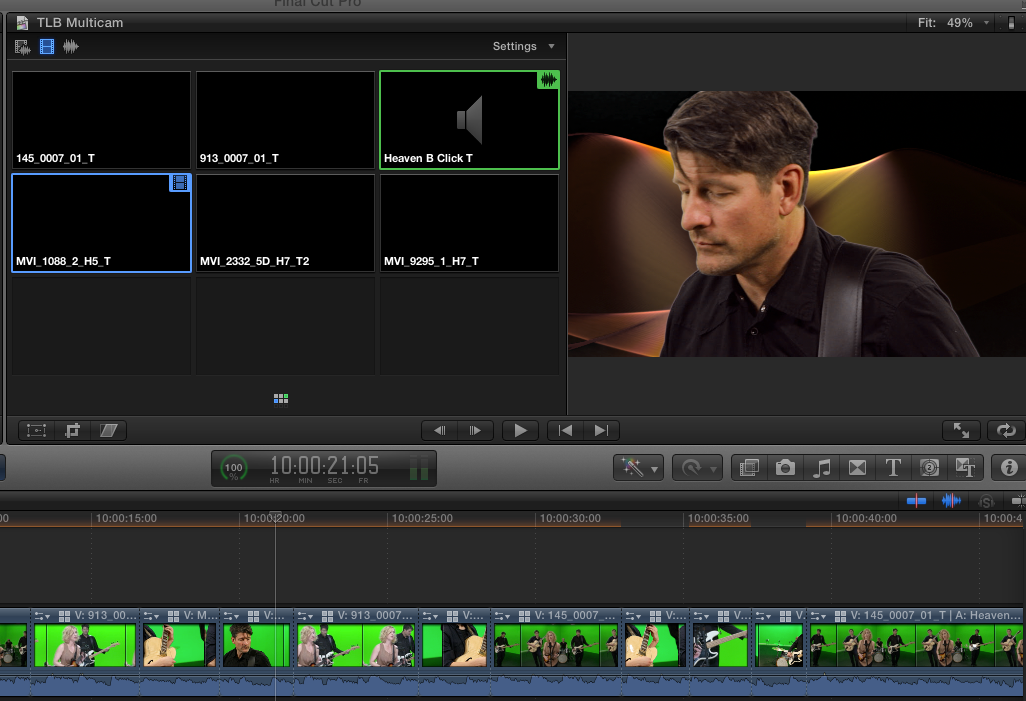
Angle viewer went black

19 Aug 2012 11:33 #13223
by Soundwise
Angle viewer went black was created by Soundwise
I made a two angle multiclip with one audio only clip. Before editing it to storyline I deleted the audio only angle. After that my angle viewer shows only black. I have trashed the prefs and renders and even rebuilt thumbnails but the angle viewer stays black.
I opened an old multicam tutorial project by Ripple Training and the problem is there also.
I'm on FCP X 10.0.5 with late 2011 MacBook Pro with 16 Gigs of RAM and Mountain Lion.
I opened an old multicam tutorial project by Ripple Training and the problem is there also.
I'm on FCP X 10.0.5 with late 2011 MacBook Pro with 16 Gigs of RAM and Mountain Lion.
Please Log in to join the conversation.

21 Aug 2012 11:10 #13276
by rjvddoes
Replied by rjvddoes on topic Re: Angle viewer went black
I just encountered the same problem here. All my multicam projects have a black angle viewer.
The only thing I did was installing the update for CoreMelt Lock & Load. Did you install that too?
I tried to uninstall the plugin with the manufacturers Uninstaller but it doesn't remove the plugin. It is still there. Help!
The only thing I did was installing the update for CoreMelt Lock & Load. Did you install that too?
I tried to uninstall the plugin with the manufacturers Uninstaller but it doesn't remove the plugin. It is still there. Help!
Please Log in to join the conversation.
21 Aug 2012 13:34 #13284
by Soundwise
Replied by Soundwise on topic Re: Angle viewer went black
Yes! Just noticed the same thing. Lock&Load is causing this. I was able to remove the plugin and now the angle viewer is working.
There is a Lock&Load remover in the CoreMelt Utilities folder in the Applications folder.
There is a Lock&Load remover in the CoreMelt Utilities folder in the Applications folder.
Please Log in to join the conversation.
21 Aug 2012 14:21 #13287
by wdevn
LLAP,
James
Taipei, Taiwan
Replied by wdevn on topic Re: Angle viewer went black
I am also having this issue with L&L for FCPX. I contacted the tech team at CoreMelt and they are able to duplicate the problem and are working on finding a solution.
Good luck CoreMelt.
Good luck CoreMelt.
LLAP,
James
Taipei, Taiwan
Please Log in to join the conversation.

21 Aug 2012 14:28 #13289
by CoreMelt
Replied by CoreMelt on topic Re: Angle viewer went black
Hi, we're looking for a fix for this right now, if you want to be able to easily enable Lock & Load to use it, then disable it to use the Angle Viewer then do the following.
Quit FCP X
go to /Library/Plug-Ins/FxPlug
move the file Lock & Load FCP X.fxplug to another location (desktop maybe?)
then restart FCP X.
Angle viewer will work fine, this issue is purely a display bug, no editing or project settings are changed when Lock & Load X is installed.
Then place the file back in the FxPlug folder and restart to enable use of Lock & Load again.
I'll post a link here as soon as we have an updated version
Quit FCP X
go to /Library/Plug-Ins/FxPlug
move the file Lock & Load FCP X.fxplug to another location (desktop maybe?)
then restart FCP X.
Angle viewer will work fine, this issue is purely a display bug, no editing or project settings are changed when Lock & Load X is installed.
Then place the file back in the FxPlug folder and restart to enable use of Lock & Load again.
I'll post a link here as soon as we have an updated version
Please Log in to join the conversation.
21 Aug 2012 15:52 #13299
by rjvddoes
Replied by rjvddoes on topic Re: Angle viewer went black
Thanks CoreMelt for looking in to this. I'm not at my editing computer anymore for today but I will check if this works for me too. Earlier today I tried to remove L&L manually and I thought I had removed it all but after that still no luck. I might have missed some components. I'll report back tomorrow or Thursday.
Regards,
Robbert-Jan
Regards,
Robbert-Jan
Please Log in to join the conversation.
21 Aug 2012 19:20 #13307
by Soundwise
Replied by Soundwise on topic Re: Angle viewer went black
Hats off to CoreMelt since they already send me a patch fix that works. Now waiting for the official fix.
Please Log in to join the conversation.
22 Aug 2012 00:19 #13325
by CoreMelt
Replied by CoreMelt on topic Re: Angle viewer went black
We're testing the fix for this and hope to have it live tomorrow if all goes well.
Please Log in to join the conversation.
22 Aug 2012 09:35 #13336
by rjvddoes
Replied by rjvddoes on topic Re: Angle viewer went black
I can report that moving the file Lock & Load FCP X.fxplug to the Desktop solved the problem for now. I can use the Angle Viewer again.
Thanks CoreMelt for the quick response and I will look forward to the permanent fix
Regards,
Robbert-Jan
Thanks CoreMelt for the quick response and I will look forward to the permanent fix
Regards,
Robbert-Jan
Please Log in to join the conversation.
22 Aug 2012 14:09 #13339
by CoreMelt
Replied by CoreMelt on topic Re: Angle viewer went black
Hi, a new installer is now available which fixes this problem, please download and install over the top either the lock & load installer or coremelt complete installer they have both been updated.
www.coremelt.com/updates/
any other issues please contact us support at coremelt dot com
www.coremelt.com/updates/
any other issues please contact us support at coremelt dot com
Please Log in to join the conversation.
- mistaluv2006
-

- Offline
- New Member
-

Less
More
- Posts: 1
- Thank you received: 0
15 Sep 2012 09:24 - 15 Sep 2012 09:26 #14068
by mistaluv2006
Replied by mistaluv2006 on topic Re: Angle viewer went black
I have this exact issue, even after removing Lock N Load, issue is still there plus LL still shows up in my effects???? I removed everything manually from the Plug IN folder and used the uninstallers....problem still exists!!! I completely removed FCP X and reinstalled it, trashed prefs, did a clean install....problem left for awhile but came back lol....I'm so upset right now, and guess what plug in is in my filter list C2 LL...now I am considering a reformat and complete install of OS and apps just to get these hidden files off my system...any other ideas before I do this??? Oh yeah, I updated the LL with the latest version from the site that was suppose to be a fix or something...moved files to desktop...my problem still exists on my Mac Pro...but not on my Macbook Pro...and you guessed it... no LL on my Macbook Pro so I don't have this problem there....please help me....
SCREENSHOTS!!
**Notice that when you set the Angle Viewer to 2 and 4 cams, the black boxes appear, but when set to 9 and 16 the cams show up, but the cam is spilling over into the cam 3 angle, IDK what to do here....is there another issue?
SCREENSHOTS!!
**Notice that when you set the Angle Viewer to 2 and 4 cams, the black boxes appear, but when set to 9 and 16 the cams show up, but the cam is spilling over into the cam 3 angle, IDK what to do here....is there another issue?
Last edit: 15 Sep 2012 09:26 by mistaluv2006. Reason: adding pics
Please Log in to join the conversation.
15 Sep 2012 09:39 #14071
by CoreMelt
Replied by CoreMelt on topic Re: Angle viewer went black
mistaluv2006 please contact us direct support at coremelt dot com.
The motion template file is in /Library/Application Support/Final Cut Pro/Templates/Effects
however if you have removed the plugin file Lock & Load FCP X.fxplug from /Library/PlugIns/FxPlug then there is no way that our plugin can be causing this. The motion template just provides the listing it doesn't load any code.
We have also not had any reports of a problem with the angle viewer after our update 1.0.1 version for FCP X, so we would be very keen to try and work out what is happening here.
We are happy to help you in more detail if you contact us direct at the email above.
The motion template file is in /Library/Application Support/Final Cut Pro/Templates/Effects
however if you have removed the plugin file Lock & Load FCP X.fxplug from /Library/PlugIns/FxPlug then there is no way that our plugin can be causing this. The motion template just provides the listing it doesn't load any code.
We have also not had any reports of a problem with the angle viewer after our update 1.0.1 version for FCP X, so we would be very keen to try and work out what is happening here.
We are happy to help you in more detail if you contact us direct at the email above.
Please Log in to join the conversation.
