


3 Post Moderation Rule for New Boarders (25 Jan 2021)
New boarders will have their posts moderated - Don't worry if you cannot see your post immediately.
Compound Clip Magic used for music video cut in FCPX


04 Jul 2014 22:57 - 04 Jul 2014 23:07 #49205
by TGC
Compound Clip Magic used for music video cut in FCPX was created by TGC
This is a music video which I sort of edited in FCPX. When I say 'sort of' I mean there was very little editing in the conventional sense of the word. No montage. Not cuts.
I've posted it here because I realised some interesting things about compound clip behaviour and building effects shots in X. Apologies if everyone knows about this type of thing, but it was a surprise to me.
Project Details
Directed by Nabil .
Shot portrait on green screen with Red Epic at 5k.
Proxy clips created directly in fcpx from the red raw files.
Offline sent for VFX at Gloria FX .
Setting the Comp
The concept of the video is the singer, Twigs, playing multiple 'characters' in a long, slow one-shot pull-out over a backdrop created by the artist Ignasi Monreal. So my job was to pick the takes, arrange them and time the movement of the 'camera'. Altering the pace and positioning of the pull back.
It was a simple job of using the built in keyer and masks to remove the green screen, shrinking down the shots and placing the characters. I did this all inside a compound clip and then applied the camera move ontop of the compound clip in an HD sequence.
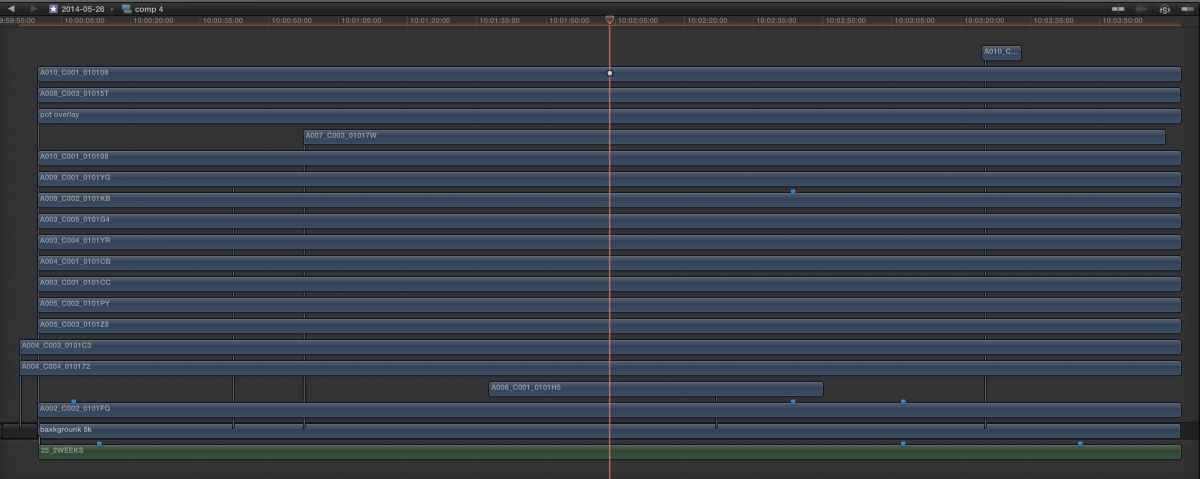
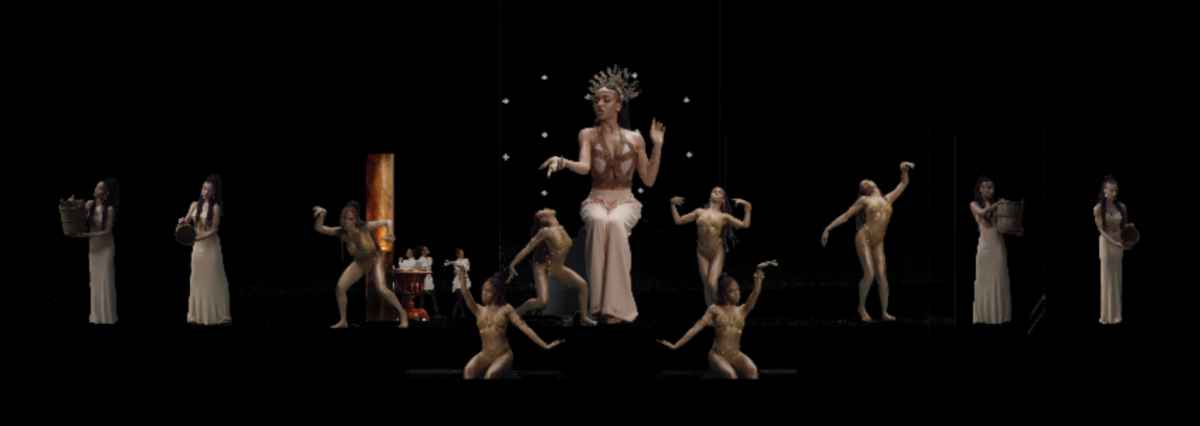

This is where I found things got interesting...
Compound Clip Magic
I was expecting that the compound clip, which had dimensions of 1920x1080, to act like a normal clip with the same dimensions (As it would with an Avid mix down or a Final Cut Classic nest). I had resigned to myself to the fact that it would look a little crappy in the offline.
What I was surprised to find was that it didn't at all. When I scaled it to 800% it looked pretty good. Certainly not what I expected from such a huge push in. Just to check I wasn't going mad I exported a 1080 QuickTime of the full comp and applied the same scaling. Below you can see a comparison.


So it seems that rather than locking a compound clip to its given dimensions, Final Cut uses any available pixels of the clips within the compound to show it in the best quality. The compound clip is a dynamic container with dimensions almost academic.
This was news to me. Wonderful news. Gone are all the metaphors of old. The rule book has been thrown out and features I would never have requested, continue to surprise me.
I've posted it here because I realised some interesting things about compound clip behaviour and building effects shots in X. Apologies if everyone knows about this type of thing, but it was a surprise to me.
Project Details
Directed by Nabil .
Shot portrait on green screen with Red Epic at 5k.
Proxy clips created directly in fcpx from the red raw files.
Offline sent for VFX at Gloria FX .
Setting the Comp
The concept of the video is the singer, Twigs, playing multiple 'characters' in a long, slow one-shot pull-out over a backdrop created by the artist Ignasi Monreal. So my job was to pick the takes, arrange them and time the movement of the 'camera'. Altering the pace and positioning of the pull back.
It was a simple job of using the built in keyer and masks to remove the green screen, shrinking down the shots and placing the characters. I did this all inside a compound clip and then applied the camera move ontop of the compound clip in an HD sequence.
This is where I found things got interesting...
Compound Clip Magic
I was expecting that the compound clip, which had dimensions of 1920x1080, to act like a normal clip with the same dimensions (As it would with an Avid mix down or a Final Cut Classic nest). I had resigned to myself to the fact that it would look a little crappy in the offline.
What I was surprised to find was that it didn't at all. When I scaled it to 800% it looked pretty good. Certainly not what I expected from such a huge push in. Just to check I wasn't going mad I exported a 1080 QuickTime of the full comp and applied the same scaling. Below you can see a comparison.
So it seems that rather than locking a compound clip to its given dimensions, Final Cut uses any available pixels of the clips within the compound to show it in the best quality. The compound clip is a dynamic container with dimensions almost academic.
This was news to me. Wonderful news. Gone are all the metaphors of old. The rule book has been thrown out and features I would never have requested, continue to surprise me.
Last edit: 04 Jul 2014 23:07 by TGC.
Please Log in to join the conversation.


04 Jul 2014 23:16 #49207
by alex4D
Replied by alex4D on topic Compound Clip Magic used for music video cut in FCPX
I like the dust motes for added depth, and how my view was directed to each group of people.
I've relied on Final Cut's 'Continuously Rasterize' flag (an After Effects term) a few times over the years. On a couple of 4K+ jobs I've used more like a real-time compositor than editing software. The fun happens when you realise that although a comp may be 1920 by 1080 scaled down to less in your main project, it isn't cropped into a 1920 by 1080 viewport - all the pixels in all the layers in the compound clip are available in the main project.
It's always worth reiterating these sort of Final Cut features that make it more like Smoke than Premiere!
It's almost as if it is a relational database-driven node-based editor with a magnetic timeline UI on top...
Perhaps Apple think ubiquitous video literacy won't come as quickly with a more complex user interaction model.
@Alex4D
I've relied on Final Cut's 'Continuously Rasterize' flag (an After Effects term) a few times over the years. On a couple of 4K+ jobs I've used more like a real-time compositor than editing software. The fun happens when you realise that although a comp may be 1920 by 1080 scaled down to less in your main project, it isn't cropped into a 1920 by 1080 viewport - all the pixels in all the layers in the compound clip are available in the main project.
It's always worth reiterating these sort of Final Cut features that make it more like Smoke than Premiere!
It's almost as if it is a relational database-driven node-based editor with a magnetic timeline UI on top...
Perhaps Apple think ubiquitous video literacy won't come as quickly with a more complex user interaction model.
@Alex4D
Please Log in to join the conversation.
04 Jul 2014 23:24 #49209
by TGC
Oh! is that what i should be calling it!
It's so brilliant. It's doing really cleaver stuff. Has this always been the way compound clips worked?
Replied by TGC on topic Compound Clip Magic used for music video cut in FCPX
alex4D wrote: Final Cut's 'Continuously Rasterize' flag
Oh! is that what i should be calling it!
It's so brilliant. It's doing really cleaver stuff. Has this always been the way compound clips worked?
Please Log in to join the conversation.
04 Jul 2014 23:40 #49211
by alex4D
Replied by alex4D on topic Compound Clip Magic used for music video cut in FCPX
I think so - certainly by the end of 2011.
@Alex4D
@Alex4D
Please Log in to join the conversation.
04 Jul 2014 23:45 #49212
by TGC
Replied by TGC on topic Compound Clip Magic used for music video cut in FCPX
Great. I like the way that if you shrink a compound clip down, anything outside the 'borders' of the original comp comes in.
I can see this being annoying in some situations but i've found it helpful mostly.
(I should really save some of this chat for monday!)
I can see this being annoying in some situations but i've found it helpful mostly.
(I should really save some of this chat for monday!)
Please Log in to join the conversation.
