


- Posts: 2
- Thank you received: 0
3 Post Moderation Rule for New Boarders (25 Jan 2021)
New boarders will have their posts moderated - Don't worry if you cannot see your post immediately.
Trying to export a 16:9 QuickTime Movie
- Anita in NYC
-
 Topic Author
- Offline
- New Member
-

Less
More
18 Mar 2014 20:31 #42939
by Anita in NYC
Trying to export a 16:9 QuickTime Movie was created by Anita in NYC
Hi there!
I exported a file from Final Cut Pro 6. It appeared to be 16:9 via the sequence settings. As I was editing it, it looked 16:9. I have 2 Quicktime Players on my computer. One, is Quicktime Player, one is Quicktime Player 7 Pro. My computer by default opens all video files with the former Qucktime Player. Even though, if I click "Get Info" on the export it says the Dimensions are: 853 x 480 when it opens with the default Quicktime Player, it appears in 4:3 mode. I have to give this export to someone and am very worried and do not want them to see it as a 4:3 file which just does not look right. Have I done something wrong? When it opens in the Quicktie Player 7 Pro, it appears in 16:9 mode.
Does anybody know what I am talking about.
Very best regards and thanks!
Anita
I exported a file from Final Cut Pro 6. It appeared to be 16:9 via the sequence settings. As I was editing it, it looked 16:9. I have 2 Quicktime Players on my computer. One, is Quicktime Player, one is Quicktime Player 7 Pro. My computer by default opens all video files with the former Qucktime Player. Even though, if I click "Get Info" on the export it says the Dimensions are: 853 x 480 when it opens with the default Quicktime Player, it appears in 4:3 mode. I have to give this export to someone and am very worried and do not want them to see it as a 4:3 file which just does not look right. Have I done something wrong? When it opens in the Quicktie Player 7 Pro, it appears in 16:9 mode.
Does anybody know what I am talking about.
Very best regards and thanks!
Anita

Please Log in to join the conversation.

18 Mar 2014 23:36 - 18 Mar 2014 23:38 #42947
by plysat
Can't sleep? Try this: fcpxpert.net ;-)
Replied by plysat on topic Trying to export a 16:9 QuickTime Movie
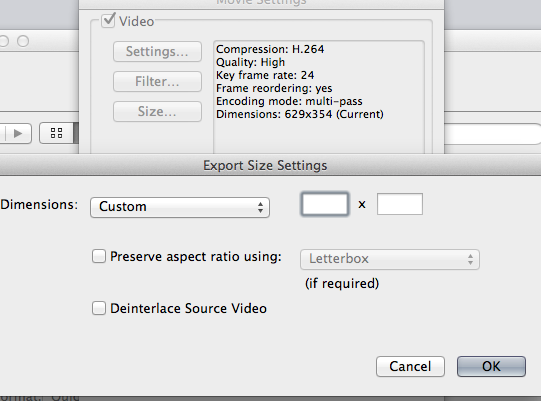
It has what's called an anamorphic flag, meaning that it isn't really 853x480. it's 720x480, but the player should see the flag and stretch it to the correct Aspect Ratio. If you want to be positive it will play correctly, export it from FCP or the quicktime player, but change the size. Set the Aspect ratio to "custom" and make it 853x480. that way it will actually be 16:9 and not depend on the player to interpret it. Make sense?
Can't sleep? Try this: fcpxpert.net ;-)
Last edit: 18 Mar 2014 23:38 by plysat.
Please Log in to join the conversation.
- Anita in NYC
-
Topic Author
- Offline
- New Member
-
Less
More
- Posts: 2
- Thank you received: 0
20 Mar 2014 03:19 #43030
by Anita in NYC
Replied by Anita in NYC on topic Trying to export a 16:9 QuickTime Movie
Thank you so much! I will give it a shot! Much appreciated!!!
Please Log in to join the conversation.
