


There are many ways to boil down an interview so that it makes the most sense and comes out at the right duration. Slavik Boyechko has an ingenious method to transcribe his interviews to make life easier.
It's a fact that most people don't talk in nice soundbites that get to the point succinctly. Well, unless you are interviewing a politician who will easily achieve the first but probably not the latter. If you really want to get the most out of an interview, then nothing beats having the transcribed text in front of you.
We will let Slavik explain...
One of the best things you can do for your videos is to transcribe your interview, which makes the story edit so much better. Basically, you transcribe the interview and then copy and paste the best pieces of the interview and arrange them into a story in any text editor. After that, you start laying those interview pieces down in Final Cut, smooth the transitions, and voila, the radio edit of your video. (Or 'head cut' 'skeleton' 'sync' or 'bites' -Ed)
I think the transcription method is superior to paraphrasing interview segments for a “paper edit” – which doesn’t allow as much precise storytelling as a full transcription.
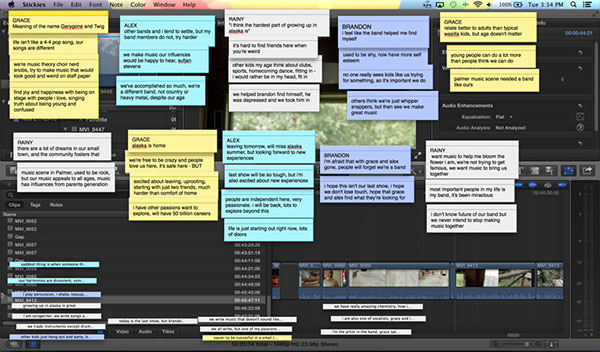
A paraphrased interview turned paper edit using the Mac OS “Stickies” app
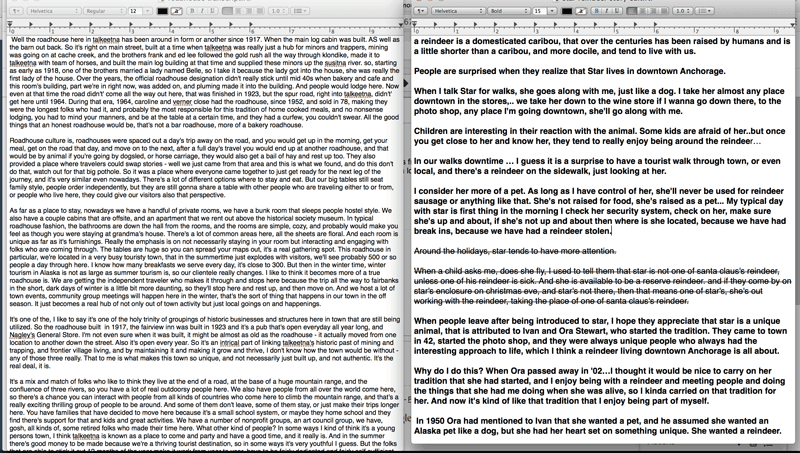
A transcript on the left, and a story edit on the right
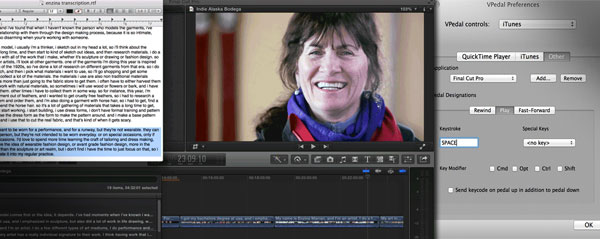
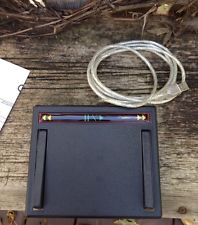 For the transcription, I whole-heartedly recommend getting a vPedal. The vPedal is essential for use with closed captioning software, like InqScribe and MovieCaptioner, and costs about $75. But more than that, with the Mac vPedal app, you can control Final Cut Pro X with the pedal, whilst writing in TextEdit or any word processing program. The setup is super easy.
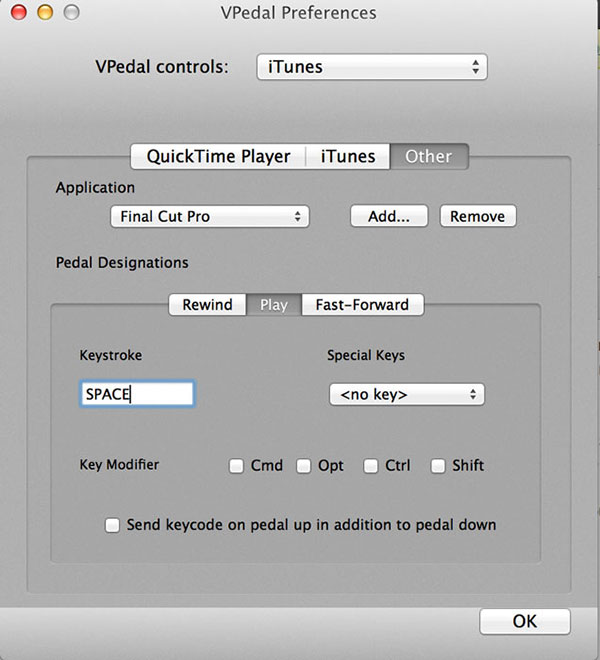
The goal is to Play/Pause a FCPX project that has your interview clip(s) in it, while typing the contents of the interview in TextEdit. Then you blade the clips in between questions asked (or other major pauses), and rename the clips with the full contents of the paragraph of text. Cutting the interview into paragraphs of thoughts makes finding the precise sentence or word easier.
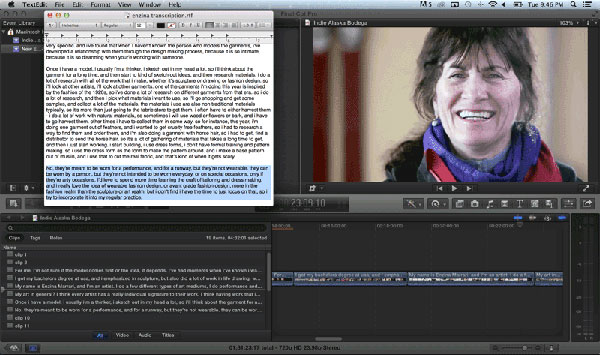
But what if you don’t have a vPedal? I’ve been trying to figure that out for a while now, so I can transcribe interviews at home or on-the-go when I don’t have the pedal around. Here’s what I’ve come up with. The CAPS Lock key is the best option for playing and pausing, at least for me, but you could certainly pick other keys.
Step 1: Download PCKeyboardHack – After installing, open the program, check “Change Caps Lock” on, and then under “Keycode” enter in 101, which is the F9 key. By default, my Mac OS didn’t have F9 attached to any hotkey, so it was the easiest “empty” hotkey to pick for me.
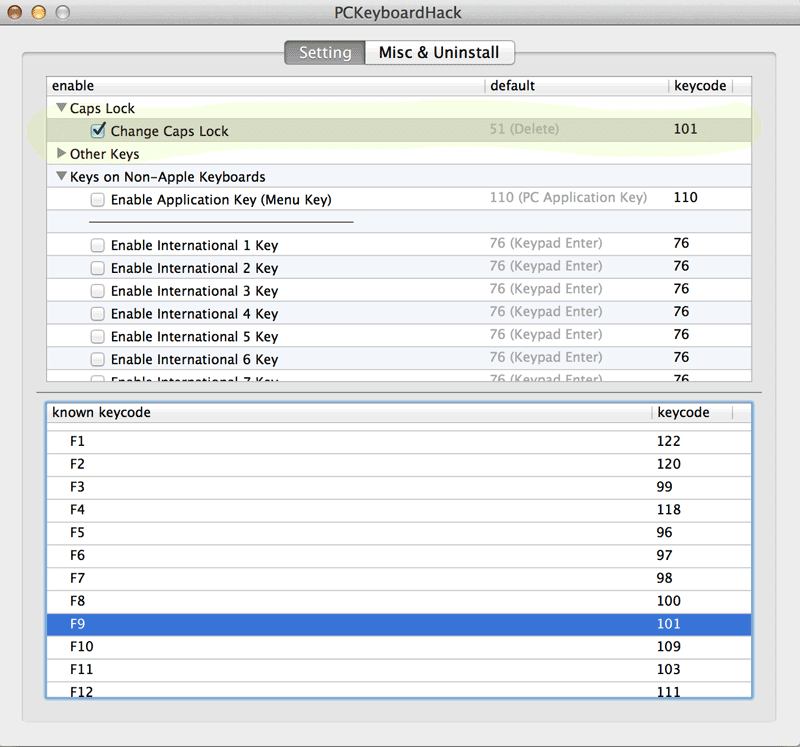
So at this point, the CAPS Lock key is now a shortcut for “F9,” which does nothing, yet.
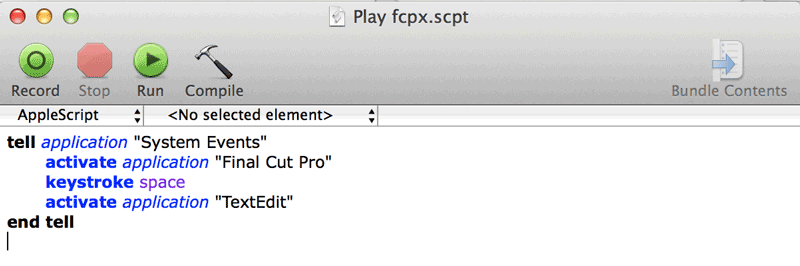
Step 2: Open AppleScript Editor, and copy and paste this:
tell application “System Events”
activate application “Final Cut Pro”
keystroke space
activate application “TextEdit”
end tell
Then save this script, call it “FCPX Play Pause” or something.
Step 3: Download Quicksilver – after installing, go into “Triggers” and create a new trigger, have it run your Applescript you just created, and assign hotkey F9 to it.
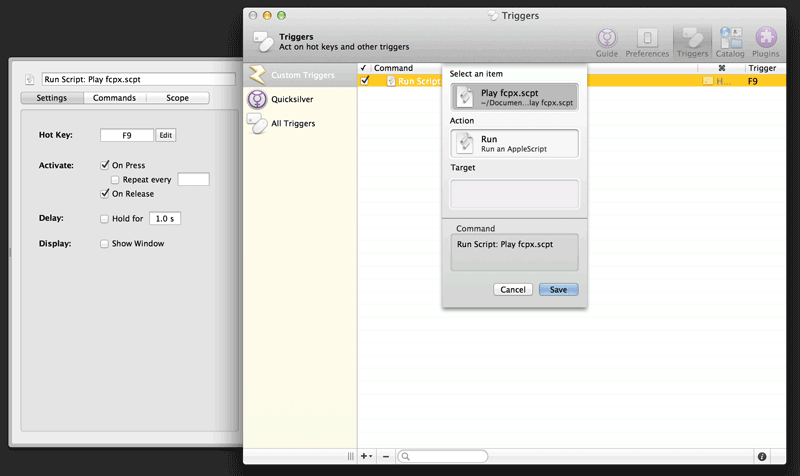
That’s it! Now while you’re typing in Textedit, you can press the CAPS Lock key to Play/Pause your interview project in FCPX. This is my first Applescript ever, so it’s pretty rudimentary – so if you have a better way to play/pause FCPX while it’s running in the background, please let me know!
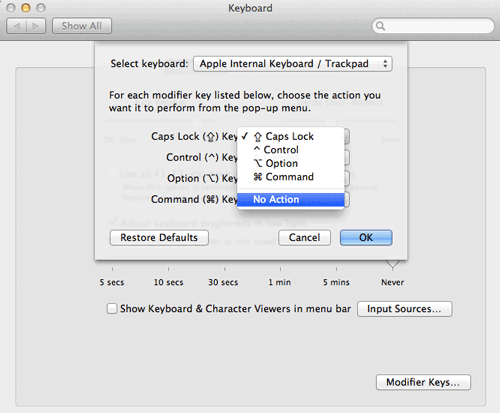
If you’re having an issue with it requiring you to press CAPS Lock twice in order to Play/Pause, there are a couple things that could help. 1) Don’t use a bluetooth keyboard, and 2) Try turning off CAPS Lock in the System Preferences keyboard options, like so:
If you use a different editing program or word processor, you could try substituting that application in the Applescript, assuming that the spacebar plays/pauses in your editor.
And finally, when you’re done transcribing, make sure to close Quicksilver and turn off the CAPS Lock option in PCKeyboardHack, so you can have your Caps lock button back.…
 Slavik Boyechko is a documentary filmmaker and Digital Media Director at Alaska Public Media, where he develops TV programs and shoots and edits the PBS Digital Studios series INDIE ALASKA - exclusively on Final Cut Pro X. He maintains a blog at alaskavideoshooter.com and you can follow him on Twitter @akvideoshooter.
I am the Editor-in-Chief of FCP.co and have run the website since its inception ten years ago.
I have also worked as a broadcast and corporate editor for over 30 years, starting on one inch tape, working through many formats, right up to today's NLEs.
Under the name Idustrial Revolution, I have written and sold plugins for Final Cut Pro for 13 years.
I was made a Freeman of Lichfield through The Worshipful Company of Smiths (established 1601). Though I haven't yet tried to herd a flock of sheep through the city centre!
Current Editing

2020 has been busy, the beginning of the year was finishing off a new property series (cut on FCP) for Channel 4 called The Great House Giveaway. I also designed and built the majority of the graphics as Motion templates. It has been a great success and the shows grabbed more viewers in the 4pm weekday slot than any previous strand. It has been recommissioned by C4 for 60 episodes, including prime-time versions and five themed programmes. The shows have also been nominated for a 2021 BAFTA.

Although both were postponed to later in the year, I worked again on ITV's coverage of the Tour de France and La Vuelta. 2020 was my 25th year of editing the TdF and my 20th year as lead editor. The Tour was the first broadcast show to adopt FCPX working for multiple editors on shared storage.

BBC's Snooker has played a big part in my life, I've been editing tournament coverage since 1997. I'm proud to be part of a very creative team that has pioneered many new ideas and workflows that are now industry standard in sports' production. This is currently an Adobe Premiere edit.

Covid cancelled some of the regular corporate events that I edit such as trade shows & events. I was lucky however to edit, from home, on projects for Amazon Kindle, Amazon Black Friday, Mastercard and very proud to have helped local charitable trust Kendall & Wall secure lottery funding.
As for software, my weapon of choice is Final Cut Pro and Motion, but I also have a good knowledge and broadcast credits with Adobe Premiere Pro, MOGRT design and Photoshop.
Plugin Design & Development
I'm the creative force behind Idustrial Revolution, one of the oldest Final Cut Pro plugin developers. It hosts a range of commercial and free plugins on the site. One free plugin was downloaded over a thousand times within 24 hours of release.
I also take on custom work, whether it is adapting an existing plugin for a special use or designing new plugins for clients from scratch. Having a good knowledge of editing allows me to build-in flexibility and more importantly, usability.
FCP.co
Now in its 10th year and 4th redesign, running FCP.co has given me knowledge on how to run a large CMS- you are currently reading my bio from the database! Although it sounds corny, I am pretty well up on social media trends & techniques, especially in the video sector. The recent Covid restrictions has enabled live FCP.co shows online. This involves managing a Zoom Webinar through Restream.io to YouTube and Facebook.
The Future
I'm always open to new ideas and opportunities, so please get in touch at editor (at) fcp.co. I've judged film competitions, presented workflow techniques to international audiences and come up with ideas for TV shows and software programs!
