


- Posts: 8
- Thank you received: 4
3 Post Moderation Rule for New Boarders (25 Jan 2021)
New boarders will have their posts moderated - Don't worry if you cannot see your post immediately.
Free REAL 35MM Film Grain Plugin
- GorillaGrain
-
 Topic Author
- Offline
- New Member
-

Less
More
06 Dec 2011 10:23 - 15 Dec 2011 19:53 #2422
by GorillaGrain
Free REAL 35MM Film Grain Plugin was created by GorillaGrain
We are now offering free 1080P film grain from real 35mm Film Scans. Just download and install. The effects will show up in the filters section in FCPX. Then open the inspector tab to make adjustments. Raising contrast adds more grain and lowering it makes the grain more subtle.
We'd love see what you make with the grain!
You can also purchase a paid version which features 8 more grain options in FULL 1080P!
Enjoy!
Chris
gorillagrain.com/features?preview=true&a...iew_nonce=965bbb55f4
gorillagrain.com/
We'd love see what you make with the grain!
You can also purchase a paid version which features 8 more grain options in FULL 1080P!
Enjoy!
Chris
gorillagrain.com/features?preview=true&a...iew_nonce=965bbb55f4
gorillagrain.com/
Last edit: 15 Dec 2011 19:53 by peteramwiggins.
Please Log in to join the conversation.
- julianboudier
-
- Offline
- Junior Member
-

Less
More
- Posts: 24
- Thank you received: 0
06 Dec 2011 19:56 #2425
by julianboudier
Replied by julianboudier on topic Re: Free REAL 35MM FILM GRAIN FCPX PLUGIN!
Hi,
Unfortunately, the installer for the FCP X plugin does not seem to work...
Am I the only one to experience this?
Best,
J
Unfortunately, the installer for the FCP X plugin does not seem to work...
Am I the only one to experience this?
Best,
J
Please Log in to join the conversation.
- GorillaGrain
-
Topic Author
- Offline
- New Member
-
Less
More
- Posts: 8
- Thank you received: 4
06 Dec 2011 21:13 - 08 Dec 2011 03:26 #2426
by GorillaGrain
Replied by GorillaGrain on topic Re: Free REAL 35MM FILM GRAIN FCPX PLUGIN!
UPDATE: The Free Grain installer works great now!
[strike]Hey Everyone, sorry for the inconvenience. The install works great on my machine. I will test on [strike]other machines today and trouble shoot.
For now you can re-download the file, I uploaded a manual install version. I give instructions in the readme on the install. Super easy! Same as all the other plugins on here. Just drag the folder into your "Effects" folder for fcpx. I will get this install fixed asap! Thanks![/strike][/strike]
[strike]Hey Everyone, sorry for the inconvenience. The install works great on my machine. I will test on [strike]other machines today and trouble shoot.
For now you can re-download the file, I uploaded a manual install version. I give instructions in the readme on the install. Super easy! Same as all the other plugins on here. Just drag the folder into your "Effects" folder for fcpx. I will get this install fixed asap! Thanks![/strike][/strike]
Last edit: 08 Dec 2011 03:26 by GorillaGrain.
Please Log in to join the conversation.
07 Dec 2011 00:12 #2427
by DrivenTV
Replied by DrivenTV on topic Re: Free REAL 35MM FILM GRAIN FCPX PLUGIN!
Love it! Great work. Thank you very much 
Please Log in to join the conversation.
- julianboudier
-
- Offline
- Junior Member
-
Less
More
- Posts: 24
- Thank you received: 0
07 Dec 2011 15:30 #2433
by julianboudier
Replied by julianboudier on topic Re: Free REAL 35MM FILM GRAIN FCPX PLUGIN!
Thanks, great work, now working;)
Please Log in to join the conversation.
- Lee Patterson
-
- Offline
- Elite Member
-

Less
More
- Posts: 239
- Thank you received: 20
07 Dec 2011 15:44 #2434
by Lee Patterson
Replied by Lee Patterson on topic Re: Free REAL 35MM FILM GRAIN FCPX PLUGIN!
How is it that both Color Grading central and Gorrilla use the same tutorial example footage of the Levi's girl? Is it free to use stock somewhere? I love free stuff:)
Please Log in to join the conversation.
- GorillaGrain
-
Topic Author
- Offline
- New Member
-
Less
More
- Posts: 8
- Thank you received: 4
08 Dec 2011 03:23 - 08 Dec 2011 03:27 #2464
by GorillaGrain
Replied by GorillaGrain on topic Re: Free REAL 35MM FILM GRAIN FCPX PLUGIN!
Hey Lee,
I'm actually good buddies with Denver from Color Grading Central and we have the same buddy who shoots really good video.
vimeo.com/matthewbutler
BTW the Free Gorilla Grain Automatic Installer is up and running now
I'm actually good buddies with Denver from Color Grading Central and we have the same buddy who shoots really good video.
vimeo.com/matthewbutler
BTW the Free Gorilla Grain Automatic Installer is up and running now
Last edit: 08 Dec 2011 03:27 by GorillaGrain.
Please Log in to join the conversation.
- Lee Patterson
-
- Offline
- Elite Member
-
Less
More
- Posts: 239
- Thank you received: 20
08 Dec 2011 04:09 #2466
by Lee Patterson
Replied by Lee Patterson on topic Re: Free REAL 35MM FILM GRAIN FCPX PLUGIN!
Cheers! I'll check him out, ta
Please Log in to join the conversation.
- GorillaGrain
-
Topic Author
- Offline
- New Member
-
Less
More
- Posts: 8
- Thank you received: 4
14 Dec 2011 10:14 - 16 Dec 2011 22:08 #2578
by GorillaGrain
Replied by GorillaGrain on topic Re: Free REAL 35MM FILM GRAIN FCPX PLUGIN!
Hey everyone, the Free Gorilla Grain Package now features a Free 1080P film grain clip, in addition to all the other clips that you can test out before you buy!
Enjoy!
gorillagrain.com/features
Enjoy!
gorillagrain.com/features
Last edit: 16 Dec 2011 22:08 by GorillaGrain.
Please Log in to join the conversation.
- GorillaGrain
-
Topic Author
- Offline
- New Member
-
Less
More
- Posts: 8
- Thank you received: 4
14 Dec 2011 10:16 - 16 Dec 2011 22:08 #2579
by GorillaGrain
Replied by GorillaGrain on topic Re: Free REAL 35MM FILM GRAIN FCPX PLUGIN!
GorillaGrain wrote: We are offering free 1080P film grain from real 35mm Film Scans. Just download and install. The effects will show up in the filters section in FCPX. Then open the inspector tab to make adjustments. Raising contrast adds more grain and lowering it makes the grain more subtle.
We'd love see what you make with the grain!
You can also purchase a paid version which features 8 more grain options in FULL 1080P!
Enjoy!
Find it @
gorillagrain.com/features
Last edit: 16 Dec 2011 22:08 by GorillaGrain.
Please Log in to join the conversation.
- Lee Patterson
-
- Offline
- Elite Member
-
Less
More
- Posts: 239
- Thank you received: 20
16 Dec 2011 15:11 #2623
by Lee Patterson
Replied by Lee Patterson on topic Re: Free REAL 35MM FILM GRAIN FCPX PLUGIN!
the link takes me to a page that says
'You do not have permission to preview drafts.'
just in case you aren't aware:) Cheers
'You do not have permission to preview drafts.'
just in case you aren't aware:) Cheers
Please Log in to join the conversation.
- GorillaGrain
-
Topic Author
- Offline
- New Member
-
Less
More
- Posts: 8
- Thank you received: 4
16 Dec 2011 22:08 #2627
by GorillaGrain
Replied by GorillaGrain on topic Re: Free REAL 35MM FILM GRAIN FCPX PLUGIN!
Fixed it! Thanks lee!
Please Log in to join the conversation.
- GorillaGrain
-
Topic Author
- Offline
- New Member
-
Less
More
- Posts: 8
- Thank you received: 4
30 Dec 2011 12:40 #2875
by GorillaGrain
Replied by GorillaGrain on topic Re: Free REAL 35MM Film Grain Plugin
Hey everyone, I know have a how-to video on the home page of Gorilla Grain!
www.gorillagrain.com
www.gorillagrain.com
Please Log in to join the conversation.
13 May 2012 08:11 #8401
by Machado
Replied by Machado on topic Re: Free REAL 35MM Film Grain Plugin
I just downloaded the folder.
I put it under users/movies/motion templates/effects
But I don't see it in FCP X
did I do it wrong?
I noticed you used the term "filters section" but I don't see that either
Thank you!
I put it under users/movies/motion templates/effects
But I don't see it in FCP X
did I do it wrong?
I noticed you used the term "filters section" but I don't see that either
Thank you!
Please Log in to join the conversation.

13 May 2012 09:04 #8404
by dgwvideo
Creating history....one edit at a time !
Replied by dgwvideo on topic Re: Free REAL 35MM Film Grain Plugin
Be sure to restart FCPX after you installed.
By filters section, he is referring to the effects browser. See screenshot.
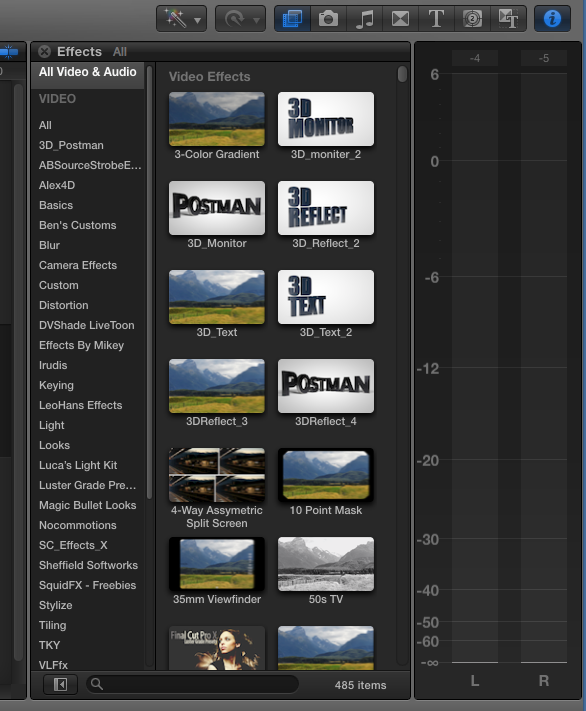
By filters section, he is referring to the effects browser. See screenshot.
Creating history....one edit at a time !
Please Log in to join the conversation.
- GorillaGrain
-
Topic Author
- Offline
- New Member
-
Less
More
- Posts: 8
- Thank you received: 4
13 May 2012 09:52 #8406
by GorillaGrain
Replied by GorillaGrain on topic Re: Free REAL 35MM Film Grain Plugin
Hey Machado!
The download should have a FCPX installer package. That will place the files where they need to be. Did you get an installer package?
Thanks!
Chris
The download should have a FCPX installer package. That will place the files where they need to be. Did you get an installer package?
Thanks!
Chris
Please Log in to join the conversation.
13 May 2012 12:04 #8407
by Machado
Replied by Machado on topic Re: Free REAL 35MM Film Grain Plugin
The folder contains the .mpkg which I understand is the "package" - A tutorial .mov - There is a "README" file - and MED-DIRTY 20P.mov file - I have downloaded effects a couple of times and I have always put them in the "Effects" folder under "Movies/Motion Templates..."
Please forgive me if I'm still doing something wrong. It's still not showing in FCP X
Please forgive me if I'm still doing something wrong. It's still not showing in FCP X
Please Log in to join the conversation.
- TrixTrax9000
-
- Offline
- Platinum Member
-

Less
More
- Posts: 1213
- Thank you received: 142
13 May 2012 15:47 #8408
by TrixTrax9000
Replied by TrixTrax9000 on topic Re: Free REAL 35MM Film Grain Plugin
is there a way to get this without having to join another email spam list?
thanks
thanks
Please Log in to join the conversation.
13 May 2012 22:15 #8425
by Machado
Replied by Machado on topic Re: Free REAL 35MM Film Grain Plugin
Alright! I did it. Thank you very much!
I will start messing around with it
I will start messing around with it
Please Log in to join the conversation.
