


- Posts: 145
- Thank you received: 1
3 Post Moderation Rule for New Boarders (25 Jan 2021)
New boarders will have their posts moderated - Don't worry if you cannot see your post immediately.
drawing a line in motion
27 May 2018 22:14 #95689
by owenpga
drawing a line in motion was created by owenpga
i've figured out how to draw the line and animated it to "write on"
when i bring it into fcp i can't get the line to stay after it draws on.
what settings do i need to change to keep the line from disappearing.
thanks
O
when i bring it into fcp i can't get the line to stay after it draws on.
what settings do i need to change to keep the line from disappearing.
thanks
O
Please Log in to join the conversation.
27 May 2018 23:52 #95691
by ianstubbs
Replied by ianstubbs on topic drawing a line in motion
Make sure that the line layer goes all the way to the end of the project in Motion. The write on behaviour doesn’ t need to but the line layer does or it will disappear when the layer runs out.
Ian.
Ian.
Please Log in to join the conversation.
28 May 2018 00:27 #95692
by owenpga
Replied by owenpga on topic drawing a line in motion
Thanks Ian. The quality of the line when I import to 1080 timeline is not great.
How can I make sure when i'm creating the motion templates that they will be sharp in FCP.
thanks for your time.
Owen
How can I make sure when i'm creating the motion templates that they will be sharp in FCP.
thanks for your time.
Owen
Please Log in to join the conversation.


28 May 2018 02:00 - 28 May 2018 02:00 #95693
by JoeEditor
Replied by JoeEditor on topic drawing a line in motion
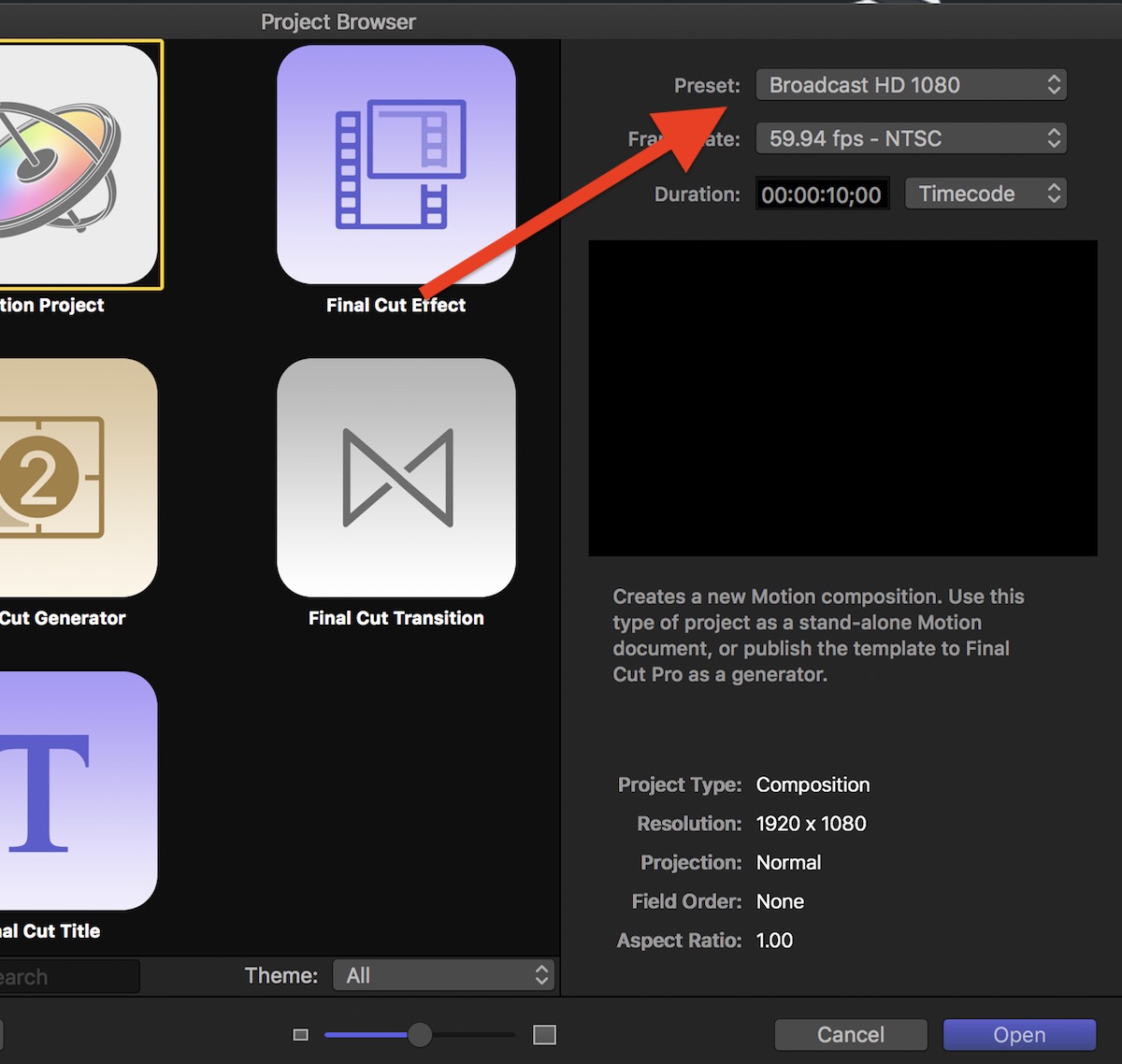
Verify the Motion project is the same frame size as the FCPX project.
Verify FCPX is set to playback using best quality, not better performance.
That's a start.
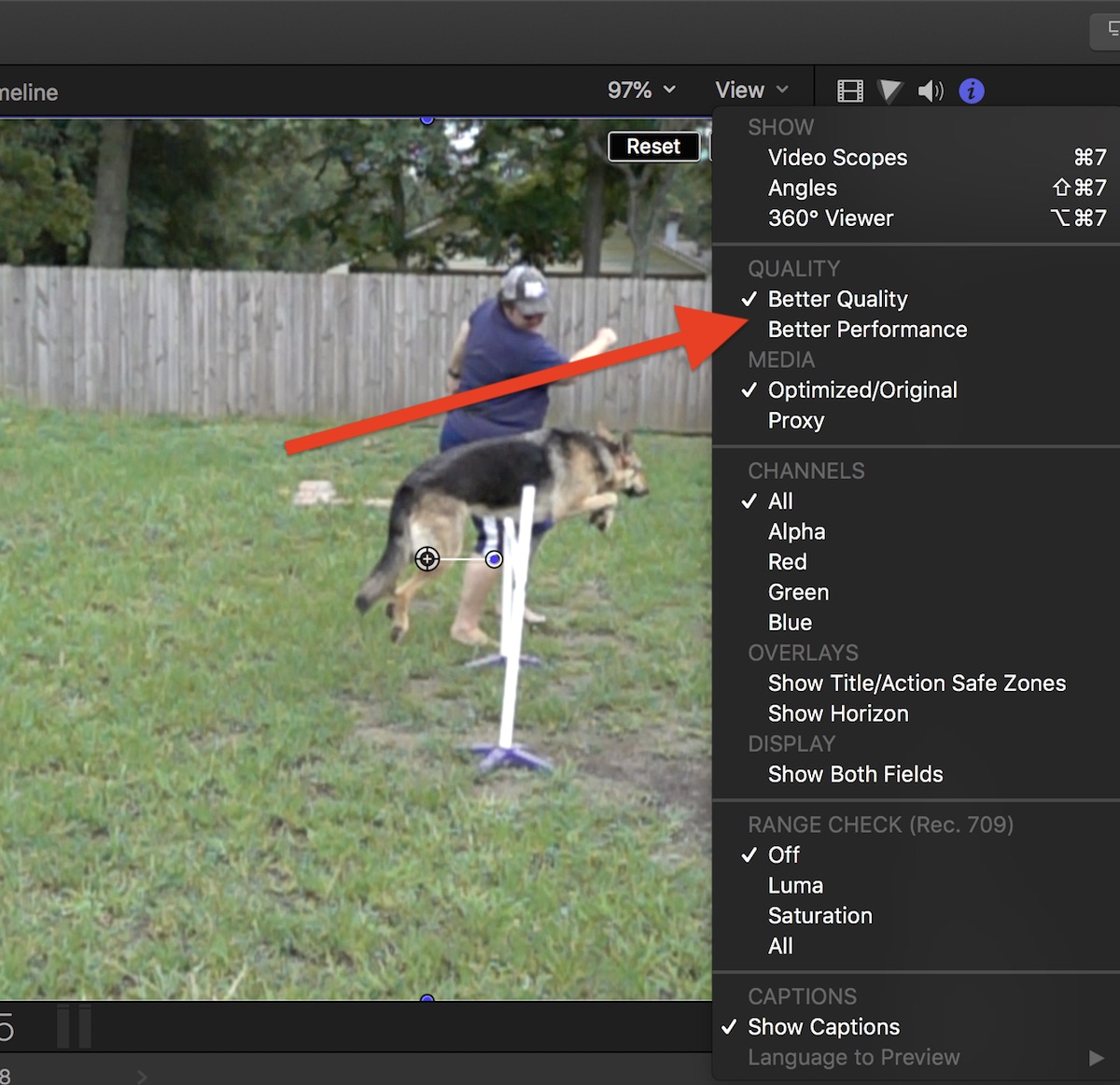
Verify FCPX is set to playback using best quality, not better performance.
That's a start.
Last edit: 28 May 2018 02:00 by JoeEditor.
Please Log in to join the conversation.
- JarrodMFay
-

- Offline
- Elite Member
-

Less
More
- Posts: 172
- Thank you received: 34
28 May 2018 02:36 #95694
by JarrodMFay
Replied by JarrodMFay on topic drawing a line in motion
Also, in Motion make sure under the render tab your render quality is set to "best" (instead of the default "normal"). This sometimes makes a big difference in how sharp the graphic looks.
Please Log in to join the conversation.
- Karsten Schlüter
-

- Offline
- Moderator
-

Less
More
- Posts: 3790
- Thank you received: 718
28 May 2018 04:46 #95696
by Karsten Schlüter
Replied by Karsten Schlüter on topic drawing a line in motion
another handy [strike]trick[/strike] feature in Motion is, to make parts of the Project 'Mandatory', have a look:
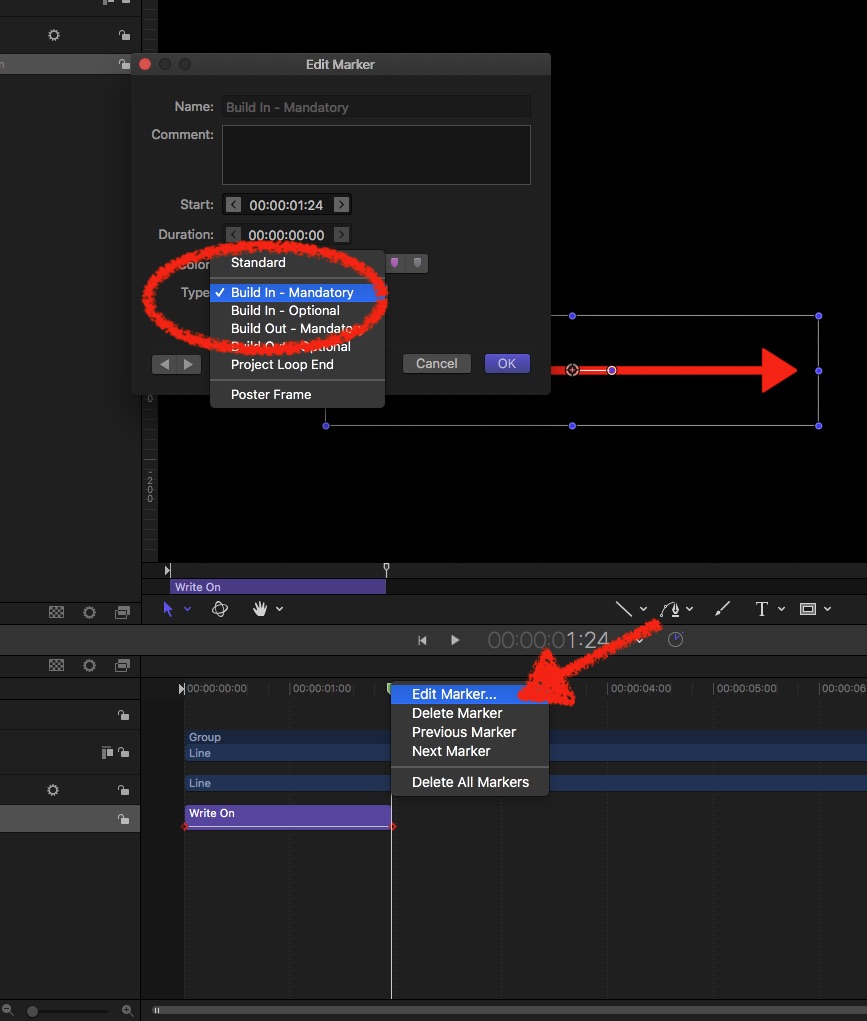
Here's your Project - a line, a WriteOn Behave… setting the playhead near the end of the animated part, hit M/setting a Marker, cmd-click, select 'edit Marker' and under Type set to 'build-in mandatory' …
Which gives in FCPX the effect: you can stretch the Generator as long as you want = the WriteOn keeps its set duration! Only the part behind it (=the line) is extended.....
Here's your Project - a line, a WriteOn Behave… setting the playhead near the end of the animated part, hit M/setting a Marker, cmd-click, select 'edit Marker' and under Type set to 'build-in mandatory' …
Which gives in FCPX the effect: you can stretch the Generator as long as you want = the WriteOn keeps its set duration! Only the part behind it (=the line) is extended.....
Please Log in to join the conversation.
28 May 2018 17:41 #95704
by owenpga
Replied by owenpga on topic drawing a line in motion
I’m trying the create an evenly dashed line that goes from the golf ball to the target. when i use the gyro ? tool to change the perspective, my dashes get longer at the ball and get progressively shorter as the line moves to target.
Is there a more correct way to create this line? i'd like it to look like the attached screenshot.
There is still perspective distortion happening but when I do it the distortion from close to far is more exaggerated.
thanks
Is there a more correct way to create this line? i'd like it to look like the attached screenshot.
There is still perspective distortion happening but when I do it the distortion from close to far is more exaggerated.
thanks
Please Log in to join the conversation.
- Karsten Schlüter
-
- Offline
- Moderator
-
Less
More
- Posts: 3790
- Thank you received: 718
28 May 2018 18:34 - 28 May 2018 18:37 #95705
by Karsten Schlüter
An easy way is:
use the Bezier tool to create the line (a parable needs just three points).
Now, choose Outline, and the Airbrush (!):
]
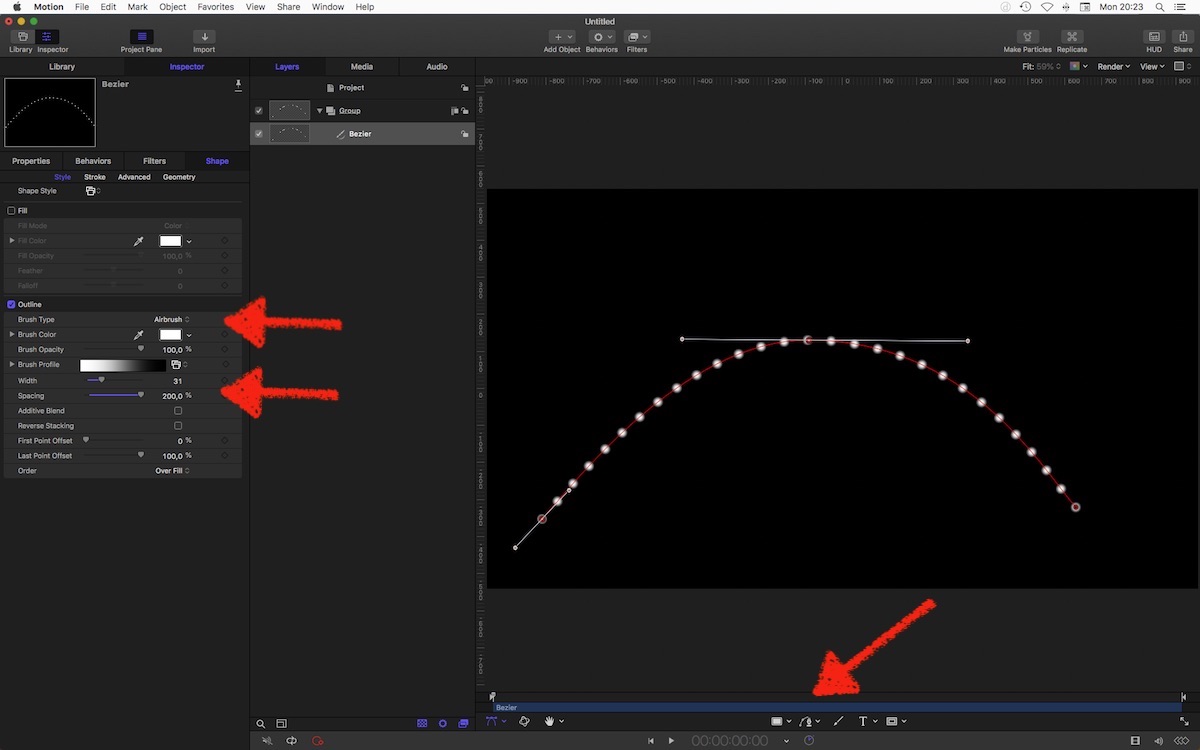
set Width and Spacing to your needs.
In the Brush Profile, delete the second black dot (0% ) to create razor-sharp dots, rotate Group around Y-axis gives:
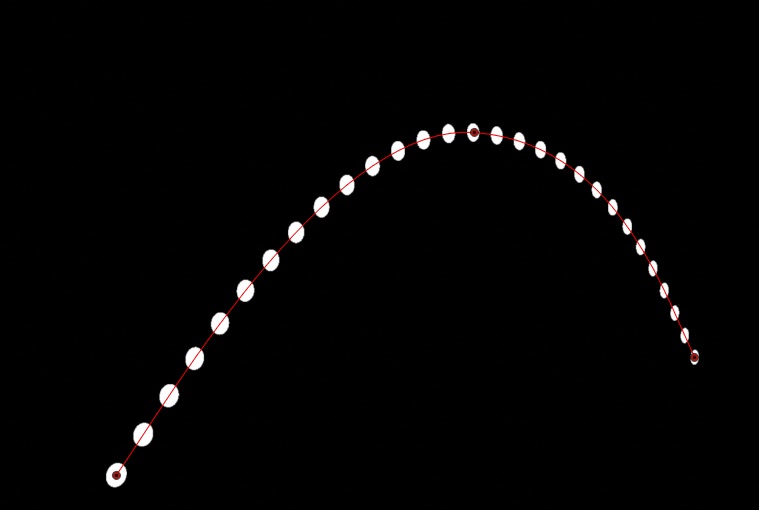
…
Replied by Karsten Schlüter on topic drawing a line in motion
owenpga wrote: I’m trying the create an evenly dashed line…
An easy way is:
use the Bezier tool to create the line (a parable needs just three points).
Now, choose Outline, and the Airbrush (!):
]
set Width and Spacing to your needs.
In the Brush Profile, delete the second black dot (0% ) to create razor-sharp dots, rotate Group around Y-axis gives:
…
Last edit: 28 May 2018 18:37 by Karsten Schlüter.
Please Log in to join the conversation.
28 May 2018 19:00 #95706
by owenpga
Replied by owenpga on topic drawing a line in motion
is there a way i can change the dots to rectangles
Please Log in to join the conversation.
28 May 2018 19:02 #95707
by owenpga
Replied by owenpga on topic drawing a line in motion
i found it. thank you
Please Log in to join the conversation.
- Karsten Schlüter
-
- Offline
- Moderator
-
Less
More
- Posts: 3790
- Thank you received: 718
28 May 2018 19:12 #95708
by Karsten Schlüter
share your solution - helping is give and take
Replied by Karsten Schlüter on topic drawing a line in motion
owenpga wrote: i found it. thank you
share your solution - helping is give and take
Please Log in to join the conversation.
28 May 2018 19:18 #95710
by owenpga
Replied by owenpga on topic drawing a line in motion
changed the line from dots to dashed using the shape style dropdown.
is it possible to use the write on function with the this type of dashed line? when i select apply it doesn't create the motion. i was able to apply write on when using the line tool.
is it possible to use the write on function with the this type of dashed line? when i select apply it doesn't create the motion. i was able to apply write on when using the line tool.
Please Log in to join the conversation.
- Karsten Schlüter
-
- Offline
- Moderator
-
Less
More
- Posts: 3790
- Thank you received: 718
29 May 2018 04:32 - 29 May 2018 04:34 #95718
by Karsten Schlüter
works like charm here. (?)
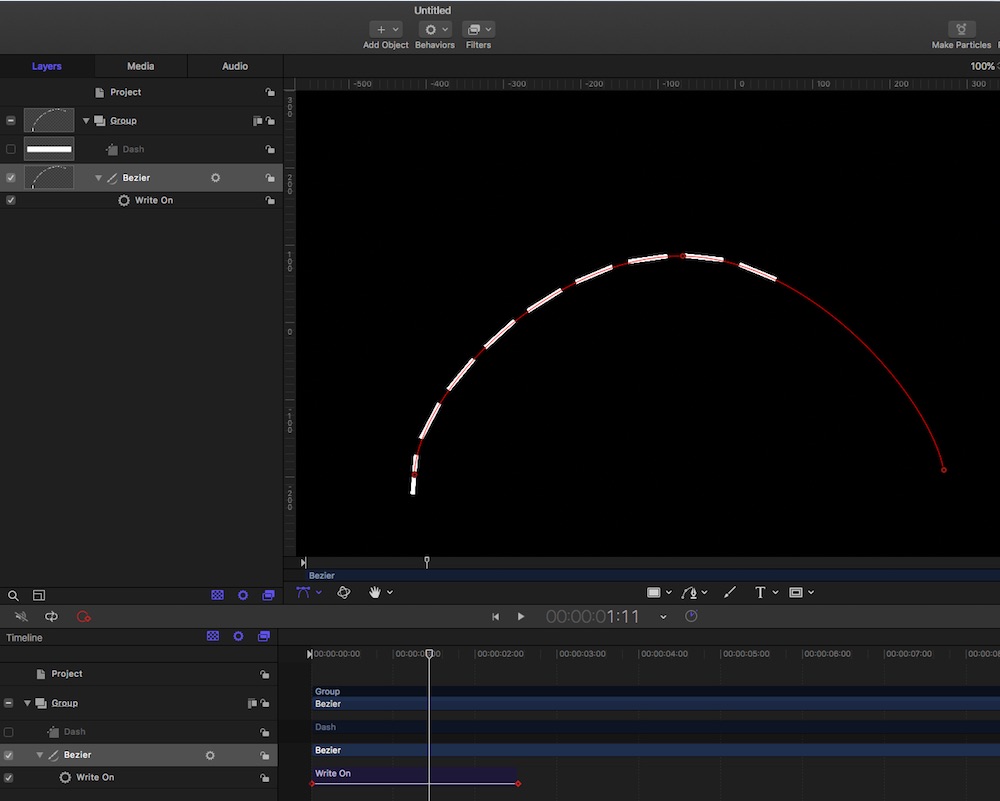
Draw line with Bezier, select Airbrush, choose 'Dash Medium'' as Style, apply Write-On Behav …
Replied by Karsten Schlüter on topic drawing a line in motion
owenpga wrote: …is it possible to use the write on function with the this type of dashed line? ….
works like charm here. (?)
Draw line with Bezier, select Airbrush, choose 'Dash Medium'' as Style, apply Write-On Behav …
Last edit: 29 May 2018 04:34 by Karsten Schlüter.
Please Log in to join the conversation.
29 May 2018 11:24 #95727
by owenpga
Replied by owenpga on topic drawing a line in motion
If i wanted to use the bezier tool to draw a line as a golf ball is moving , is this possible in motion and if so how would i import the video so as to trace the movement of ball?
thanks owen
thanks owen
Please Log in to join the conversation.
- Karsten Schlüter
-
- Offline
- Moderator
-
Less
More
- Posts: 3790
- Thank you received: 718
29 May 2018 12:15 - 29 May 2018 12:16 #95731
by Karsten Schlüter
can not find a nice video, most are from behind = little of a line to see.
so what about a golf swing?
Basically…
Export the Range in your FinalCut Project (select in the Timeline with the Range tool!) …
Select New Project in M5 and choose Import as project:
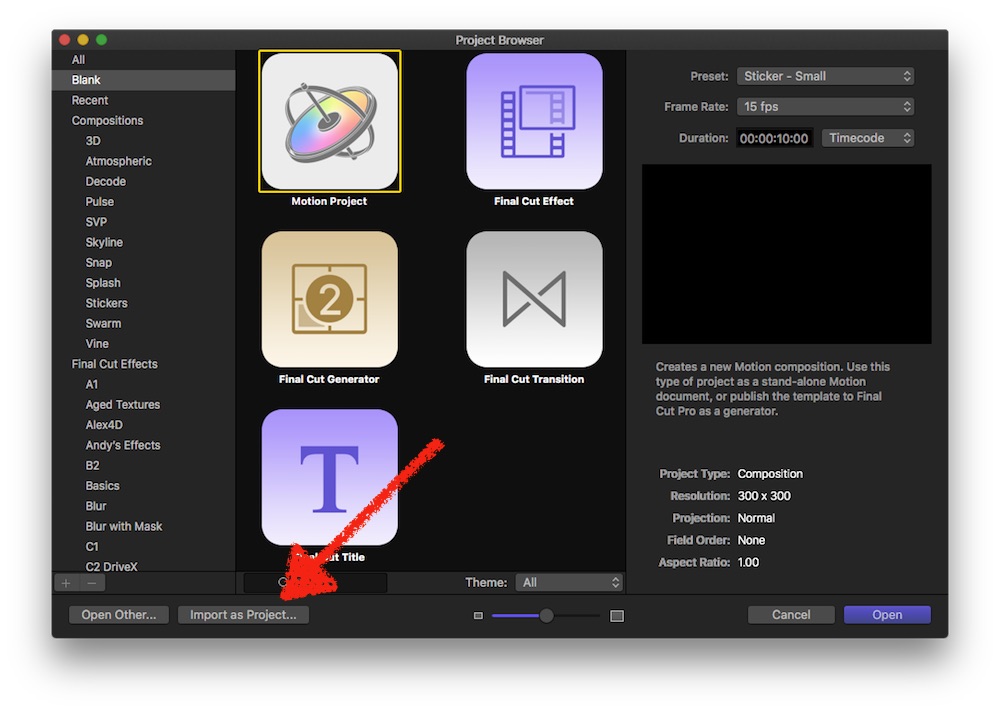
=> Motion adopts automatically all settings/formats.
Next:
Draw your line, using the Bezier tool - roughly, somehow, we adjust soon; keep in mind: we need just a few 'turn points'…
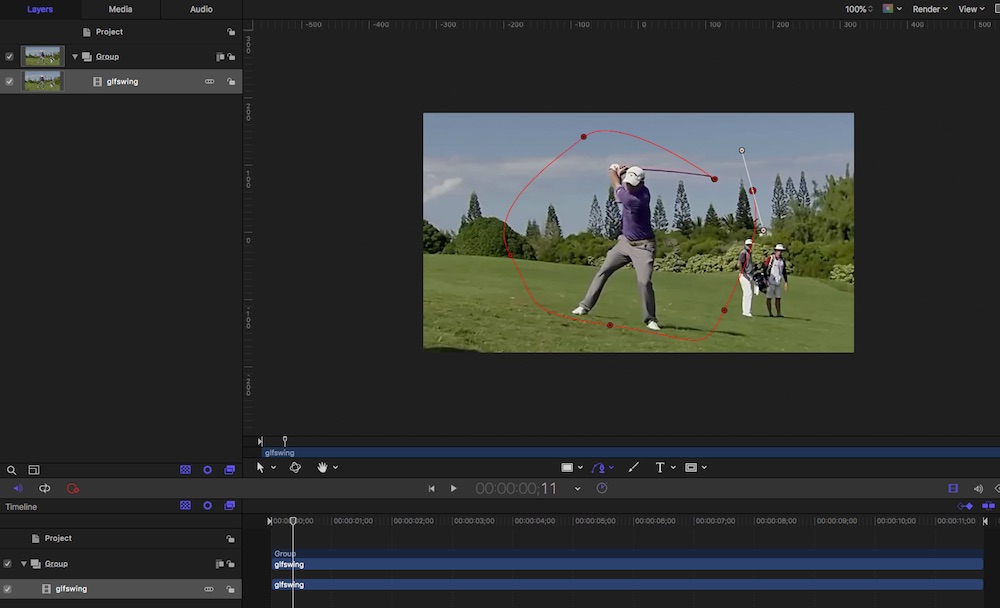
With the Bezier tool selected , Adjust each point; position and curve:
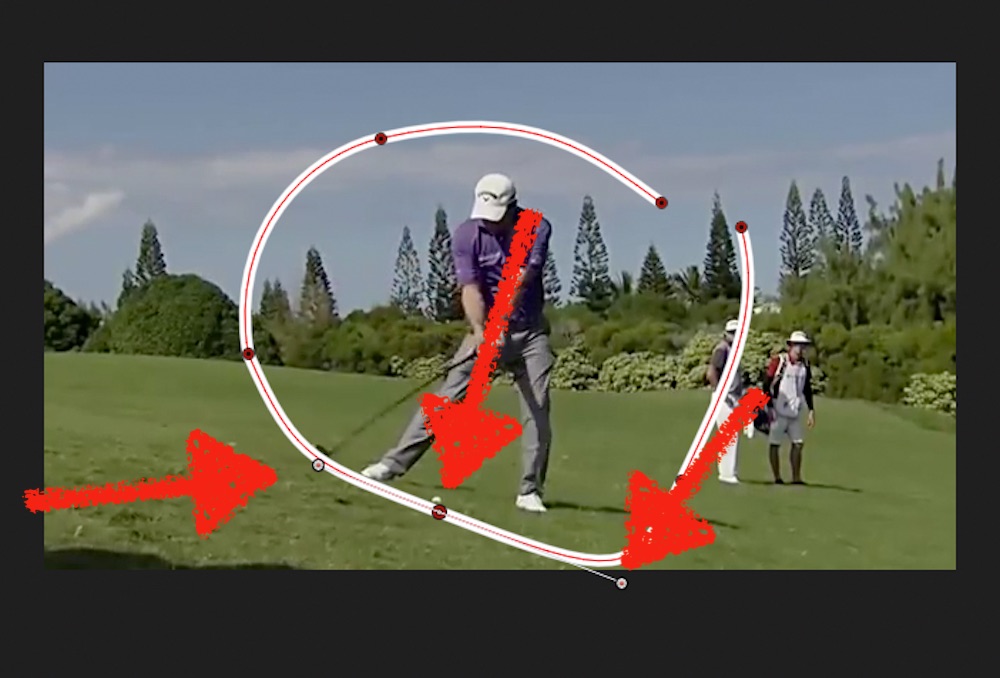
Keep in mind: you can adjust the curves individually - just hold the cmd key…
Finally: apply 'look' = Shape Style, WriteOn Behave, adjust length of sequence.
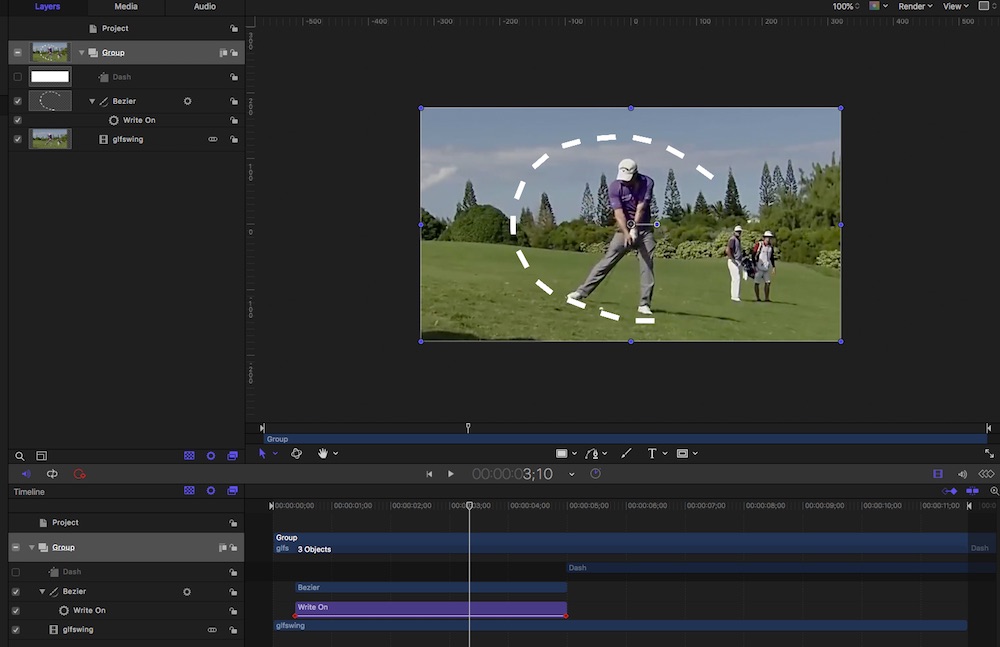
When done export and import back into your FC project… replace source.
Yep, that back'n forth is annoying… 'bouncing' is in the Top10 list of Asked Features… LOL
Replied by Karsten Schlüter on topic drawing a line in motion
owenpga wrote: If i wanted to use the bezier tool to draw a line as a golf ball is moving , …
can not find a nice video, most are from behind = little of a line to see.
so what about a golf swing?
Basically…
Export the Range in your FinalCut Project (select in the Timeline with the Range tool!) …
Select New Project in M5 and choose Import as project:
=> Motion adopts automatically all settings/formats.
Next:
Draw your line, using the Bezier tool - roughly, somehow, we adjust soon; keep in mind: we need just a few 'turn points'…
With the Bezier tool selected , Adjust each point; position and curve:
Keep in mind: you can adjust the curves individually - just hold the cmd key…
Finally: apply 'look' = Shape Style, WriteOn Behave, adjust length of sequence.
When done export and import back into your FC project… replace source.
Yep, that back'n forth is annoying… 'bouncing' is in the Top10 list of Asked Features… LOL
Last edit: 29 May 2018 12:16 by Karsten Schlüter.
Please Log in to join the conversation.
29 May 2018 12:44 #95732
by owenpga
Replied by owenpga on topic drawing a line in motion
Thanks Karsten. Not sure if the last sentence was sarcasm?
Not sure what the best way to ask questions without annoying everyone. I’m trying to step up my videos for my teaching business , but being a novice with all of this makes it hard.
Should i just post as new topic so others can chime in with answers??? Thanks
Not sure what the best way to ask questions without annoying everyone. I’m trying to step up my videos for my teaching business , but being a novice with all of this makes it hard.
Should i just post as new topic so others can chime in with answers??? Thanks
Please Log in to join the conversation.
- Karsten Schlüter
-
- Offline
- Moderator
-
Less
More
- Posts: 3790
- Thank you received: 718
29 May 2018 13:46 #95733
by Karsten Schlüter
nonono, sorry, to my excuse, I'm German = grumpy&wiseguyish by nature, I would mark sarcasm with some smiley or wotever.-
Bouncing = using Motion without leaving FinalCut, nor ex-im-ex-reimporting clips is INDEED high on the list of most-wanted-features.
conc. new threads: I say, every post here is 'on topic'… I would have described your final goal = 'tracking' swings and balls at first… but, everybody is a different learner … plus as a beginner, you lack the lingo.... no, from my mods pov all fine, don't hesitate to ask, no such thing as dumb questions, just dumb answers
Replied by Karsten Schlüter on topic drawing a line in motion
owenpga wrote: Thanks Karsten. Not sure if the last sentence was sarcasm? .…
nonono, sorry, to my excuse, I'm German = grumpy&wiseguyish by nature, I would mark sarcasm with some smiley or wotever.-
Bouncing = using Motion without leaving FinalCut, nor ex-im-ex-reimporting clips is INDEED high on the list of most-wanted-features.
conc. new threads: I say, every post here is 'on topic'… I would have described your final goal = 'tracking' swings and balls at first… but, everybody is a different learner … plus as a beginner, you lack the lingo.... no, from my mods pov all fine, don't hesitate to ask, no such thing as dumb questions, just dumb answers
Please Log in to join the conversation.
29 May 2018 16:55 #95734
by owenpga
Replied by owenpga on topic drawing a line in motion
so when i make the selection of video in FC to bring into motion, should i cut the entry and exit points so i can remove that old clip and replace with new motion edits? or is there a better way to insert new edit into timeline?
thank you.
thank you.
Please Log in to join the conversation.
- Karsten Schlüter
-
- Offline
- Moderator
-
Less
More
- Posts: 3790
- Thank you received: 718
30 May 2018 03:44 #95739
by Karsten Schlüter
It's actually the only one …
Replied by Karsten Schlüter on topic drawing a line in motion
owenpga wrote: … or is there a better way to insert new edit into timeline?….
It's actually the only one …
Please Log in to join the conversation.
