


- Posts: 58
- Thank you received: 22
3 Post Moderation Rule for New Boarders (25 Jan 2021)
New boarders will have their posts moderated - Don't worry if you cannot see your post immediately.
STUMPED - Can't add effects in 3D without breaking the scene...
04 Apr 2016 16:45 - 04 Apr 2016 16:46 #74918
by Norbz
A little hard to explain so I made a video detailing my issue.
I really hope there is a process for this that I am not seeing as I just killed a day and a half trying to figure this out and I think there is a glitch in Motion 5 so - hopefully I'm wrong. In short, you cannot add an effect in a 3D scene to any object without it totally breaking your scene despite what layer ordering or grouping or options you choose...
Please help :blink:
I really hope there is a process for this that I am not seeing as I just killed a day and a half trying to figure this out and I think there is a glitch in Motion 5 so - hopefully I'm wrong. In short, you cannot add an effect in a 3D scene to any object without it totally breaking your scene despite what layer ordering or grouping or options you choose...
Please help :blink:
Last edit: 04 Apr 2016 16:46 by Norbz.
Please Log in to join the conversation.
- MarkNelsonMovies
-

- Offline
- Elite Member
-

Less
More
- Posts: 256
- Thank you received: 48
04 Apr 2016 18:10 #74920
by MarkNelsonMovies
Replied by MarkNelsonMovies on topic STUMPED - Can't add effects in 3D without breaking the scene...
I'm not exactly sure how to explain this, but here goes,
Right now in Motion 5, 3D text layers will not intersect with regular layers,
Since the effects are 2D, adding one to a 3D object will rasterize the layer, and turn it into a normal layer, which means it will now longer interact with other 3D objects.
they only way I know (and others may have a better way) to work around this limitation is to render out the composition's parts as separate files with Alpha channels, and then apply the effects in Motion or FCPX as you composite them together.
Hopefully this will be addressed in a future update. Maybe with the addition of the ability to extrude a vector shape? We can Hope.
hope this helps
-Mark
Right now in Motion 5, 3D text layers will not intersect with regular layers,
Since the effects are 2D, adding one to a 3D object will rasterize the layer, and turn it into a normal layer, which means it will now longer interact with other 3D objects.
they only way I know (and others may have a better way) to work around this limitation is to render out the composition's parts as separate files with Alpha channels, and then apply the effects in Motion or FCPX as you composite them together.
Hopefully this will be addressed in a future update. Maybe with the addition of the ability to extrude a vector shape? We can Hope.
hope this helps
-Mark
Please Log in to join the conversation.
04 Apr 2016 18:19 - 04 Apr 2016 18:41 #74921
by Norbz
Replied by Norbz on topic STUMPED - Can't add effects in 3D without breaking the scene...
Thank you,
Les sigh.
Starting to understand the normal layer in 3d vs 2d layer in 3d vs 3d in 3d+effect, a bit more, but still confusing. My brain immediately start to think of masks and tricks but to do that for every filter or any particle/element you add into a scene is indeed limiting. Noticed this happens on adding dropzones or other stuff from the library too.
At least I can stop driving myself in a crazy loop now .
.
Les sigh.
Starting to understand the normal layer in 3d vs 2d layer in 3d vs 3d in 3d+effect, a bit more, but still confusing. My brain immediately start to think of masks and tricks but to do that for every filter or any particle/element you add into a scene is indeed limiting. Noticed this happens on adding dropzones or other stuff from the library too.
At least I can stop driving myself in a crazy loop now
.
Last edit: 04 Apr 2016 18:41 by Norbz.
Please Log in to join the conversation.
- MarkNelsonMovies
-
- Offline
- Elite Member
-
Less
More
- Posts: 256
- Thank you received: 48
04 Apr 2016 18:56 #74925
by MarkNelsonMovies
Replied by MarkNelsonMovies on topic STUMPED - Can't add effects in 3D without breaking the scene...
We'll see what the experts have to say, but I did some testing, and as best I can tell, Motion 5 renders 3D text in a separate space/environment than everything else, and certain actions, like adding a filter, or flattening a group, cause the 3D object to be rendered in it's own space, (and then composited by layer order) rather than the space of the rest of the 3D objects.
Maybe this will be changed in an update, but until then you could try Blender or Fusion 8 which are designed for this sort of thing (and are free) and can output a rendered video file for further use in Motion or FCPX.
Maybe this will be changed in an update, but until then you could try Blender or Fusion 8 which are designed for this sort of thing (and are free) and can output a rendered video file for further use in Motion or FCPX.
Please Log in to join the conversation.
04 Apr 2016 19:17 - 04 Apr 2016 20:19 #74926
by Norbz
Replied by Norbz on topic STUMPED - Can't add effects in 3D without breaking the scene...
I really appreciate your breakdown and further testing.
Yeah I have other 3D apps that I could achieve this in within a few minutes however I'm in the middle of doing a 3d Robot package of plugins for m5/fcp and really wanted to incorporate a few options for users in the controls without 3rd party or extra add-ons/files just yet (and to explore the limits of m5 a bit more).
Cheers Mark thanks again.
EDIT: And thanks for dropping a comment on YT for others.. subbed to your channel (cool stop motion bro).
Yeah I have other 3D apps that I could achieve this in within a few minutes however I'm in the middle of doing a 3d Robot package of plugins for m5/fcp and really wanted to incorporate a few options for users in the controls without 3rd party or extra add-ons/files just yet (and to explore the limits of m5 a bit more).
Cheers Mark thanks again.
EDIT: And thanks for dropping a comment on YT for others.. subbed to your channel (cool stop motion bro
).
Last edit: 04 Apr 2016 20:19 by Norbz.
Please Log in to join the conversation.
04 Apr 2016 23:49 #74933
by Pielle
Replied by Pielle on topic STUMPED - Can't add effects in 3D without breaking the scene...
Sorry Norbz !
I confirm what was said by Mark Nelson. Nothing to do, when you apply a 2D effect on a 3D surface, the 3D surface is rasterized and behaves like a 2D and does not respect the level order. I had already found this problem when I made the animation "Night in the city" I had tried to put a glow effect in the luminous sphere. I solved the problem by inserting a light inside the sphere, but I do not think this is your case.
I confirm what was said by Mark Nelson. Nothing to do, when you apply a 2D effect on a 3D surface, the 3D surface is rasterized and behaves like a 2D and does not respect the level order. I had already found this problem when I made the animation "Night in the city" I had tried to put a glow effect in the luminous sphere. I solved the problem by inserting a light inside the sphere, but I do not think this is your case.
Please Log in to join the conversation.

10 Apr 2016 01:37 #75114
by sc_fox
Replied by sc_fox on topic STUMPED - Can't add effects in 3D without breaking the scene...
Some effects are "3D aware"... Glint is the best glow filter to use, but Overdrive, Light Rays and Outer Glow will also work. However (and here's the gotcha) You have to apply the effect to a parent group containing ALL your 3D elements. Here's an example:
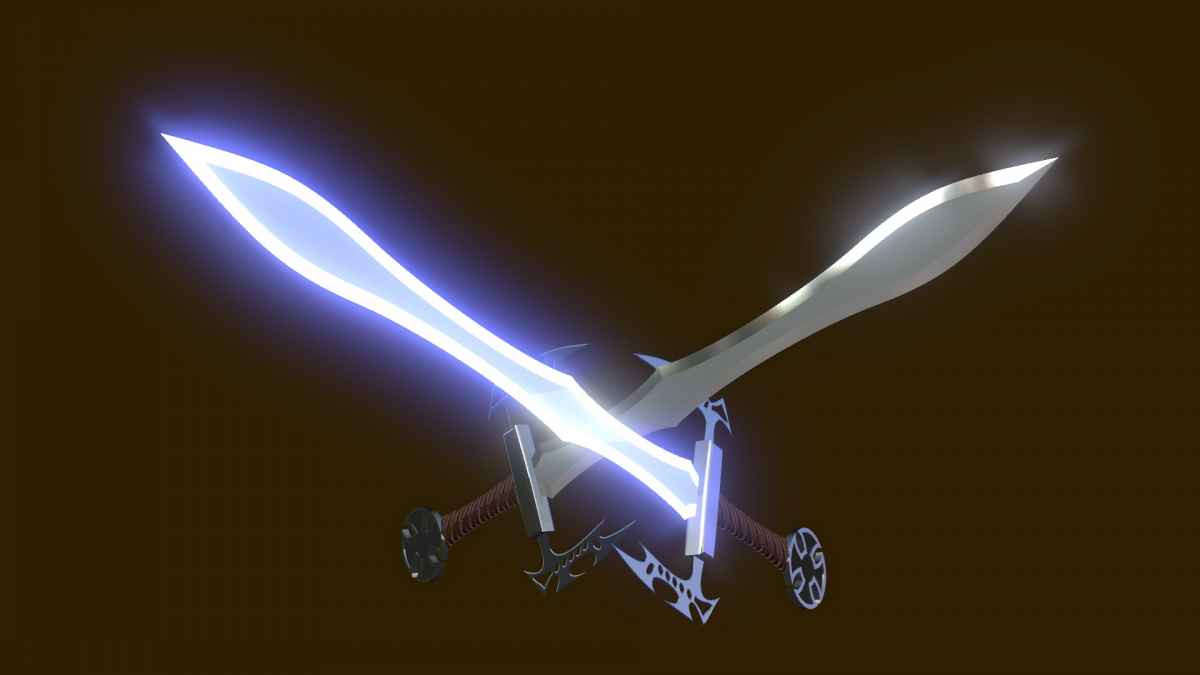
Each sword is 5 pieces. Each sword is built inside their own group. Both sword groups are grouped into a single group and the Glint filter applied to that "top level" group. A global light is applied to the "scene" (it casts a bluish tint and pointed more at the left-pointing sword.) As you can see, the 3D-ness of the scene is retained even with the use of a glow filter.
You'll have to test which other filters will not interfere with 3D (and most won't be appropriate for multiple object model assemblies anyway.)
HTH
Each sword is 5 pieces. Each sword is built inside their own group. Both sword groups are grouped into a single group and the Glint filter applied to that "top level" group. A global light is applied to the "scene" (it casts a bluish tint and pointed more at the left-pointing sword.) As you can see, the 3D-ness of the scene is retained even with the use of a glow filter.
You'll have to test which other filters will not interfere with 3D (and most won't be appropriate for multiple object model assemblies anyway.)
HTH
Please Log in to join the conversation.
10 Apr 2016 09:46 #75123
by Pielle
Replied by Pielle on topic STUMPED - Can't add effects in 3D without breaking the scene...
Finally the 3D group is growing with more and more qualified members, and you Mahoney, are certainly one of those.
I checked what you say, and ( if I correctly understand ) seems to me partially true.
1 ) The only filters that respect layers order are:
Glint
Light Rays
Outer Glow (partially)
Overdrive
2 ) The filter in that way, is applied at all the objects inside the layer
The question is : How to apply it to a single object?, or rather, how to let it to appear on a single object? .
3 ) The use of the light is not very clear. what do you mean by global light , an Ambient or a point light ?.
4)Maybe the glow in the blade is the answer .
Would you be kind enough to attach the template of the swords ( as I usually do ) so that I can examine it?
Thanks Pielle
I checked what you say, and ( if I correctly understand ) seems to me partially true.
1 ) The only filters that respect layers order are:
Glint
Light Rays
Outer Glow (partially)
Overdrive
2 ) The filter in that way, is applied at all the objects inside the layer
The question is : How to apply it to a single object?, or rather, how to let it to appear on a single object? .
3 ) The use of the light is not very clear. what do you mean by global light , an Ambient or a point light ?.
4)Maybe the glow in the blade is the answer .
Would you be kind enough to attach the template of the swords ( as I usually do ) so that I can examine it?
Thanks Pielle
Please Log in to join the conversation.
11 Apr 2016 02:01 #75159
by sc_fox
Replied by sc_fox on topic STUMPED - Can't add effects in 3D without breaking the scene...
If I've messed up this reply, it's because I haven't really gotten used to this editor yet...please bear with me!
I think Motion 3D is great! Easiest 3D ever. (It could use more features ) I've been building models since day one.
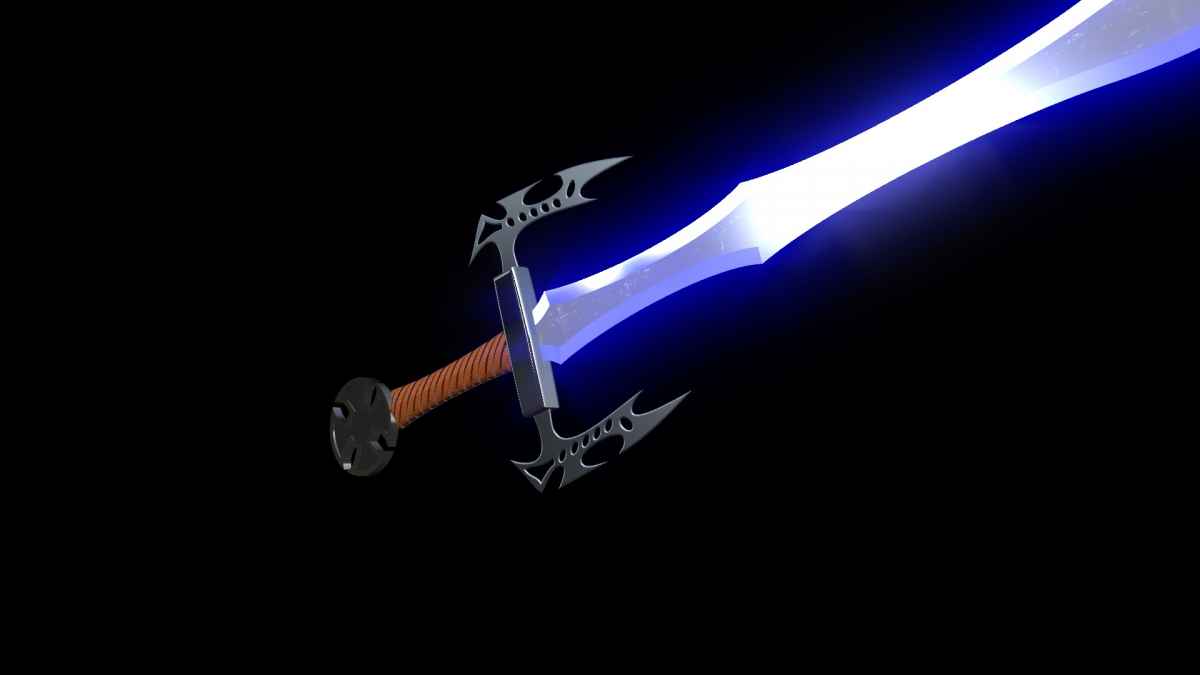
Apply the Glint filter as described, but to "fire" it off on individual pieces, Add Layer > Emit and increase the Intensity. Set the Glint Intensity and Exposure parameters very low. For the example below (if I got the attachment right) the Exposure is -6 and the Intensity is 0. The Emit Intensity is over 5700 slightly (and just for the Front and Back Edges and Side, *not* the front and back [flat part of the sword blade.)
It's a light at the Camera level, not localized to any given group. Most likely directional with Shadows. You'll see it in the project attached.
I started out in 1985 developing graphic design skills on a Mac (512K "Fat" Mac) and began developing PostScript typefaces in 1987. My font creations endeavors went sideways by 1992. I've become very protective of my fonts. You have to agree to the terms of use before downloading and installing the font. Basically, you can install the font on any machine you own. You may use it to create any artwork/media you want royalty free. You may not distribute the font in any way to another party. (Implied, you cannot create a template that uses the font.) You may not modify or edit the font or make a derivative for distribution. By downloading the software (font + template) you agree to the terms stated. [That means ALL parties that download this attachment!] (I had a really bad experience with my earlier fonts...) Also—the font is not finished and I might have commercial plans for it in the future.
Included in the zip are JPGs of 3 models I built from the font. The font is specifically designed to have the blade, hilt and handle perfectly aligned to each other (create the blade character, duplicate and change to the hilt, duplicate and change to the handle characters.) The tail piece decorations are either a plain circle or a Celtic Cross. There are two Celtic Weave characters to help build the tailpiece design (see the Sword3.jpg image. [The secondary Celtic weave is built to go into the 4 arms of the cross.]) The blade in Sward3 is decorated with "Elvish" script (Tengwar-Gandalf - I believe it's free.)
I hope everything gets through okay -- I've had problems with this editor almost every time I've used it (LOL).
Pielle wrote: Finally the 3D group is growing with more and more qualified members, and you Mahoney, are certainly one of those.
I checked what you say, and ( if I correctly understand ) seems to me partially true.
1 ) The only filters that respect layers order are:
Glint
Light Rays
Outer Glow (partially)
Overdrive
I think Motion 3D is great! Easiest 3D ever. (It could use more features
) I've been building models since day one.Pielle wrote: 2 ) The filter in that way, is applied at all the objects inside the layer
The question is : How to apply it to a single object?, or rather, how to let it to appear on a single object? .
Apply the Glint filter as described, but to "fire" it off on individual pieces, Add Layer > Emit and increase the Intensity. Set the Glint Intensity and Exposure parameters very low. For the example below (if I got the attachment right) the Exposure is -6 and the Intensity is 0. The Emit Intensity is over 5700 slightly (and just for the Front and Back Edges and Side, *not* the front and back [flat part of the sword blade.)
Pielle wrote: 3 ) The use of the light is not very clear. what do you mean by global light , an Ambient or a point light ?.
It's a light at the Camera level, not localized to any given group. Most likely directional with Shadows. You'll see it in the project attached.
Pielle wrote: 4)Maybe the glow in the blade is the answer .
Would you be kind enough to attach the template of the swords ( as I usually do ) so that I can examine it?
Thanks Pielle
I started out in 1985 developing graphic design skills on a Mac (512K "Fat" Mac) and began developing PostScript typefaces in 1987. My font creations endeavors went sideways by 1992. I've become very protective of my fonts. You have to agree to the terms of use before downloading and installing the font. Basically, you can install the font on any machine you own. You may use it to create any artwork/media you want royalty free. You may not distribute the font in any way to another party. (Implied, you cannot create a template that uses the font.) You may not modify or edit the font or make a derivative for distribution. By downloading the software (font + template) you agree to the terms stated. [That means ALL parties that download this attachment!] (I had a really bad experience with my earlier fonts...) Also—the font is not finished and I might have commercial plans for it in the future.
Included in the zip are JPGs of 3 models I built from the font. The font is specifically designed to have the blade, hilt and handle perfectly aligned to each other (create the blade character, duplicate and change to the hilt, duplicate and change to the handle characters.) The tail piece decorations are either a plain circle or a Celtic Cross. There are two Celtic Weave characters to help build the tailpiece design (see the Sword3.jpg image. [The secondary Celtic weave is built to go into the 4 arms of the cross.]) The blade in Sward3 is decorated with "Elvish" script (Tengwar-Gandalf - I believe it's free.)
I hope everything gets through okay -- I've had problems with this editor almost every time I've used it (LOL).
Please Log in to join the conversation.
11 Apr 2016 02:59 - 11 Apr 2016 03:00 #75160
by Norbz
Replied by Norbz on topic STUMPED - Can't add effects in 3D without breaking the scene...
Thanks for chiming in and clearing this part up - so at least a few are 3D aware, which means that if the demand is there and growing we may see other filters downstream that work as well.
Cool to see that you've developed your own shapes/fonts, I scouted the usual suspect softwares re creating your own from bezier curves/shapes and might still dabble in it but for now I'm enjoying just maximizing my creativity with system fonts and for ease of use for end users.
Totally respect your I.P. and if I were in your shoes I might start up a 'shape shop' and indeed monetize on your fonts if you've built out a bunch of these cool shapes.
Cool to see that you've developed your own shapes/fonts, I scouted the usual suspect softwares re creating your own from bezier curves/shapes and might still dabble in it but for now I'm enjoying just maximizing my creativity with system fonts and for ease of use for end users.
Totally respect your I.P. and if I were in your shoes I might start up a 'shape shop' and indeed monetize on your fonts if you've built out a bunch of these cool shapes
.
Last edit: 11 Apr 2016 03:00 by Norbz.
Please Log in to join the conversation.
- Karsten Schlüter
-

- Offline
- Moderator
-

Less
More
- Posts: 3790
- Thank you received: 718
11 Apr 2016 03:59 - 11 Apr 2016 04:00 #75162
by Karsten Schlüter
funny idea ....
like LEGO-sets, diff. font-sets for diff. themes ...
but
a) frankly: that whole vectors>>font>>'typing' thing is a crutch
b) veeeery niché, I'm afraid
maybe Apple surprises us (soon?) with some serious Motion update, which, among others, allow shapes as 3D source.
Or, aside the monsters C4D, Maya et al, some helpful soul gives us the '3D.app for the rest of us' with some revolutionaire new UI-concept, utilizing Motion as render-engine/'portal' to FCPX ... but, with all personal enthusiasm to this topic - again, too niché to be a business-model .....
guess, that is/was motionvfx.com business plan with mObject + its 'objects' store ...
Replied by Karsten Schlüter on topic STUMPED - Can't add effects in 3D without breaking the scene...
Norbz wrote: ... might start up a 'shape shop' ….
funny idea ....
like LEGO-sets, diff. font-sets for diff. themes ...
but
a) frankly: that whole vectors>>font>>'typing' thing is a crutch
b) veeeery niché, I'm afraid
maybe Apple surprises us (soon?) with some serious Motion update, which, among others, allow shapes as 3D source.
Or, aside the monsters C4D, Maya et al, some helpful soul gives us the '3D.app for the rest of us' with some revolutionaire new UI-concept, utilizing Motion as render-engine/'portal' to FCPX ... but, with all personal enthusiasm to this topic - again, too niché to be a business-model .....
guess, that is/was motionvfx.com business plan with mObject + its 'objects' store ...
Last edit: 11 Apr 2016 04:00 by Karsten Schlüter.
Please Log in to join the conversation.
11 Apr 2016 04:16 #75163
by sc_fox
Replied by sc_fox on topic STUMPED - Can't add effects in 3D without breaking the scene...
iVinci Express is free from the app store. There are at least two free sites to convert SVG paths to font characters and create a finished font for use in Motion. I recommend
icomoon.io/app
. After "tax season" I *plan* (don't hold your breath) to put together a tutorial on using these tools to create custom fonts for Motion (but don't let me stop you from going ahead on your own, but I will have a few tips that might not be all that obvious.) [BTW - icomoon.io/app has a ton of free icon symbols available - you can pick and choose to create your fonts with or add to a font you are creating.]
There are also at least two free font creation apps. One is Fontforge and the other is TypeLight3 (I've tried them both and don't really care for them). Icomoon and Glyphter (the other converter) should be more than adequate. What you should know is that you need to set the EM units (or UPM) to the highest value allowed (8192 for both sites, is the limit.) Always initialize all your path artwork to exactly the same size document. If layout is important, make sure all your artwork lines up with each other (easiest way is to use Layers as guides for your layout requirements — you can only save one path layer per character, so save out each path set individually before uploading to these svg-to-font converters.)
Another tip is: if any of your artwork is "long", do not arrange it vertically. You only get a fixed height resolution in any font, but you can go pretty far beyond the vertical limit in horizontal orientations (about five times the height) which improves the resolution Motion has to work with (I really can't explain that any further here.) However, if you look at the Sword font in Font Book, you'll notice the blades are horizontally laid out. The hilt characters take up the entire height of the character across their vertical axis and the EM is set to 8000 (maximum for Fontographer, which isn't a TTF font maker originally - all it's "measures" are PostScript-based.) The result is a beautifully finished model because Motion has the path data it needs to render the character. Any less and Motion can do weird things to areas that have complex paths (like cutouts, etc.)
If you really want to get into making precision fonts for Motion, I recommend Fontographer. It hasn't changed much since it was introduced back in the 1980's — it is the easiest font software in my experience and has some very nice features for potential model makers — like making any-sided polygons and "stars", etc. If you've ever used Adobe Illustrator (from 1.0 to 3.0, in simpler times) it's pretty much the same experience.
I can answer specific questions, but an overall general explanation of font creation is pretty far beyond the scope so far developed here. Just trying to get people more excited about the possibilities available in the new Motion (which is just about 1 year old now! April 13th, I believe.)
There are also at least two free font creation apps. One is Fontforge and the other is TypeLight3 (I've tried them both and don't really care for them). Icomoon and Glyphter (the other converter) should be more than adequate. What you should know is that you need to set the EM units (or UPM) to the highest value allowed (8192 for both sites, is the limit.) Always initialize all your path artwork to exactly the same size document. If layout is important, make sure all your artwork lines up with each other (easiest way is to use Layers as guides for your layout requirements — you can only save one path layer per character, so save out each path set individually before uploading to these svg-to-font converters.)
Another tip is: if any of your artwork is "long", do not arrange it vertically. You only get a fixed height resolution in any font, but you can go pretty far beyond the vertical limit in horizontal orientations (about five times the height) which improves the resolution Motion has to work with (I really can't explain that any further here.) However, if you look at the Sword font in Font Book, you'll notice the blades are horizontally laid out. The hilt characters take up the entire height of the character across their vertical axis and the EM is set to 8000 (maximum for Fontographer, which isn't a TTF font maker originally - all it's "measures" are PostScript-based.) The result is a beautifully finished model because Motion has the path data it needs to render the character. Any less and Motion can do weird things to areas that have complex paths (like cutouts, etc.)
If you really want to get into making precision fonts for Motion, I recommend Fontographer. It hasn't changed much since it was introduced back in the 1980's — it is the easiest font software in my experience and has some very nice features for potential model makers — like making any-sided polygons and "stars", etc. If you've ever used Adobe Illustrator (from 1.0 to 3.0, in simpler times) it's pretty much the same experience.
I can answer specific questions, but an overall general explanation of font creation is pretty far beyond the scope so far developed here. Just trying to get people more excited about the possibilities available in the new Motion (which is just about 1 year old now! April 13th, I believe.)
Please Log in to join the conversation.
11 Apr 2016 05:14 #75167
by Norbz
Replied by Norbz on topic STUMPED - Can't add effects in 3D without breaking the scene...
icomoon
I compiled a bunch of their icons into a font a while back to test, it's pretty cool.
Also went on quite the little exploration journey with all this too (shapes, fonts, svg's, font softwares, web based converters, and almost bit the bullet on a few purchases. Then sat back and got discouraged after thinking how much work is going to go into just a library of shapes (and then watch motion launch an update making everything obsolete).
I have the mobject stuff and got some of their title intros etc just to learn from and kind of agree it's such a tiny micro-niche it might be hard to build out a sustainable biz model from but for now it's all an interesting grey deregulated area.
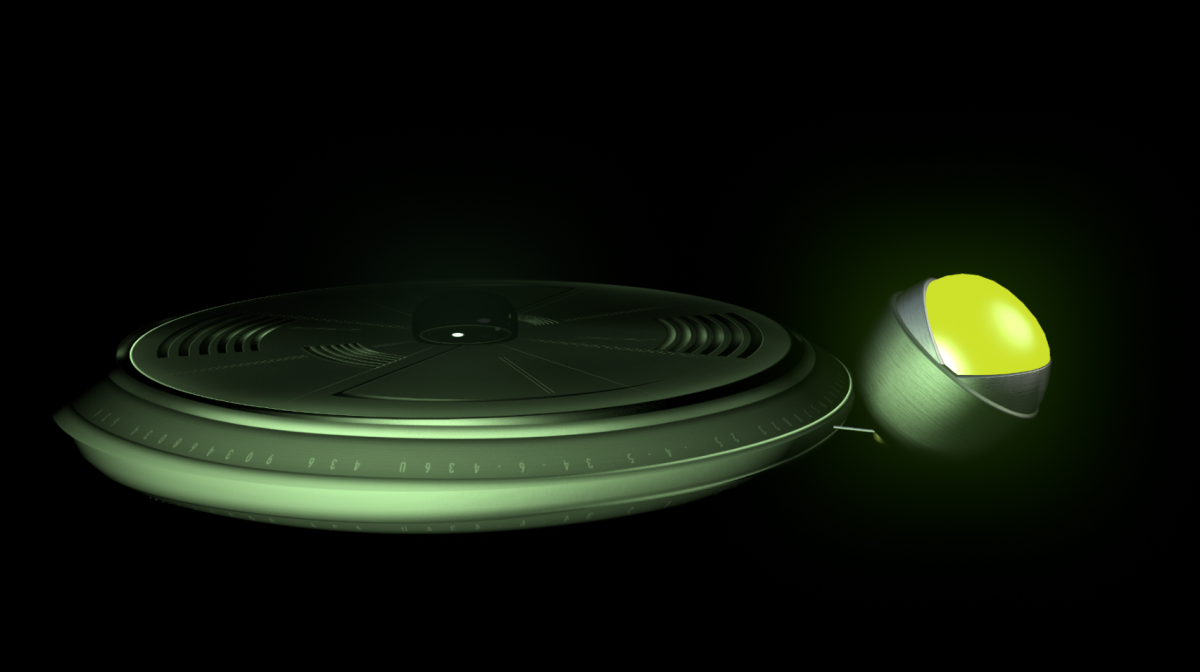
I managed to add the Glint to one of my robots as an eye glow and yeah it's cool how complimented with with EMIT you kind of get the effect isolated.
Here's a preview:
I compiled a bunch of their icons into a font a while back to test, it's pretty cool.
Also went on quite the little exploration journey with all this too (shapes, fonts, svg's, font softwares, web based converters, and almost bit the bullet on a few purchases. Then sat back and got discouraged after thinking how much work is going to go into just a library of shapes (and then watch motion launch an update making everything obsolete).
I have the mobject stuff and got some of their title intros etc just to learn from and kind of agree it's such a tiny micro-niche it might be hard to build out a sustainable biz model from but for now it's all an interesting grey deregulated area.
I managed to add the Glint to one of my robots as an eye glow and yeah it's cool how complimented with with EMIT you kind of get the effect isolated.
Here's a preview:
Please Log in to join the conversation.
11 Apr 2016 08:15 #75175
by sc_fox
I did too! It didn't take long to realize that other people's ideas about what makes a good icon doesn't coincide with mine... most of the time. I use Unicode more [just type control-command-shift when creating a text object to get the unicode popup.] For most models, very basic shapes seem to be more useful... circles, squares, rectangles... (all easily found in Unicode )
There's a way to get a better looking "sphere"...
Start with a circle character. Align it to the center of the canvas. When you convert to 3D, you should see a bounding box with blue control points appear. Use Guidelines set at 0,0 to help align the character. Use Text > Format > Advanced > Offset (X&Y) to align those blue dots to the guides as close as possible. You will be able to fine tune when completing the next step.
Take the circle character (bullet?) and use a Replicator to revolve it. Set the replicator shape to Line and the X values to 0. Set Angle End > Y to just short of 180 degrees (fine tune later.) Set the number of points to 30. Set the depth to 0 and the Front and Back Edges to Round. Adjust the (Front Edge) Depth to about 10 (or just enough for the center edges of the replicated circles to just touch.) Adjust the Width to create a smooth surface. It helps to Add Layer > Custom Specular to help smooth out edges more. (Emit should also take care of it.)
If you notice a distinct "edge" along either side, go back to Offset > X and hold down the option key and drag on the value up or down until that edge line disappears (you'll have perfected the alignments at this point.)
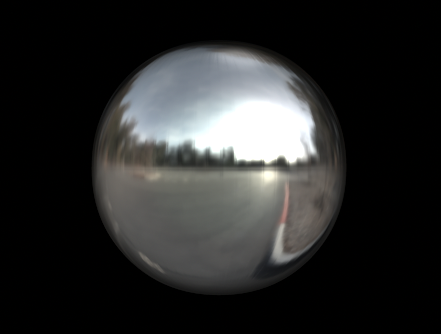
Notice that the environment accurately wraps around the replicated shapes (this is *not* possible to recreate with a custom environment at this time or wrapping an image on the sphere.)
Replied by sc_fox on topic STUMPED - Can't add effects in 3D without breaking the scene...
Norbz wrote: icomoon
I compiled a bunch of their icons into a font a while back to test, it's pretty cool.
Also went on quite the little exploration journey with all this too (shapes, fonts, svg's, font softwares, web based converters, and almost bit the bullet on a few purchases. Then sat back and got discouraged after thinking how much work is going to go into just a library of shapes (and then watch motion launch an update making everything obsolete).
I did too! It didn't take long to realize that other people's ideas about what makes a good icon doesn't coincide with mine... most of the time. I use Unicode more [just type control-command-shift when creating a text object to get the unicode popup.] For most models, very basic shapes seem to be more useful... circles, squares, rectangles... (all easily found in Unicode
)I love(d) mObject and even recommended it on my YouTube channel. However, I've grown annoyed with MotionVFX. They rumored an upgrade about a year ago and recently again in the last couple of weeks... and still nothing. Plus, I can't develop any templates using it, for sale or otherwise... there's no run-time for it and end users would be forced to buy it as separate software.Norbz wrote: I have the mobject stuff and got some of their title intros etc just to learn from and kind of agree it's such a tiny micro-niche it might be hard to build out a sustainable biz model from but for now it's all an interesting grey deregulated area.
Norbz wrote: I managed to add the Glint to one of my robots as an eye glow and yeah it's cool how complimented with with EMIT you kind of get the effect isolated.
There's a way to get a better looking "sphere"...
Start with a circle character. Align it to the center of the canvas. When you convert to 3D, you should see a bounding box with blue control points appear. Use Guidelines set at 0,0 to help align the character. Use Text > Format > Advanced > Offset (X&Y) to align those blue dots to the guides as close as possible. You will be able to fine tune when completing the next step.
Take the circle character (bullet?) and use a Replicator to revolve it. Set the replicator shape to Line and the X values to 0. Set Angle End > Y to just short of 180 degrees (fine tune later.) Set the number of points to 30. Set the depth to 0 and the Front and Back Edges to Round. Adjust the (Front Edge) Depth to about 10 (or just enough for the center edges of the replicated circles to just touch.) Adjust the Width to create a smooth surface. It helps to Add Layer > Custom Specular to help smooth out edges more. (Emit should also take care of it.)
If you notice a distinct "edge" along either side, go back to Offset > X and hold down the option key and drag on the value up or down until that edge line disappears (you'll have perfected the alignments at this point.)
Notice that the environment accurately wraps around the replicated shapes (this is *not* possible to recreate with a custom environment at this time or wrapping an image on the sphere.)
Norbz wrote: Here's a preview:
Please Log in to join the conversation.
11 Apr 2016 08:35 #75176
by Pielle
Replied by Pielle on topic STUMPED - Can't add effects in 3D without breaking the scene...
Hi Mahoney ! First of all I thank you for answering my questions and sharing your own template with your fonts. This evening I hope to have some time to study it. I want to tell you that I understand very well the reason you did not want to make public your font: give away your work for free and see others use it for business is not really the best. As I wrote some time ago. in the days when filemaker, was .fp3 and not managed images. I had already drawn fonts and logos for a database for my work. Then I continued with Logomotion (do you remember?), Kinemac, and others. If the Motion 5 section of this forum in my topic Real 3D You can find works with font designed by me. Interesting is the font "Ornithopter-Regular.ttf" with which I built Leonardo's ornithopter used in the animation "Sunset flight". I suggest to open the template to take a look, there are some interesting solutions regarding the sea and the sunset effect. Anyway since this is a hobby for me, I do not mind and I share everything. Lately I've been trying to build models using the available system fonts, and since you like swords.
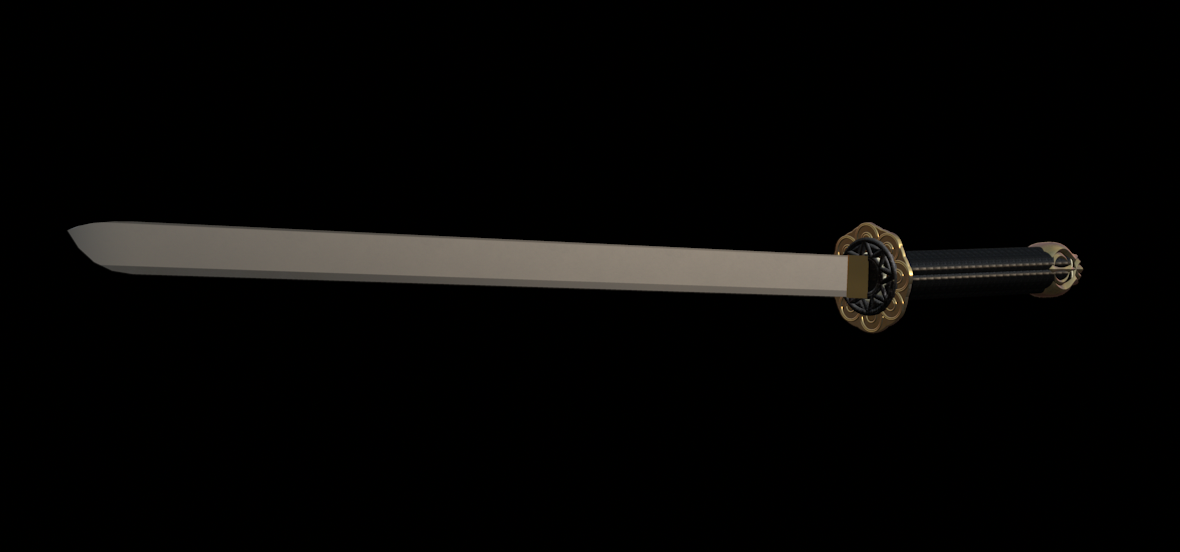
To repay you, I leave a gift made for this occasion. With friendship and a smile Pielle
To repay you, I leave a gift made for this occasion. With friendship and a smile Pielle
Please Log in to join the conversation.
11 Apr 2016 19:45 - 11 Apr 2016 21:00 #75199
by Norbz
Sometimes it's the little things... I really really appreciate you for that. The replicator scares me a bit re render times but in this instance everything is clumped together on one shape so it's not killing the plugin load time (which is important for me when releasing these to slow(er) machines as fcp plugins). I've upped it to 100 points as a test and it looks super crisp and no extra loading/rendering so it seems. And here I was complaining about polygon count limits etc.
This actually opens up a few limitations for me now - thanks again.
EDIT:
" (this is *not* possible to recreate with a custom environment at this time or wrapping an image on the sphere.)"
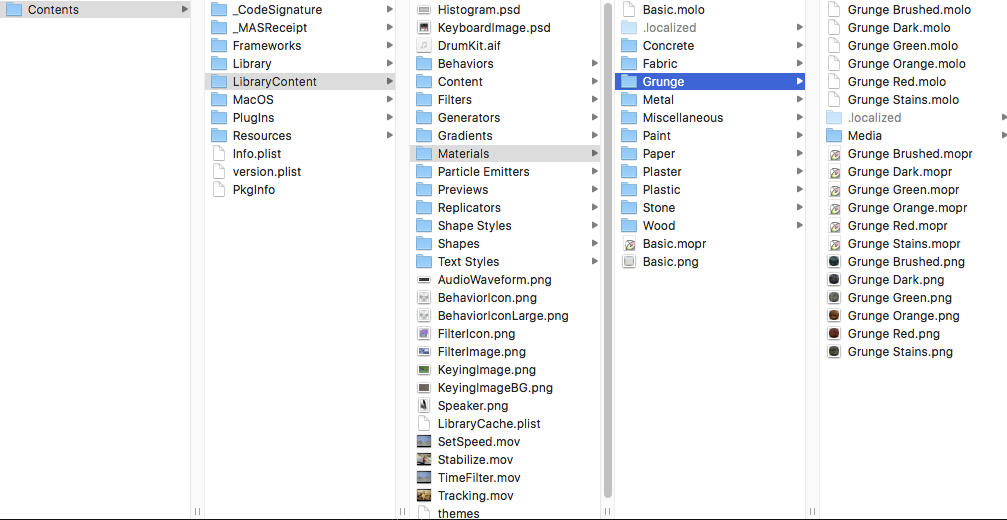
^ How far did you go with this? I just tried to right click on the Motion application, went digging into the contents, and can see all the library files etc. however I can't locate the images used for the environment panel (they may be hardcoded and no resource to a png/jpg but I doubt it). If we can find them, then it MIGHT be a matter of simply replacing the files with yours and renaming yours to theirs (aka switching out files but leaving filenames the same).
Looks like you can actually do quite a bit in there re replacing images.
Replied by Norbz on topic STUMPED - Can't add effects in 3D without breaking the scene...
sc_fox wrote:
There's a way to get a better looking "sphere"...
Sometimes it's the little things... I really really appreciate you for that. The replicator scares me a bit re render times but in this instance everything is clumped together on one shape so it's not killing the plugin load time (which is important for me when releasing these to slow(er) machines as fcp plugins). I've upped it to 100 points as a test and it looks super crisp and no extra loading/rendering so it seems. And here I was complaining about polygon count limits etc.This actually opens up a few limitations for me now - thanks again.
EDIT:
" (this is *not* possible to recreate with a custom environment at this time or wrapping an image on the sphere.)"
^ How far did you go with this? I just tried to right click on the Motion application, went digging into the contents, and can see all the library files etc. however I can't locate the images used for the environment panel (they may be hardcoded and no resource to a png/jpg but I doubt it). If we can find them, then it MIGHT be a matter of simply replacing the files with yours and renaming yours to theirs (aka switching out files but leaving filenames the same).
Looks like you can actually do quite a bit in there re replacing images.
Last edit: 11 Apr 2016 21:00 by Norbz.
Please Log in to join the conversation.
12 Apr 2016 06:37 #75203
by Pielle
Replied by Pielle on topic STUMPED - Can't add effects in 3D without breaking the scene...
OK Fox. The problem was that I had misunderstood when you said to add a glow effect. That to which you were referring was the one in Glint and not a new effect. The light is not essential but a touch of class. I deleted the font and played the scene with two Katana.
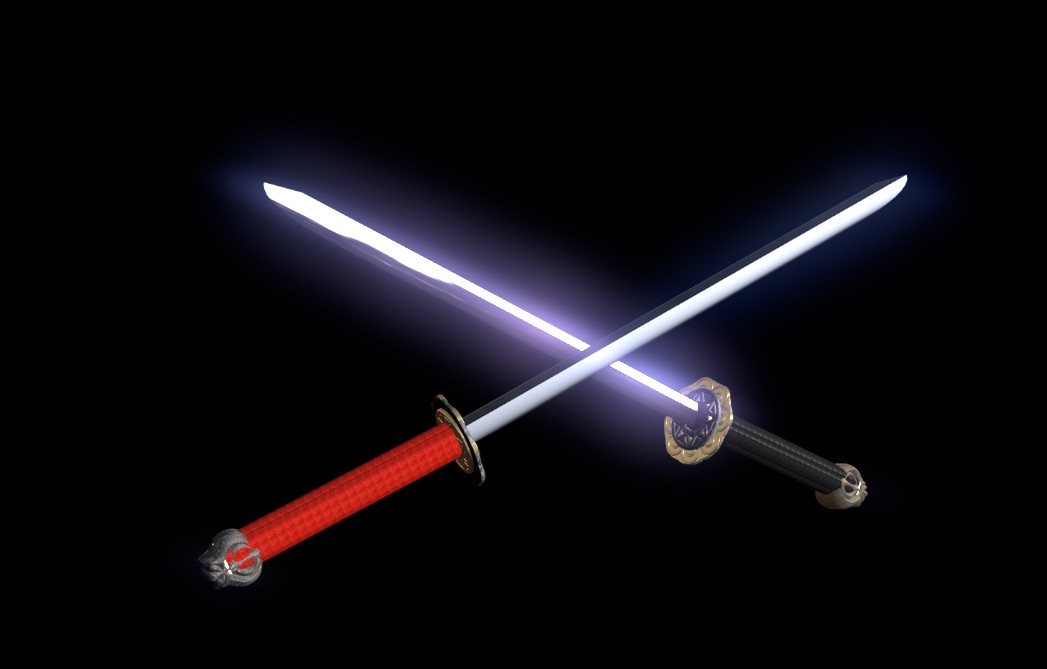
Thanks again Pielle
Thanks again Pielle
Please Log in to join the conversation.
12 Apr 2016 22:22 #75271
by sc_fox
Replied by sc_fox on topic STUMPED - Can't add effects in 3D without breaking the scene...
It's tax season and I'm falling behind! I apologize for my tardiness.
I've seen the Ornithopter (brilliant, by the way) and Drone model (I had already done a version of my own ) but I liked the way you applied the stripes pattern (I learned something there!)
I do remember hearing about LogoMotion but never used it. At that time, I was more involved with print graphics and I was involved in programming my own software (algorithmic composition and other MIDI software) and creating fonts (I did the PostScript version of the Concertware font which eventually became "Briard" for Nightingale.) [I do so miss the 68K Mac — it was so much fun to program!] I dabbled in 3D for awhile (terrains, simple shapes, etc. game quality things.) I was derailed by the internet. My programming skills got turned to Java and JavaScript, later PHP and now I'm completely lost when it comes to using Obj-C and programming the new intel macs. [New! heh - it's been 10 years now.]
Your Katana is very well done. Cool how you were able to get everything out of Zapf Dingbats. I'd still like to make one with a curved blade. I think it's going to require two characters for the blade - one for the flat part and another that can be beveled to create the edge but fashioned so that the top bevel fits up into the flat blade character. (I could try a custom bumps gradient to fit along the edge as you did with the small_stripe.jpg image, but the effect only goes so far when turning the image — the flat edge will always be apparent at certain angles.
April 13, 2016 — one year anniversary of real 3d in Apple Motion!
I've seen the Ornithopter (brilliant, by the way) and Drone model (I had already done a version of my own
) but I liked the way you applied the stripes pattern (I learned something there!)I do remember hearing about LogoMotion but never used it. At that time, I was more involved with print graphics and I was involved in programming my own software (algorithmic composition and other MIDI software) and creating fonts (I did the PostScript version of the Concertware font which eventually became "Briard" for Nightingale.) [I do so miss the 68K Mac — it was so much fun to program!] I dabbled in 3D for awhile (terrains, simple shapes, etc. game quality things.) I was derailed by the internet. My programming skills got turned to Java and JavaScript, later PHP and now I'm completely lost when it comes to using Obj-C and programming the new intel macs. [New! heh - it's been 10 years now.]
Your Katana is very well done. Cool how you were able to get everything out of Zapf Dingbats. I'd still like to make one with a curved blade. I think it's going to require two characters for the blade - one for the flat part and another that can be beveled to create the edge but fashioned so that the top bevel fits up into the flat blade character. (I could try a custom bumps gradient to fit along the edge as you did with the small_stripe.jpg image, but the effect only goes so far when turning the image — the flat edge will always be apparent at certain angles.
April 13, 2016 — one year anniversary of real 3d in Apple Motion!
Please Log in to join the conversation.
13 Apr 2016 08:30 #75284
by Pielle
Replied by Pielle on topic STUMPED - Can't add effects in 3D without breaking the scene...
If you like the unconventional solutions download the Easter egg that I've given for a present to Karsten (in the topic SCRBBL ), inside there is the surprise "of course”. I like joking, and the Katana was a joke ( for your font problem ) built up in ten minutes. You read in my mind. I was experimenting some ways to model the blade for a project about highlanders ( Connor MacLeod's katana ). The two katana used in "duel.jpg" Have had a reshape and the blades have another modeling way. At last i think to adopt a dedicated font. Too complex project and impossible to make without it.
Yeah today is the day: Happy birthday
Yeah today is the day: Happy birthday
Please Log in to join the conversation.
13 Apr 2016 09:11 - 13 Apr 2016 09:13 #75288
by sc_fox

Dedicated fonts aren't a bad thing I name all mine starting with ZZSC -- the ZZ to drop them down to the bottom of font lists and the SC for sight-creaitons. They're both easy to find and out of the way at the same time. I'll have to look for the Easter egg when I can spare a few minutes tomorrow (it got to be too late today.)
Replied by sc_fox on topic STUMPED - Can't add effects in 3D without breaking the scene...
Dedicated fonts aren't a bad thing
I name all mine starting with ZZSC -- the ZZ to drop them down to the bottom of font lists and the SC for sight-creaitons. They're both easy to find and out of the way at the same time. I'll have to look for the Easter egg when I can spare a few minutes tomorrow (it got to be too late today.)
Last edit: 13 Apr 2016 09:13 by sc_fox. Reason: video link did not work
Please Log in to join the conversation.
