


- Posts: 56
- Thank you received: 3
3 Post Moderation Rule for New Boarders (25 Jan 2021)
New boarders will have their posts moderated - Don't worry if you cannot see your post immediately.
Magic Bullet Looks 2 for FCP X (and related)
10 Feb 2012 02:30 #4208
by goestas
Magic Bullet Looks 2 for FCP X (and related) was created by goestas
I would love to see some discussion, tips, questions, issues, bugs, presets for MBL 2 /FCP X version) here. Or else to assemble a little collection of MBL plus other grading tools (cgc, mlooks, ...) under one topic. Any takers?
Please Log in to join the conversation.
11 Feb 2012 06:41 - 11 Feb 2012 06:45 #4249
by goestas
Replied by goestas on topic MBL 2 black levels discrepancy
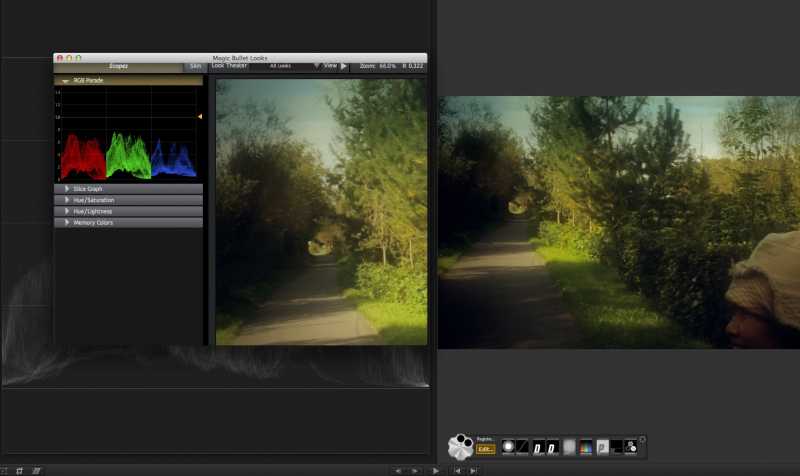
Ok, I'll start us off with a problem. There is a noticeable difference between dark image areas in the MBL 2 preview vs FCP X viewer. This is not just a display quirk: I duplicated the situation in Motion and noticed that, if I then feed the resulting image into another instance (layer) of MBL 2, the RGB values are darker (but visually not as dark as in the viewer). This is amplified by the intensity of the effect applied, rather than constant (i.e. a MBL 2 curves effect left at default causes a minute, basically irrelevant change, but an S-curve causes FCP X or Motion to crush black in their respective viewers, even though MBL shows greys. I'm communicating with Red Giant, will let you know what they come up with. At the moment, this makes reliable grading with MBL 2 almost impossible.
Last edit: 11 Feb 2012 06:45 by goestas.
Please Log in to join the conversation.
11 Feb 2012 06:58 #4253
by goestas
Replied by goestas on topic MBL2 slows FCP X, freezes, crashes?
I've suspected this, just wasn't sure whether it was MBL 2 or something else. See also
this
comment. Anybody else experiencing these issues, or noticing how/when they occur? For example, it got really bad with slowdowns for me while grading h.264 footage with MBL2 in FCP X. FCP X taking minutes to quit, among other things, even though background rendering not even turned on. I'm trying to rattle Red Giant's cage on this as well right now.
Please Log in to join the conversation.
11 Feb 2012 16:32 - 11 Feb 2012 16:38 #4261
by tap5a
Replied by tap5a on topic Re: MBL2 slows FCP X, freezes, crashes?
One thing I've pointed out what isn't exactly related only to MBL2 but almost all 3rd party effects (and also some Apple's own) is that effects soften non-square video material badly. It doesn't happen with square pixel material. Plugin makers have confirmed this thing and it's very very bad if you're working for example with anamorphic SD material. Basicly it makes for example MBL2 totally useless for people working with non-square material.

This thing is caused how effects see video material through Motion templates. I guess plugins get video material through motion templates as square pixel so there's lot of scaling involved back and forth and that's why softening happens. Maybe sometimes you could tolerate little softening but worst thing is that if I add for example three MBL2 filters I get three times softening.
This thing is caused how effects see video material through Motion templates. I guess plugins get video material through motion templates as square pixel so there's lot of scaling involved back and forth and that's why softening happens. Maybe sometimes you could tolerate little softening but worst thing is that if I add for example three MBL2 filters I get three times softening.
Last edit: 11 Feb 2012 16:38 by tap5a.
Please Log in to join the conversation.
11 Feb 2012 16:39 #4263
by goestas
Replied by goestas on topic Re: MBL2 slows FCP X, freezes, crashes?
Couldn't this be rather easily solved by Apple by incorporating non-standard (non sq.-pix.) resolutions and variable preview scaling (such as when quicktime plays back a 16:9 file)? What I find curious is that your sample output is also being "smoothed" vertically ...
Please Log in to join the conversation.
11 Feb 2012 16:45 - 11 Feb 2012 16:46 #4264
by tap5a
Replied by tap5a on topic Re: MBL2 slows FCP X, freezes, crashes?
I guess it could be solved kind easily by Apple. All effects work without problems with non-square material in Motion and basicly FCPX and Motion are sharing same rendering engine so problem is how effecs see material through Motion templates.
Basicly what happens now with SD anamorphic material and effects is that original is 720x576 and after you add for example MBL2 it gets scaled through Motion template to 1050x576 so effect see it as square pixel, effect does it's processing and then FCPX scales it back to 720x576 for timeline. That's why all this softening.
Basicly what happens now with SD anamorphic material and effects is that original is 720x576 and after you add for example MBL2 it gets scaled through Motion template to 1050x576 so effect see it as square pixel, effect does it's processing and then FCPX scales it back to 720x576 for timeline. That's why all this softening.
Last edit: 11 Feb 2012 16:46 by tap5a.
Please Log in to join the conversation.
- peteramwiggins
-

- Offline
- Administrator
-

- The Administrator :)
Less
More
- Posts: 1049
- Thank you received: 404
13 Feb 2012 06:37 #4305
by peteramwiggins
Administrator
Replied by peteramwiggins on topic Re: Magic Bullet Looks 2 for FCP X (and related)
Done lets see how many posts we get
Administrator
Please Log in to join the conversation.

18 Feb 2012 03:59 #4522
by BenB
Replied by BenB on topic Re: Magic Bullet Looks 2 for FCP X (and related)
Just applied for a refund for Looks 2. After going back and forth with tech support, they said that running my broadcast monitor off my AJA Kona card is sapping too much from my ATI Radeon card for Looks 2 to work correctly, and is why FCP X crashes all the time. Makes no logical sense to me, but, if Red Giant tech support says my rig can't support Looks 2, what can I do beside fill our a refund request form.
Mac Pro, 2 x 3.2 GHz Xeon, 16GB RAM, ATI Radeon HD 4870, 30" Apple Cinema Display, AJA Kona LHi, FSI LM-2451W. And they tell me ProRes 422 1080 and 720 won't run well with Looks 2, UNLESS I disconnect the FSI monitor totally and not use broadcast out. Makes no sense to me at all. I have A/V output turned OFF in FCP X because the AJA beta drivers crash my system, the monitor is off, the SDI cable has nothing being passed through it. WTF?
Mac Pro, 2 x 3.2 GHz Xeon, 16GB RAM, ATI Radeon HD 4870, 30" Apple Cinema Display, AJA Kona LHi, FSI LM-2451W. And they tell me ProRes 422 1080 and 720 won't run well with Looks 2, UNLESS I disconnect the FSI monitor totally and not use broadcast out. Makes no sense to me at all. I have A/V output turned OFF in FCP X because the AJA beta drivers crash my system, the monitor is off, the SDI cable has nothing being passed through it. WTF?
Please Log in to join the conversation.
18 Feb 2012 05:26 #4524
by goestas
Replied by goestas on topic Re: Magic Bullet Looks 2 for FCP X (and related)
Hmmm. Sounds a bit bogus to me too. A crash is a computing error, I would have thought, rather than a sign of insufficient resources (that would be, endless virtual memory swapping/drive activity, for example).
Well, Red Giant tech support have been utterly silent in my case after I challenged them to please look into the problems instead of asking me what I consider irrelevant questions. I am not running any unusual hardware (not that a broadcast monitor should be considered unusual in a post production environment), just a regular 2nd monitor thru the monitor/tbolt port. I've had severe slow-downs, especially with h.264 footage, which could be a resources issue, but what bugs me most is the impossibility of accurate grading due to the preview discrepancy I've described. In fairness, I am hearing that a lot of developers are apparently having problems with the latest FCP X. I just wish they'd be up front, public & proactive about it - certainly such a strategy would bolster my trust & good will & patience - which are currently stretched very thin as well. Hope someone from Red Giant is listening in , otherwise I might have to return that puppy to the store as well.
Well, Red Giant tech support have been utterly silent in my case after I challenged them to please look into the problems instead of asking me what I consider irrelevant questions. I am not running any unusual hardware (not that a broadcast monitor should be considered unusual in a post production environment), just a regular 2nd monitor thru the monitor/tbolt port. I've had severe slow-downs, especially with h.264 footage, which could be a resources issue, but what bugs me most is the impossibility of accurate grading due to the preview discrepancy I've described. In fairness, I am hearing that a lot of developers are apparently having problems with the latest FCP X. I just wish they'd be up front, public & proactive about it - certainly such a strategy would bolster my trust & good will & patience - which are currently stretched very thin as well. Hope someone from Red Giant is listening in
, otherwise I might have to return that puppy to the store as well. Please Log in to join the conversation.
18 Feb 2012 06:01 - 18 Feb 2012 06:03 #4525
by BenB
Replied by BenB on topic Re: Magic Bullet Looks 2 for FCP X (and related)
First, yes, resource use can cause an app to crash.
But we're basically dealing with a double edged sword here. FCP X and Motion 5 are running on a whole new framework technology here. No one is simply updating old QuickTime drivers or newer FXPlug code. Philip Hodgetts has written extensively about this issue. As a (trying my best to be) retired IT engineer, I understand totally what vendors are going through and that it's all evolutionary and all for the best in the long run.
What really ticks me off is when Red Giant ignores the technical data I've given them about my case, states I have two monitors on one card when I've told them twice I don't, and give me, personally, a career IT engineer (not a repair tech), some BS techno-bable I see right through as a smoke screen. Just tell me you're having problems! I can deal with that! AJA did, and I'm perfectly happy to wait with them. But Red Giant's tech support is treating FCP X customers like idiot children and basically not being honest.
I refuse have some vendor I spent hard earned money with treat me in such a degrading, insulting way. That's what ticks me off.
Nattress levels and Yanobox together are cheaper than Looks by itself, anyway, and give as much practical use. And they don't crash your system, or demand MUCH MORE specs than the app it's written for. Not to mention their customer support is way more friendly and honest.
Hey Red Giant! You listening? Better question is, "Do you give a rats behind about treating us like intelligent adults when we hand you our hard earned money?"
But we're basically dealing with a double edged sword here. FCP X and Motion 5 are running on a whole new framework technology here. No one is simply updating old QuickTime drivers or newer FXPlug code. Philip Hodgetts has written extensively about this issue. As a (trying my best to be) retired IT engineer, I understand totally what vendors are going through and that it's all evolutionary and all for the best in the long run.
What really ticks me off is when Red Giant ignores the technical data I've given them about my case, states I have two monitors on one card when I've told them twice I don't, and give me, personally, a career IT engineer (not a repair tech), some BS techno-bable I see right through as a smoke screen. Just tell me you're having problems! I can deal with that! AJA did, and I'm perfectly happy to wait with them. But Red Giant's tech support is treating FCP X customers like idiot children and basically not being honest.
I refuse have some vendor I spent hard earned money with treat me in such a degrading, insulting way. That's what ticks me off.
Nattress levels and Yanobox together are cheaper than Looks by itself, anyway, and give as much practical use. And they don't crash your system, or demand MUCH MORE specs than the app it's written for. Not to mention their customer support is way more friendly and honest.
Hey Red Giant! You listening? Better question is, "Do you give a rats behind about treating us like intelligent adults when we hand you our hard earned money?"
Last edit: 18 Feb 2012 06:03 by BenB.
Please Log in to join the conversation.
18 Feb 2012 06:14 #4528
by goestas
Thanks for pointing that out, I'm no technical expert. I guess what I though I was getting at, I've dealt with a lot of buggy software at the beginning of the 3D animation boom, and eventually the crashes (mostly) went away because the bugs were fixed, with the same hardware running it.
I do think there are resource allocation issues galore with FCP X, but these imho ought to be sorted out in software, mostly -- if necessary, giving the option to throttle down some background processes if you're not running 16 processors with 1 TB of RAM -- I expect FCP X to be streamlined for my top of the line Macbook Pro i7, at least, not for the machine I should be upgrading to in two years.
Sad if true, but I fear it may be. I've given them an ultimatum to respond by mid-week. We'll see.
Thanks so much for your comments here, at least I know I am not alone, and that better minds than me are sure that there's problems with this here thang.
Replied by goestas on topic Re: Magic Bullet Looks 2 for FCP X (and related)
BenB wrote: First, yes, resource use can cause an app to crash.
Thanks for pointing that out, I'm no technical expert. I guess what I though I was getting at, I've dealt with a lot of buggy software at the beginning of the 3D animation boom, and eventually the crashes (mostly) went away because the bugs were fixed, with the same hardware running it.
I do think there are resource allocation issues galore with FCP X, but these imho ought to be sorted out in software, mostly -- if necessary, giving the option to throttle down some background processes if you're not running 16 processors with 1 TB of RAM -- I expect FCP X to be streamlined for my top of the line Macbook Pro i7, at least, not for the machine I should be upgrading to in two years.
BenB wrote: But Red Giant's tech support is treating FCP X customers like idiot children and basically not being honest.
Sad if true, but I fear it may be. I've given them an ultimatum to respond by mid-week. We'll see.
Thanks so much for your comments here, at least I know I am not alone, and that better minds than me are sure that there's problems with this here thang.
Please Log in to join the conversation.
18 Feb 2012 06:25 #4530
by BenB
Replied by BenB on topic Re: Magic Bullet Looks 2 for FCP X (and related)
Two things I'm grateful for:
The Jim Beam in my office cabinet.
That I do not own a gun.
The Jim Beam in my office cabinet.
That I do not own a gun.
Please Log in to join the conversation.
23 Feb 2012 06:18 - 23 Feb 2012 06:21 #4748
by goestas
Replied by goestas on topic Re: Magic Bullet Looks 2 for FCP X (and related)
Ok, so after some back & forth -- and I do believe my support representative was at least trying to help -- I've received an official (I assume) statement from Red Giant about the various problems - color inconsistency, sluggishness, possible crashes - with MBL 2 in FCP X. Not sure if this is good news or bad. I am being given the option to get a refund; bearing in mind that I purchased the software at the 50% intro deal and would probably never spend $400 on it again in the future. I'd sure like some feedback what, in your collective experiences, should be my strategy. Patience, or take the money & run?
"What you are experiencing is a currently an open issue in our database.
Unfortunately, it is not yet known when an update will be released to fix this issue; we are working on getting this resolved asap though.
I have added you to our issue notification list so once an update has been released we will notify you.
Or if you prefer I would be happy to process a refund for your copy of Looks." - RG
Oh, and I also just received a request from RG to participate in a survey on MBL2. "Your answers will be crutical to the future development of additional FCPX plug-ins." If this is any indication of the company's level of attention to detail, I should probably take the money ...
"What you are experiencing is a currently an open issue in our database.
Unfortunately, it is not yet known when an update will be released to fix this issue; we are working on getting this resolved asap though.
I have added you to our issue notification list so once an update has been released we will notify you.
Or if you prefer I would be happy to process a refund for your copy of Looks." - RG
Oh, and I also just received a request from RG to participate in a survey on MBL2. "Your answers will be crutical to the future development of additional FCPX plug-ins." If this is any indication of the company's level of attention to detail, I should probably take the money ...
Last edit: 23 Feb 2012 06:21 by goestas. Reason: added info
Please Log in to join the conversation.
23 Feb 2012 08:13 - 23 Feb 2012 08:42 #4751
by BenB
Replied by BenB on topic Re: Magic Bullet Looks 2 for FCP X (and related)
All they told me was my 8-core, 16GB RAM, HD 4870, single monitor system was no powerful enough for Looks2. The tech I emailed insisted I had a second monitor connected to that graphics card, which I didn't. The tech support I received was so bad, I'd be extremely polite to call it grossly incompetent. I got a refund, and won't be going back after such horrible treatment.
I did the post-refund survey, and no where did they ask me anything that could in any way technically contribute to them fixing or improving anything.
At least I know I'm not the only person asking for a refund. Seem Red Giant knows they messed up bad, but refuse to admit it. Plain and simple.
Follow up: I find it insulting that after the survey, they want to offer me a discount on Looks presets, after I got refunded and don't use it any longer. Not to mention I JUST got an email asking if I could set up a time to do screen sharing so they can find out what is wrong with my system. AFTER issuing me a refund and I'm not using the software any longer. Idiots...
I did the post-refund survey, and no where did they ask me anything that could in any way technically contribute to them fixing or improving anything.
At least I know I'm not the only person asking for a refund. Seem Red Giant knows they messed up bad, but refuse to admit it. Plain and simple.
Follow up: I find it insulting that after the survey, they want to offer me a discount on Looks presets, after I got refunded and don't use it any longer. Not to mention I JUST got an email asking if I could set up a time to do screen sharing so they can find out what is wrong with my system. AFTER issuing me a refund and I'm not using the software any longer. Idiots...
Last edit: 23 Feb 2012 08:42 by BenB.
Please Log in to join the conversation.


23 Feb 2012 09:53 #4756
by dgwvideo
Creating history....one edit at a time !
Replied by dgwvideo on topic Re: Magic Bullet Looks 2 for FCP X (and related)
Wow...I bought it and had a few issues but it worked for the most part. I also haven't used it that much so now I'm worried 
Creating history....one edit at a time !
Please Log in to join the conversation.
27 Feb 2012 03:01 #4912
by dgwvideo
Creating history....one edit at a time !
Replied by dgwvideo on topic Re: Magic Bullet Looks 2 for FCP X (and related)
If anyone is interested I just posted some additional info on my experience with MBL2 and fcpx, along with some graded stills of clips here:
fcp.co/forum/12-red-giant-magic-bullet-a...ed-fine-in-fcpx#4911
fcp.co/forum/12-red-giant-magic-bullet-a...ed-fine-in-fcpx#4911
Creating history....one edit at a time !
Please Log in to join the conversation.

22 Oct 2012 02:40 - 22 Oct 2012 02:45 #15357
by RonPriest
Replied by RonPriest on topic Re: Magic Bullet Looks 2 for FCP X (and related)
After having the new iMac since Feb, and starting fresh with FCPX 10.0.3 and now 10.0.5 I have had almost zero problems. I installed MB Looks 2 trial and within 1 hour, FCPX goes AWOL with no response and had to force quit 3 times! It didn't take me long to figure out how to uninstall the POS! I've certainly spent too much money, time and effort to have a flawless editing system, and I'm certainly not going to be held hostage by Red Giant.
It just figures that when you try to adapt an application that wasn't designed from the ground up for FCPX, it's bound to have problems. And, I figure until Red Giant decides to do just that, it won't be worth the hassle trying to use it. It reminded me of the old Premiere Pro days.
It just figures that when you try to adapt an application that wasn't designed from the ground up for FCPX, it's bound to have problems. And, I figure until Red Giant decides to do just that, it won't be worth the hassle trying to use it. It reminded me of the old Premiere Pro days.
Last edit: 22 Oct 2012 02:45 by RonPriest.
Please Log in to join the conversation.
22 Oct 2012 12:53 - 22 Oct 2012 12:53 #15367
by dgwvideo
Creating history....one edit at a time !
Replied by dgwvideo on topic Re: Magic Bullet Looks 2 for FCP X (and related)
Ron...
You don't say what version the trial of MBL2 is, but the latest full version is 2.08. I have been using this fairly routinely since its release and have had no problems at all.
If you are using all the latest versions, then I would suggest trashing all fcpx prefs and repairing permissions on both levels of all drives. Restart fcpx and see what happens.
A lot of the grading effects within MBL2 require pretty powerful resources so maybe your iMac is struggling a bit there.
You don't say what version the trial of MBL2 is, but the latest full version is 2.08. I have been using this fairly routinely since its release and have had no problems at all.
If you are using all the latest versions, then I would suggest trashing all fcpx prefs and repairing permissions on both levels of all drives. Restart fcpx and see what happens.
A lot of the grading effects within MBL2 require pretty powerful resources so maybe your iMac is struggling a bit there.
Creating history....one edit at a time !
Last edit: 22 Oct 2012 12:53 by dgwvideo.
Please Log in to join the conversation.
22 Oct 2012 14:57 #15374
by RonPriest
Replied by RonPriest on topic Re: Magic Bullet Looks 2 for FCP X (and related)
There is no problems with my iMac and there is no problem with my preferences. All is well now that I've removed MBL. I'm not sure if it was version 2.0.8 or not and Im not sure how I can check now that it's removed. I suppose I assumed Red Giant was smart enough to provide the latest and greatest to someone who wanted to test it out, maybe they aren't.
My problem seemed to start when I would pause using Looks while editing a look in full screen and switch to another Desktop to accomplish other tasks (i.e. checking mail or whatever). When I would return to MB, I had the spinning beech and FCP was not responding. I'm now wondering if I was possibly returning to the wrong desktop? Apparently when you go into a MB edit screen, it opens in a new desktop for the MB interface (which I really hate). Is it possible that I was returning to the wrong desktop, the FCP desktop versus the MB desktop? Is it natural for FCPX to be non responsive while inside a MB desktop editing a look? Maybe you can see if you can duplicate that for me. Do you understand what Im saying?
In any case, I've used MBL in the past with FCP7, but I haven't got a warm feeling about the MBL interface inside FCPX. As mentioned above, I don't like the fact that it has to leave the FCPX interface to edit a look. When you look at newer applications built for FCPX such as CrumplePop Color Kit, it works like any other filter inside FCPX as it allows you to see the result you would have when using any filter just by selecting a clip and skimming over the filter. You don't have to leave the FCPX user interface to adjust the properties of a filter and you can monitor your scopes while making those adjustments. Having to leave the NLE interface just seems so PC DOSie to me? ... DOSie, I think I just made that up.
My problem seemed to start when I would pause using Looks while editing a look in full screen and switch to another Desktop to accomplish other tasks (i.e. checking mail or whatever). When I would return to MB, I had the spinning beech and FCP was not responding. I'm now wondering if I was possibly returning to the wrong desktop? Apparently when you go into a MB edit screen, it opens in a new desktop for the MB interface (which I really hate). Is it possible that I was returning to the wrong desktop, the FCP desktop versus the MB desktop? Is it natural for FCPX to be non responsive while inside a MB desktop editing a look? Maybe you can see if you can duplicate that for me. Do you understand what Im saying?
In any case, I've used MBL in the past with FCP7, but I haven't got a warm feeling about the MBL interface inside FCPX. As mentioned above, I don't like the fact that it has to leave the FCPX interface to edit a look. When you look at newer applications built for FCPX such as CrumplePop Color Kit, it works like any other filter inside FCPX as it allows you to see the result you would have when using any filter just by selecting a clip and skimming over the filter. You don't have to leave the FCPX user interface to adjust the properties of a filter and you can monitor your scopes while making those adjustments. Having to leave the NLE interface just seems so PC DOSie to me?
... DOSie, I think I just made that up. Please Log in to join the conversation.
23 Oct 2012 03:17 #15399
by dgwvideo
Creating history....one edit at a time !
Replied by dgwvideo on topic Magic Bullet Looks 2 for FCP X (and related)
Not really sure what your problem could be. I suppose you could be switching back to the wrong desktop.
As far as basic plugins functioning within FCPX, there are several tonal control plugins, but for any application with the robust controls offered by MBL2, I have always known them to take you outside of the NLE an into their own interface. Same happened in Legacy FCP with send to Color, send to Motion, send to Soundtrack, etc. Likewise, in FCPX all the significant grading and compositing filters have their own interface, such as mVintage, MBL, etc.
When filters offer a few basic color controls that is one thing, but when you have a complete library of effects as well as multiple grading controls, separate scopes, stackable effects and grading processes, etc. I have never seen it done in an all in one plugin within the NLE. Some of the Nattress filters and tonalizer plugins offer a good bang for the buck but they don't come close to offering what MBL2 does.
As far as basic plugins functioning within FCPX, there are several tonal control plugins, but for any application with the robust controls offered by MBL2, I have always known them to take you outside of the NLE an into their own interface. Same happened in Legacy FCP with send to Color, send to Motion, send to Soundtrack, etc. Likewise, in FCPX all the significant grading and compositing filters have their own interface, such as mVintage, MBL, etc.
When filters offer a few basic color controls that is one thing, but when you have a complete library of effects as well as multiple grading controls, separate scopes, stackable effects and grading processes, etc. I have never seen it done in an all in one plugin within the NLE. Some of the Nattress filters and tonalizer plugins offer a good bang for the buck but they don't come close to offering what MBL2 does.
Creating history....one edit at a time !
Please Log in to join the conversation.
